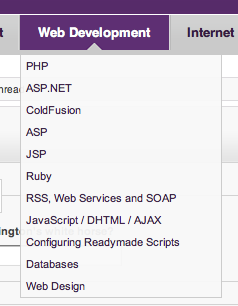
Hi, can u help me how to make coding like this picture? :'(
Firstly click Web Development and it will appear many choices.
So long I always have this problem, can't get the real code on internet..
Hope you guys help! Thanks :)

Dani AI

Generated

was right: the UI in your picture is a click-to-open dropdown (a menu button). For a solid, maintainable solution use a semantic button to toggle a hidden list, add ARIA attributes for screen readers, and let CSS handle layout while a tiny bit of JavaScript handles click/touch and keyboard (Escape/outside click) behavior. Below is a minimal pattern to adapt to the "Web Development" item from your screenshot.

HTML and CSS (minimal):

<nav class="site-nav">
  <div class="menu">
    <button class="menu-trigger" aria-haspopup="true" aria-expanded="false">Web Development</button>
    <ul class="menu-list" hidden>
      <li><a href="/frontend">Frontend</a></li>
      <li><a href="/backend">Backend</a></li>
      <li><a href="/tools">Tools</a></li>
    </ul>
  </div>
</nav>
.menu { position: relative; display: inline-block; }
.menu-list { position: absolute; left: 0; top: 100%; min-width: 180px; }
.menu-list[hidden] { display: none; }

Basic JavaScript to toggle and close:

const trigger = document.querySelector('.menu-trigger');
const list = document.querySelector('.menu-list');

trigger.addEventListener('click', () => {
  const open = trigger.getAttribute('aria-expanded') === 'true';
  trigger.setAttribute('aria-expanded', String(!open));
  list.hidden = open;
});

document.addEventListener('click', (e) => {
  if (!e.target.closest('.menu')) {
    trigger.setAttribute('aria-expanded', 'false');
    list.hidden = true;
  }
});

trigger.addEventListener('keydown', (e) => {
  if (e.key === 'Escape') {
    trigger.setAttribute('aria-expanded', 'false');
    list.hidden = true;
    trigger.focus();
  }
});

Troubleshooting tips: if the list never appears, check parent CSS (overflow: hidden or z-index), ensure the trigger is a focusable element (button), and avoid relying on :hover only (touch devices need click). Test with keyboard (Tab/Enter/Escape) and increase touch hit area for mobile. If this matches what you wanted, mark solved as suggested.

Recommended Answers

All 3 Replies

yes, you are right.. thank you very much :)

As this thread has been answered, could you just mark it as solved.

Cheers,

Be a part of the DaniWeb community

We're a friendly, industry-focused community of developers, IT pros, digital marketers, and technology enthusiasts meeting, networking, learning, and sharing knowledge.