I'm trying to finish the last tweaks on a I created using an Elegant Themes Wordpress theme and I'm having a frustrating time figuring out how to center the page titles so they are each exactly centered regardless of their width. Here's an image of how I want it to look and how it currently looks, for both short and long titles.
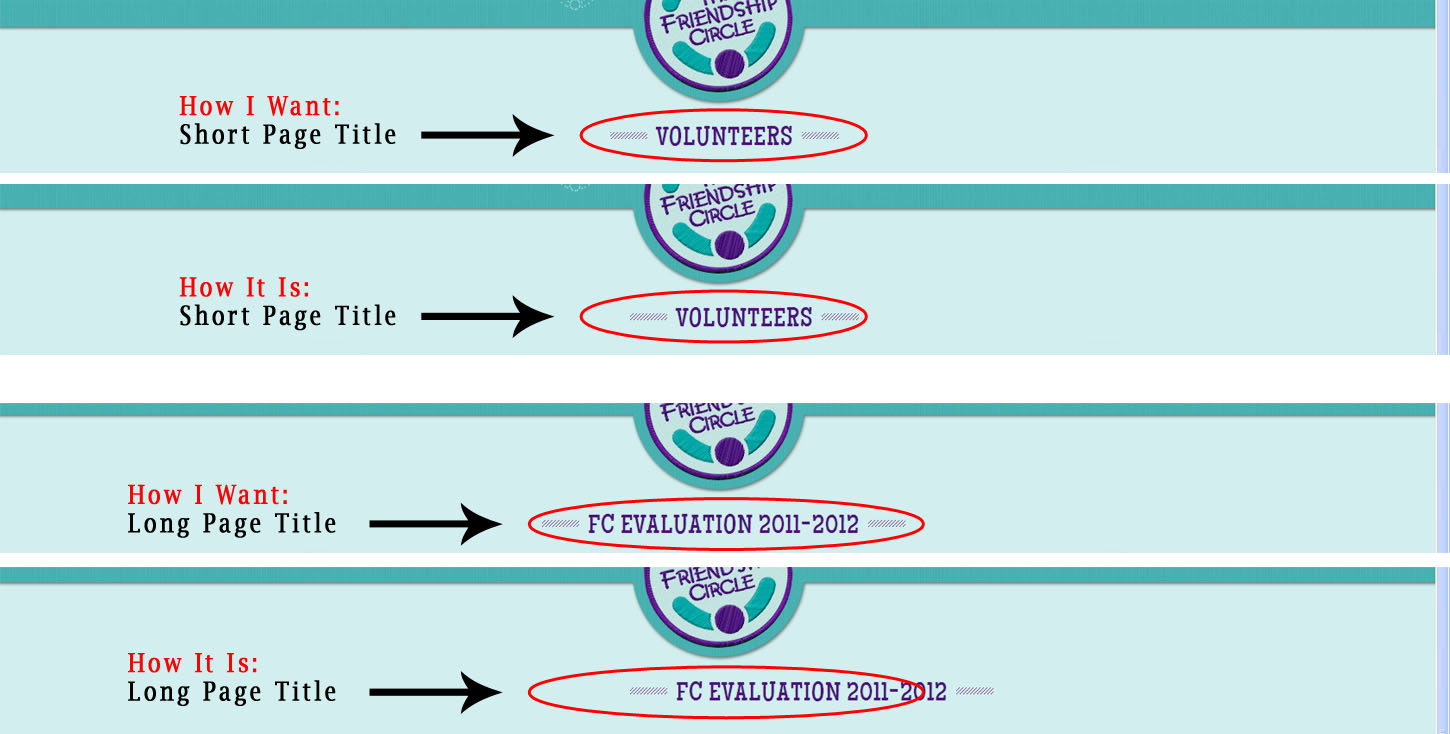
Title_positioning
Obviously the width of the title on each page is slightly different which is why I'm having trouble since using margin-left to center the title will need a different margin for eac title and I need something that will be relative and not need to be specified for each title seperately.

Here's the code for the title area of a Short Title:

<div id="category-name">
    <div class="title-area">
        <div class="left-dash">&nbsp; </div>
        <h1 class="category-title">Volunteers</h1>
        <div class="right-dash">&nbsp; </div>
    </div>
</div>

Here's the code for the title area of a Short Title:

   <div id="category-name">
        <div class="title-area"><div class="left-dash">&nbsp; </div><h1 class="category-title">FC Evaluation 2011-2012</h1><div class="right-dash">&nbsp; </div></div>

    </div>

Here is the css:

#category-name {
    padding: 0 0 0 16px;
    text-align: center;
}

.title-area {
    margin-left: 362px;
    width: 491px;
}

.left-dash, .right-dash {
    background: url("images/dashed_line.png") repeat-x scroll 50% 50% transparent;
    float: left;
    margin-top: 147px;
    width: 43px;
}

#page-top h1.category-title {
    color: #520E7D;
    float: left;
    font-family: 'MaidenOrangeRegular',sans-serif;
    font-size: 31px;
    font-style: normal;
    letter-spacing: 1px;
    line-height: 80px;
    margin-top: 117px;
    padding: 0 10px;
    text-shadow: 0 0 1px #7AABA5;
    text-transform: uppercase;
}

I know I need to remove the margin-left but I'm not sure what to replace it with to get it to work.

Please help!

Thanks in advance :-)

Dani AI

Generated

Good troubleshooting so far — the core problem is the fixed offset and floated dash elements. Floats or a hard margin-left force the whole title block to sit at a fixed spot, so short and long headings won’t stay visually centered. ’s suggestion to avoid floats and ’s point about automatic margins are both on the right track. Below are two simple, modern approaches that keep the heading exactly centered regardless of its width and make the decorative lines expand to fill the remaining space.

Flexbox approach (recommended — simple and robust):

<div class="title-row">
  <div class="dash"></div>
  <h1 class="page-title">Your Page Title</h1>
  <div class="dash"></div>
</div>
.title-row {
  display: flex;
  align-items: center;
  justify-content: center;
}
.dash {
  flex: 1;
  height: 4px;
  margin: 0 12px;
  background: repeating-linear-gradient(to right, #ccc 0 6px, transparent 6px 12px);
}
.page-title {
  white-space: nowrap;
  margin: 0;
  padding: 0 6px;
}

Pseudo-element approach (no extra markup for dashes):

.title-wrap { text-align: center; }
.title-wrap h1 {
  display: inline-block;
  position: relative;
  white-space: nowrap;
  margin: 0;
  padding: 0 10px;
}
.title-wrap h1::before,
.title-wrap h1::after {
  content: "";
  position: absolute;
  top: 50%;
  width: calc(50vw - 50%);
  height: 3px;
  background: repeating-linear-gradient(to right, #ccc 0 6px, transparent 6px 12px);
}
.title-wrap h1::before { right: 100%; margin-right: 12px; transform: translateY(-50%); }
.title-wrap h1::after  { left: 100%;  margin-left: 12px; transform: translateY(-50%); }

Troubleshooting tips: remove any fixed margin-left and floats from the title block, check for inherited floats on parent elements, and force white-space: nowrap if you want a single-line title. For a WordPress theme, add this CSS in a child theme or the Custom CSS area so theme updates won’t overwrite it.

Recommended Answers

All 3 Replies

I thin your problem is with the dashes(right and left) aligned with float. I don't like to use float, instead I use this class to align inline:

.inline
{
    position: relative;
    display: -moz-inline-stack;
    display: inline-block;
    zoom: 1;
    vertical-align: top;

    *display: inline;
}

Try it and let me know.

margin-left:auto; margin-right:auto;

margin:auto 0; // fill left and right zero top and bottom

Thanks AleMonteiro and almostbob,

Based on both of your code I got it lined up properly and I learned something new!

Thanks so much fo your help!!!

Be a part of the DaniWeb community

We're a friendly, industry-focused community of developers, IT pros, digital marketers, and technology enthusiasts meeting, networking, learning, and sharing knowledge.