I have two <div> elements nested within a <p> element and want them both displayed on the same line. Currently, no matter what I do, they get displayed one under the other. How do I get them to display on the same line?

Progz

Dani AI

Generated

The immediate cause is semantic: <p> may only contain phrasing (inline) content, not block-level elements like <div>. Browsers will implicitly close a <p> before a <div>, which is why the divs end up stacked. That explains the behaviour seen in the thread and why ended up applying a top:-12px hack to force alignment.

Preferable solutions (modern → fallback):

<div class="row">
  <div class="item">Left</div>
  <div class="item">Right</div>
</div>

/* CSS */
.row { display: flex; gap: 8px; align-items: center; }
.item { padding: 6px 8px; background: #eee; }

Flexbox is the simplest: it keeps children on one line, handles spacing, and controls vertical alignment without manual offsets.

If flexbox cannot be used, inline-block is a good fallback:

.container { font-size: 0; }   /* optional: removes whitespace gap */
.container .box { display: inline-block; vertical-align: middle; font-size: 16px; }

Notes on floats and clearing: floats work but are more error-prone—floated elements leave the normal flow, so the parent must be cleared (clearfix pseudo-element or overflow:auto) and vertical misalignment is common. The presence of position:relative; top:-12px in ' example is a sign of a vertical-alignment issue that flexbox or inline-block + vertical-align will solve cleanly.

On stylesheet practice: external stylesheets are recommended for maintainability; inline styles will override them but should be avoided except for tiny overrides. Semantics matter—use <div> (or appropriate block container) as the wrapper, and <span> for inline content inside paragraphs. For debugging, inspect the DOM with browser devtools to confirm whether the <p> was auto-closed and check computed display and box-model values.

Recommended Answers

All 5 Replies

  1. I don't believe you are allowed to embed other elements except <a> and <br /> in <p> tags. You can but it probably wouldn't look right.

  2. to get 2 divs to appear on the "same line" usually you just float the elements. Try the following:

<p style="float:left;line-height:10px;">This string</p><div style=float:left;background-color:red;height:10px;width:15px;"></div><p style="float:left;line-height:10px;">Has blocks breaking</p><div style="float:left;background-color:yellow;height:10px;width:20px;"></div><p style="float:left;line-height:10px;">up the string</p> you can put css in <style type="text/css"></style> tags in the head if the above is too messy for your tastes.

commented: +1 for pointing out invalid HTML +4

Can I both use a separate css stylesheet for <div> elements AND insert a float attribute and value inline, or perhaps define two different div classes where one floats left and the other right? I'm after parsimonious code and have fallen in love with separate stylesheet files.

Um, yes. but don't. Stick with having separate css. Doesn't have to be in a separate file. Yes, you can include multiple css stylesheets, and if you redefine an element, class or id in a another stylesheet, the last definition is used. Also, You really need to do some basic reading on your own instead of spamming a help forum. Read up on css and stylesheets anywhere.

I have a congenital brain issue that prevents me from cramming massive amounts of dense text such as those available in most reference documents. The only way I can learn is in bite-sized pieces. I do, however, retain information when I am not overwhelmed by its volume and density, which I am even on the w3schools site.

But since I'm seen as "spamming," I'll trim back my presence here. As usual, socio-political considerations are the only thing people give a damn about. The technical side of things always takes a back seat to the almighty junior-high lunchroom of human society. I'm disappointed but have to live with it.

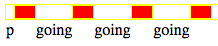
OK. I was wrong. My code did NOT WORK. I am investigating this because I myself am trying to learn CSS. the following code:

<div style="width:100%;height:14px;">
    <p style="float:left;">p</p>
    <div style="height:12px;width:20px;background-color:red;float:left;"></div>
    <p style="float:left;">going</p>
    <div style="height:12px;width:20px;background-color:red;float:left;"></div>
    <p style="width:37px;float:left;">going</p>
    <div style="height:12px;width:20px;background-color:red;float:left;"></div>
    <p style="width:37px;float:left;">going</p>
    <div style="height:12px;width:20px;background-color:red;float:left;"></div>
</div>

outputs:

Screen_shot_2013-01-15_at_9.57_.56_AM_

I can get it to look the way I want with position:relative;top:-12px;. That seems stupid and unnecessary. I wonder what the proper way of doing this is.

Be a part of the DaniWeb community

We're a friendly, industry-focused community of developers, IT pros, digital marketers, and technology enthusiasts meeting, networking, learning, and sharing knowledge.