body {
    margin: 0px;
    padding: 0px;
}

.clear {
    clear: both;
}

#menu {
    position: absolute;
    left: 50%;  
    bottom: 85.125%;
    z-index: 100;

    height: 100px;
    margin-top: -200px;

    width: 300px;
    margin-left: -150px;
}
.kroppen {

    font-family: serif;
    position: absolute;
    left: 50%;
    width: 865px;
    margin-top: 197px;
    margin-left: -450px;
    padding: 25px;
    color: #000;
    /*margin-left: -266px;*/
    border: 1px solid #ccc;
}

ul {
    list-style-type: none;
    padding: 0;
    margin: 0;
}
850
ul#nav li {
    background: #fff;
    float: left;
}

ul#nav li a {
    display: block;
    text-decoration: none;
    border-bottom: 1px solid #ccc;
    color: #000;
    padding: 5px 15px;
}

ul#nav li a:hover {
    background: #aaa;
}

ul#nav li ul li {
    float: none;
}
ul#nav li ul {
    position: absolute;
    display: none;
}
ul#nav li:hover ul {
    display:block;
}
h1, h2 {
    font-family: sans-serif;
    font-weight: normal;
}

.text { 
text-align: center; 
}
#kartan {
    width: 850;
    height: 
}


<div id="menu">
            <nav>
                    <!-- input for the navigation menu -->
                        <ul id="nav">
                            <li><a href="hem.html" id="hem">Hem</a></li>

                            <li>
                                <a href="#" id="browsers">Browsers</a>
                                <ul>
                                        <li><a href="chrome.html">Chrome</a></li>
                                        <li><a href="firefox.html">Firefox</a></li>
                                        <li><a href="ie.html">IE</a></li>
                                        <li><a href="opera.html">Opera</a></li>
                                </ul>
                            </li>

                            <li><a href="data.html" id="data"> Data</a></li>
                            <li><a href="synpunkt.html" id="synpunkt">Synpunkt</a></li>
                        </ul>
            </nav>
            </div>

The navigation bar doesnt work in Firefox and IE, but works in Chrome and Safari.

Dani AI

Generated

Short diagnosis and a few concrete fixes.

Browsers vary in how strictly they parse CSS; Chrome/Safari are often forgiving, Firefox and IE are not. In your pasted stylesheet there are a couple of parse problems (a stray token and an unfinished height declaration) and the submenu is absolutely positioned without a positioned parent. Those three things together explain why styles and the drop‑down behave in some browsers but not others. was right to ask about typos, and ’s experiments with positioning were on the right track.

Fixes to try (safe, minimal changes):

/* make each top-level LI the positioning context for its submenu */
ul#nav > li { position: relative; }

/* help older IE recognise HTML5 elements */
nav { display: block; }

/* replace the malformed rule with proper units */
#kartan { width: 850px; height: auto; }

Why this helps: giving the LI position: relative ensures an absolutely positioned submenu is placed relative to the parent, not the page. Declaring nav as a block makes older IE apply styles to it. Replacing the stray token and giving width a unit (and not leaving height: empty) prevents CSS parsing errors that can cause Firefox/IE to ignore subsequent rules.

Quick troubleshooting checklist

  • Remove/comment blocks of CSS until the menu works to find the parse error (binary search).
  • Use the browser inspector (Firefox/IE dev tools) to see whether your submenu gets display:block on hover.
  • Confirm the stylesheet is actually loaded (network tab) and served as text/css; clear cache and hard‑refresh.
  • Ensure a proper DOCTYPE and, if you must support IE8 or older, include an HTML5 shiv or create the element via JS.

If these steps don’t fix it, paste the exact external stylesheet (not the whole page) and note which browser versions you’re testing so the next suggestions can be targeted.

Recommended Answers

All 10 Replies

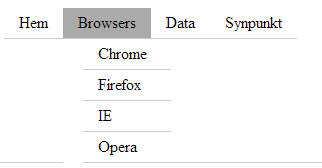
It doesnt appear to work properly in either Chrome or IE. Try adding modifying this part of your CSS to get the results shown in the picture...

ul#nav li:hover ul {
    display:block;
    position:relative;
    left:20px;
}

12b270ebc70be9fde72dc7698fd7d104

Thank you for the reply!

I dont have edited the CSS yet. It works on my computer and the laptop.

EDIT: I added the part you posted. No difference, still a problem.

Dani: Is line 41 a typo?

Yes, its fixed now.

Anyone?

I noticed that none of the CSS works in FF and IE. Why is that happening?

If you CSS is external to the page, its probably because you are not referencing it properly. When i copied you code, I used internal styles (within <style> tags)

I use external css to the page. I tried with style tags within the elements. It rendered the page well, but the drop down menu doesnt work. I dont understand why the page renders with internal style.
I double-check my CSS code and referencing is not an issue. What it seems like.

Maybe it could be the selectors, element#selector.

Not sure, the picture I posted above is what was rendered when i used your code example and made that one change.

If you are looking to create a horizontal navigation menu, I have some samples you are free to look at and use for your own needs..

Online example: Multi-level Navigation Menu with CSS

Be a part of the DaniWeb community

We're a friendly, industry-focused community of developers, IT pros, digital marketers, and technology enthusiasts meeting, networking, learning, and sharing knowledge.