My url is
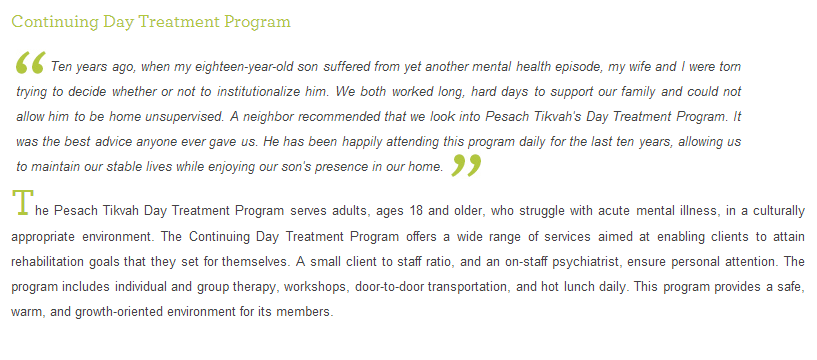
I have a closed quote, which is an image at the end of each italicized paragraph.
The img is a span, inside a div.
How can I make the img align so that it doesnt create a space between the second to last and last lines in the paragraph.
I need it to come at the end of each italicized paragraph, after the last word.
Here's the code:

<div class="italic">
It was hard coming to Pesach Tikvah at first, as I was afraid people would see me coming and going. But I am getting so much help from my therapist and psychiatristthat I now feel comfortable coming, and actually look forward to my appointment. I would never have made it without     them. The respectful, yet warm, family-like atmosphere makes it so much easier for me to get the help I need.
<span class="close"><img src="images/detail_quotegreenclosed.jpg" width="30" height="30" border="0" alt="Continuing Day Treatment Program" /></span>
</div>

Dani AI

Generated

This thread shows the usual cause and two common fixes: inline images sit on the text baseline, so the browser reserves space for descenders and that can create an extra gap. As noted, adjusting the image’s vertical alignment is a simple, correct quick fix (and it solved ’s case). ’s absolute-position approach also works, but it detaches the glyph from the line flow and can break on narrow screens or when the paragraph wraps.

A more robust, semantic approach is to make the closing-quote purely decorative via CSS (no extra markup inside the text). Insert the graphic with a pseudo-element so the quote flows with the last line and won’t change line-height unexpectedly:

.italic::after {
  content: "";
  display: inline-block;
  width: 30px;
  height: 30px;
  background: url('images/detail_quotegreenclosed.jpg') no-repeat center;
  background-size: contain;
  vertical-align: middle;
  margin-left: .25em;
  pointer-events: none;
}

Benefits: no extra DOM element to manage, the glyph moves with the line breaks, and it’s easy to swap or hide on small screens.

Quick troubleshooting checklist when spacing persists:

  • If the graphic is decorative, hide it from assistive tech (use an empty alt or use a pseudo-element).
  • If you must keep an <img>, wrap it in a container with line-height: 0 to collapse baseline space, or use display: inline-block and adjust vertical-align.
  • Avoid fixed absolute offsets unless you also handle responsive widths — absolute positioning can overlap text when the layout changes.

For this specific layout the pseudo-element approach is recommended: it keeps the markup clean, preserves accessibility choices, and avoids the layout fragility of absolute positioning.

Recommended Answers

All 3 Replies

Add vertical-align :text-top to img element

<img src="images/detail_quotegreenclosed.jpg" width="30" height="30" border="0" alt="Continuing Day Treatment Program" style="vertical-align:text-top;">

that did it, thanks

A few different ways to handle.. here is one approach..

<div class="italic" style="position:relative">
<img style="position:relative;top:8px;left:0px;" src="images/detail_quotegreen.jpg" width="30" height="30" border="0" alt="Continuing Day Treatment Program">

Ten years ago, when my eighteen-year-old son suffered from yet another mental health episode, my wife and I were torn trying to decide whether or not to institutionalize him. We both worked long, hard days to support our family and could not allow him to be home unsupervised. A neighbor recommended that we look into Pesach Tikvah's Day Treatment Program. It was the best advice anyone ever gave us. He has been happily attending this program daily for the last ten years, allowing us to maintain our stable lives while enjoying our son's presence in our home.

<img style="position:absolute;bottom:0px;right:260px;" src="images/detail_quotegreenclosed.jpg" width="30" height="30" border="0" alt="Continuing Day Treatment Program">
</div>

cdd1f128e925cb44c39729734ef41457 `

Be a part of the DaniWeb community

We're a friendly, industry-focused community of developers, IT pros, digital marketers, and technology enthusiasts meeting, networking, learning, and sharing knowledge.