Hello! Currently I'm working on a project, and I would like to liven up the landing/homepage a bit. So I have rendered out a nice looking image in 4K resolution. Now I imagine setting that as a background image in css would make my website quite slow... I'm curious how Twitter manages to have the fantastic full sized background images on its landing page, without slow loading time or blurriness. It would be great if you have any suggestions, please ask if you are confused.
Thanks!

Dani AI

Generated

Nice progress—your instincts are right and the thread has the core points. As and noted, the trick is not "one huge file" but serving the right image for the right screen, and as suggested, optimizing the file. The workflow below builds on those ideas with practical, immediately usable steps.

Start with a small set of exported sizes that match real breakpoints (for example ~480, ~1024, ~1920). Produce a low-quality blurred thumbnail (LQIP) for the first paint, plus medium and large versions. Convert to a modern format (WebP or AVIF) while keeping a JPEG fallback if you need broad compatibility. Use a good resampling filter when resizing (Lanczos or equivalent) and choose a quality setting that balances size and detail (many sites find 60–85 acceptable for JPEG/WebP).

If you use CSS backgrounds, swap images with media queries or layer a tiny inline placeholder under the real image so the page paints fast:

.hero {
  background-image: url('data:image/jpeg;base64,...'), url('bg-1920.webp');
  background-size: cover, cover;
  background-position: center, center;
  background-repeat: no-repeat, no-repeat;
}

/* swap to a smaller file on narrow screens */
@media (max-width: 767px) {
  .hero { background-image: url('data:image/jpeg;base64,...'), url('bg-480.webp'); }
}

Alternative: use an absolutely positioned <img> with srcset + object-fit: cover so browsers pick the best image automatically:

<img class="bg-img" src="bg-480.jpg"
  srcset="bg-480.jpg 480w, bg-1024.jpg 1024w, bg-1920.jpg 1920w"
  sizes="100vw" alt="">

Finally: preload the hero when appropriate (<link rel="preload" as="image">), serve images from a CDN or subdomain with long cache TTLs, and test with devtools/network or Lighthouse. If you prefer the softened look you mentioned, intentional blur plus a subtle gradient overlay often hides compression artifacts while keeping perceived performance excellent.

Recommended Answers

All 12 Replies

If you visit their site, and download the picture, you'll see why...its only a 32K picture, at least the one that I downloaded. They show different pictures and I bet they are all relatively small. I also suspect that they may have some type of acceleration/reverse proxy/caching/etc... on their end to ensure there is no network delay in getting that picture as well as their other content out of their systems.

1761afa2b9c619dd2fc47c04a149bd83

The image on the Twitter backgorund right now is: https://abs.twimg.com/a/1363712241/t1/img/front_page/cricket@2x.jpg
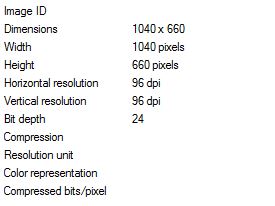
As you can see, it's actually not a very large image, at 1040x660, with a file size of 86KB. They use CSS to expand the image thereafter, which is why you'll notice the image is lower quality on big screens (mine is 1440x900), with artifacts readily apparent.

That really surprises me! I have a 1920x1080 display and it doesn't appear to be blurry to me... Well thanks for the info, so I size down my 4096x3112 image and have it size accordingly in css. Sounds like a plan I suppose, thanks guys.

so I size down my 4096x3112 image and have it size accordingly in css

If you size it down, that will only deal with the display issue, not the actual amount of bytes that need to be downloaded. When it comes to images, your source image should be as close to what you plan on displaying with regard to the orginial dimensions.

Ah JorgeM you beat me to it :)
A couple side notes:
Notice how they serve their image off a separate domain, which helps ease the load on Twitter.com.
Another useful tactic is to cache static content such as images.

hmm sized to the same size as the twitter one. Sort of blurry, is it acceptable though? Or do changes need to be made, making it bigger even?
Thanks!

I always use an optimiser for web pictures. Reduces the file size without reducing the actual size
or loosing quality. Free Web Resizer my fave.
<edit>
Sorry, misleading you... that prog's for resizing not optimising. I use paint shop pro 9 for optimising.

TonyG_cyprus, I would say it's quite impossible to reduce size and not reduce quality...

The image isn't loading for me, but generally you're going to get a bit of blur/artifacts. You need to decide what's acceptable for you and size the image based on that.

I've taken my 4K image, sized it down to a lower resolution and added some intentional blur on it, I think it looks quite nice for now.

Sounds good! Please mark the thread as solved if everything's fine :)

Be a part of the DaniWeb community

We're a friendly, industry-focused community of developers, IT pros, digital marketers, and technology enthusiasts meeting, networking, learning, and sharing knowledge.