Microsoft to Patch Hackers' "Shortcut" into Your Windows System Today

EricMack 1 Tallied Votes 367 Views Share

No more shortcuts for hackers - that's the word from Microsoft, which plans to release a patch today that the company says will fix a security loophole. The issue is tied to the way the Windows OS handles shortcuts, or .lnk files, or as Microsoft explains it in the official security advisory : "The vulnerability exists because Windows incorrectly parses shortcuts in such a way that malicious code may be executed when the icon of a specially crafted shortcut is displayed. This vulnerability can be exploited locally through a malicious USB drive, or remotely via network shares and WebDAV. An exploit can also be included in specific document types that support embedded shortcuts."

In other words, all it takes is viewing the contents of a USB drive to embed a malicious shortcut in your system.

Microsoft says the loophole is present in Windows XP Service Pack 3 and x64 Service Pack 2, right on up through Windows 7, including Windows Server 2003 and 2008. Consumers were first notified of the problem in the middle of July, along with detailed directions for a temporary workaround . Company managers say that in the interim they've seen an increase in attempts to exploit the vulnerability, prompting today's "out of band" release of the patch (out of band is Redmond-speak for outside the regular monthly update schedule).

Microsoft's Holly Stewart says that Malware in the Sality family , especially Sality.AT, have been among the most active and "virulent" of those using the shortcut backdoor:

"It is known to infect other files (making full removal after infection challenging), copy itself to removable media, disable security, and then download other malware. It is also a very large family—one of the most prevalent families this year. After the inclusion of the .LNK vector, the numbers of machines seeing attack attempts combining malicious .LNKs and Sality.AT soon surpassed the numbers we saw with Stuxnet. We know that it is only a matter of time before more families pick up the technique."

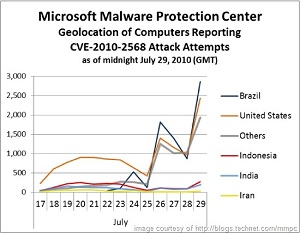
Stewart and Microsoft report that most of the computers reporting attack attempts through last week were located in Brazil, but the United States was a very close second.

Windows users with Windows Update turned on can expect to see the patch hit their systems around 1 p.m. Eastern Time today.

Image courtesy of Microsoft at
Dani AI

Generated

As reported when this thread was new: Microsoft issued an out‑of‑band security bulletin (MS10‑046) on August 2, 2010 to fix the Windows shortcut (.LNK/.PIF) icon‑parsing flaw assigned CVE‑2010‑2568. (learn.microsoft.com)

Why it mattered then (and why the thread still matters for anyone maintaining older PCs): simply viewing a folder or drive that contains a specially crafted shortcut can trigger code execution, so removable media, network shares and hosted documents were all valid attack vectors. Microsoft and US‑CERT/CISA published the same mitigation guidance and urged rapid patching. (learn.microsoft.com) Malware families quickly adopted the vector (Sality was singled out in contemporaneous coverage), which is why Microsoft pushed the update outside the normal schedule. (pcworld.com)

Practical checklist (applies to anyone landing here years later):

  • Confirm the MS10‑046/KB update is installed (look for the August 2, 2010 security update for your Windows build). Use the Update History UI or these commands from an elevated prompt:
wmic qfe get hotfixid | find "KB2286198"

or in PowerShell:

Get-HotFix -Id KB2286198

If the KB is missing, run Windows Update or apply the matching MSU/EXE from Microsoft. (learn.microsoft.com)

  • If a machine is infected or acting oddly: isolate it from networks, do a full offline scan from rescue media or run the Microsoft Malicious Software Removal Tool (MSRT) and vendor rescue tools; in many Sality‑class infections a clean rebuild from known‑good backups is the safest option. (support.microsoft.com)

  • Interim mitigations (if you cannot patch immediately): disable AutoPlay/AutoRun, consider disabling the WebClient service (if you don’t need WebDAV), and block or scan incoming .LNK/.PIF files — these are documented workarounds Microsoft and CISA recommended at the time. (learn.microsoft.com)

Notes and cautions: on compromised systems, cleaners may not restore damaged system files; expect recovery work (SFC, repair install or rebuild) and always validate removable media on a known‑clean machine before reusing.

Be a part of the DaniWeb community

We're a friendly, industry-focused community of developers, IT pros, digital marketers, and technology enthusiasts meeting, networking, learning, and sharing knowledge.