I've just installed Cent OS 5 on my server and I'm trying to configure it using Webmin. Now I've reached the Apache section and I want to install/uninstall apache modules, but in the apache configuration page cannot see the modules section.
This is very strange. Previously I had Ubuntu and the modules link was there (pic) allowing me to access a page where I could easely enable-disable all the modules I wanted. Now is not :)
How can I fix this?
Thank you!

Dani AI

Generated

what you saw on Ubuntu was the Debian-style mods-available/mods-enabled view. CentOS/RHEL does not use that layout. Modules are loaded by plain LoadModule lines in httpd.conf and in extra files under /etc/httpd/conf.d/. That is why Webmin’s list and your httpd.conf do not match. is on the right track: if Webmin is still pointed at Ubuntu paths, it will show toggles that do not change the files Apache actually reads.

Quick fix checklist (CentOS 5):

  • In Webmin -> Apache Webserver -> Module Config, point the Apache config to /etc/httpd/conf/httpd.conf, the server root to /etc/httpd, the httpd binary to /usr/sbin/httpd, and the modules directory to /usr/lib64/httpd/modules on x86_64 (or /usr/lib/httpd/modules on 32-bit). Save, then Refresh Modules in the Webmin Apache page.

Verify where modules really come from and what is active right now:

# Show the main config location Apache is using
httpd -V | egrep 'SERVER_CONFIG_FILE|HTTPD_ROOT'

# Find every LoadModule line in use
grep -R "^LoadModule" /etc/httpd | sort

# Show currently loaded (shared) modules
httpd -M | sort

To enable/disable a module on CentOS, edit the file that actually defines it (often a .conf under /etc/httpd/conf.d/ as installed by the RPM) and add or remove the LoadModule line there. Then test and restart:

apachectl configtest && service httpd restart

Tip: if a module still appears after you commented a LoadModule line, it may be compiled in (listed by httpd -l) or loaded by another file in conf.d/. Match what Webmin shows to the grep results above; once its paths are corrected, leaving "auto-detect modules" enabled usually works best on CentOS.

Recommended Answers

All 3 Replies

Have you changed the config to reflect where your CentOS apache files are? Make sure all the config info is updated and you can stop and start apache from within Webmin.

I think everything is fine with the config file, however have noticed something else which makes me more confused.
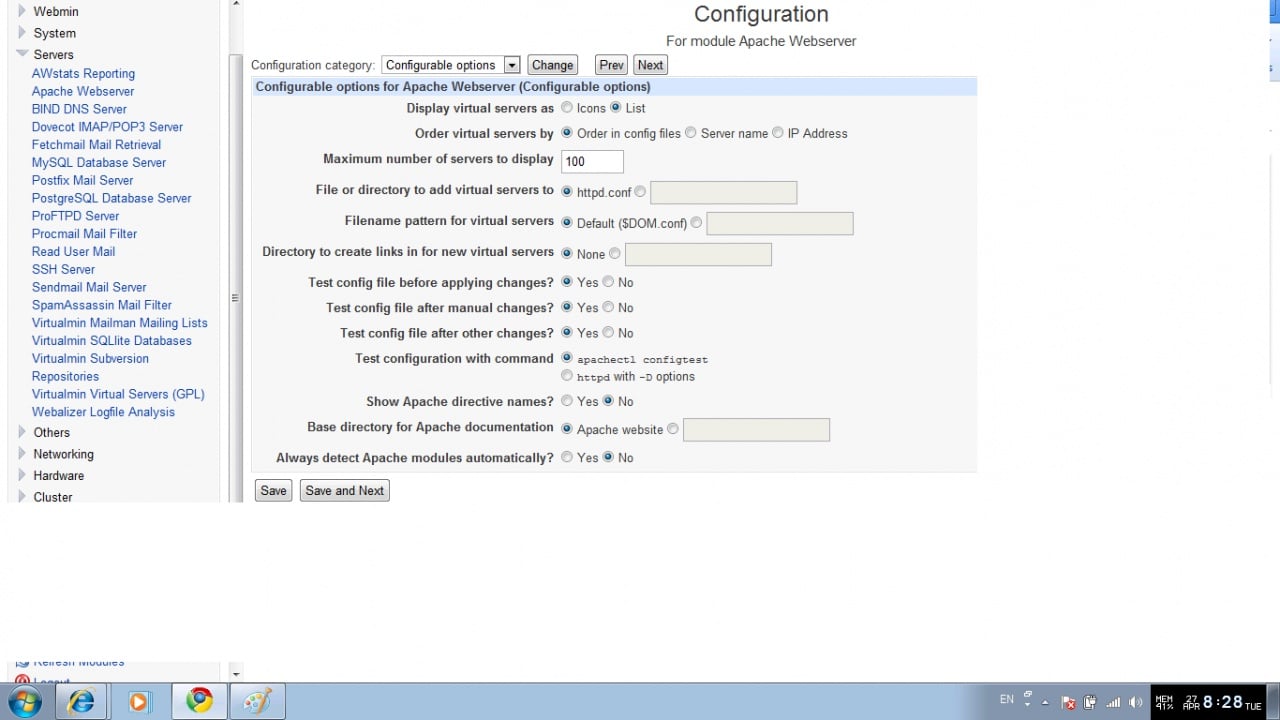
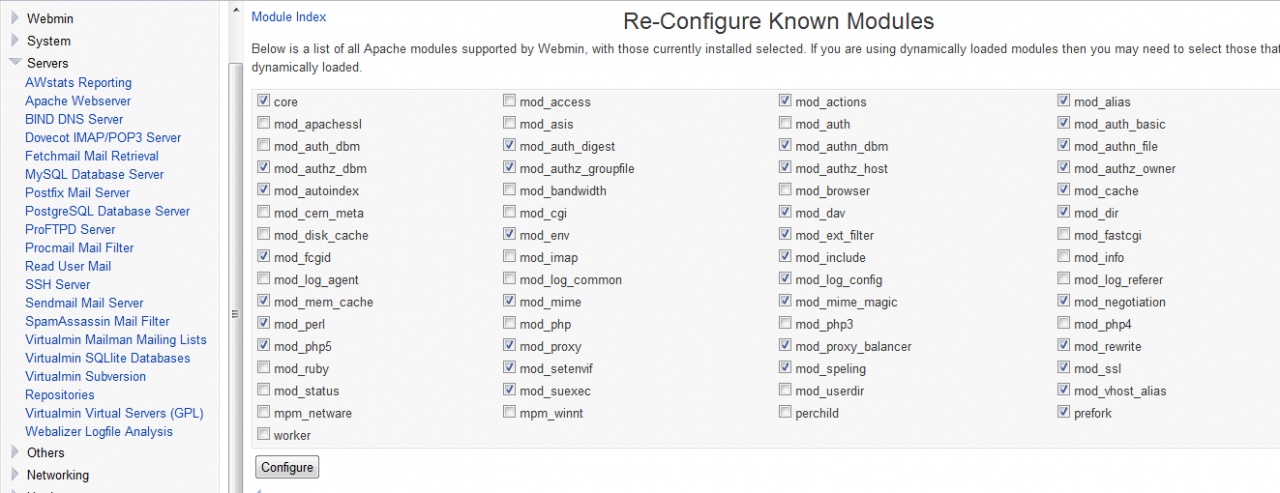
In the Apache config module, from within Webmin.Apache, these's an option to Always detect Apache modules automatically?. So, it was Yes before and I've set it to No. Now I can see the option to browse to the modules (see pic) but the changes I try to make there (enable/disable) don't save.
So not much of a progress :(

Also confusing for a noob: the Apache modules listed and enabled in the picture above don't match those enabled/disabled in the httpd.conf file. Here's what I have there:

LoadModule auth_basic_module modules/mod_auth_basic.so
LoadModule auth_digest_module modules/mod_auth_digest.so
LoadModule authn_file_module modules/mod_authn_file.so
LoadModule authn_alias_module modules/mod_authn_
LoadModule authn_anon_module modules/mod_authn_anon.so
LoadModule authn_dbm_module modules/mod_authn_
LoadModule authn_default_module modules/mod_authn_
LoadModule authz_host_module modules/mod_authz_host.so
LoadModule authz_user_module modules/mod_authz_user.so
LoadModule authz_owner_module modules/mod_authz_owner.so
LoadModule authz_groupfile_module modules/mod_authz_
LoadModule authz_dbm_module modules/mod_authz_
LoadModule authz_default_module modules/mod_authz_
LoadModule ldap_module modules/mod_
LoadModule authnz_ldap_module modules/mod_authnz_
LoadModule include_module modules/mod_
LoadModule log_config_module modules/mod_log_
LoadModule logio_module modules/mod_
LoadModule env_module modules/mod_
LoadModule ext_filter_module modules/mod_ext_filter.so
LoadModule mime_magic_module modules/mod_mime_magic.so
LoadModule expires_module modules/mod_
LoadModule deflate_module modules/mod_
LoadModule headers_module modules/mod_
LoadModule usertrack_module modules/mod_
LoadModule setenvif_module modules/mod_
LoadModule mime_module modules/mod_
LoadModule dav_module modules/mod_
#LoadModule status_module modules/mod_status.so
LoadModule autoindex_module modules/mod_
#LoadModule info_module modules/mod_
LoadModule dav_fs_module modules/mod_dav_
LoadModule vhost_alias_module modules/mod_vhost_
LoadModule negotiation_module modules/mod_
LoadModule dir_module modules/mod_
LoadModule actions_module modules/mod_actions.so
LoadModule speling_module modules/mod_
#LoadModule userdir_module modules/mod_
LoadModule alias_module modules/mod_
LoadModule rewrite_module modules/mod_
LoadModule proxy_module modules/mod_proxy.so
LoadModule proxy_balancer_module modules/mod_proxy_
LoadModule proxy_ftp_module modules/mod_proxy_ftp.so
LoadModule proxy_http_module modules/mod_proxy_http.so
LoadModule proxy_connect_module modules/mod_proxy_connect.so
LoadModule cache_module modules/mod_
LoadModule suexec_module modules/mod_
#LoadModule disk_cache_module modules/mod_disk_
#LoadModule file_cache_module modules/mod_file_
LoadModule mem_cache_module modules/mod_mem_
#LoadModule cgi_module modules/mod_
LoadModule version_module modules/mod_version.so

#
# The following modules are not loaded by default:
#
#LoadModule cern_meta_module modules/mod_cern_
#LoadModule asis_module modules/mod_

Be a part of the DaniWeb community

We're a friendly, industry-focused community of developers, IT pros, digital marketers, and technology enthusiasts meeting, networking, learning, and sharing knowledge.