The Flashback Trojan has infected at least 600,000 Apple computers running Mac OS X according to the Russian AV company Dr Web which researched the spread of the malware which was originally discovered at the end of last year and for which Apple issued a security patch just this week.
You can determine if your Mac is one of the machines infected by the Flashback Trojan, which disguises itself as an Adobe Flash Player installer, by running the AppleScripts provided by Mashable in response to the Dr Web discovery and available for download here
Alternatively, you can run the following commands in the Mac OS X Terminal yourself, and get a sense of relief if all of them give the response "The domain/default pair of (...) does not exist" as that means there is no Flashback infection present on your computer.
defaults read ~/.MacOSX/environment DYLD_INSERT_LIBRARIES; defaults read /Applications/Safari.app/Contents/Info LSEnvironment; defaults read /Applications/Firefox.app/Contents/Info LSEnvironment
If your machine is infected, then F-Secure has published step-by-step instructions for removal which can be found here
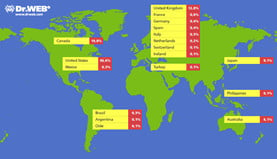 Dr Web reveals that most of the infected Macs, some 56%, are located in the United States and around 20% are in Canada. The UK accounts for roughly 13% of infections, and Australia 6%.
Meanwhile, F-Secure warns that upon execution the latest variations of the malware will "prompt the unsuspecting user for the administrator password. Whether or not the user inputs the administrator password, the malware will attempt to infect the system, though entering the password will affect how the infection is done."
If that infection is successful, the malware modifies webpage content displayed by the web browser client. F-Secure explains that "the specific webpages targeted and changes made are determined based on configuration information retrieved by the malware from a remote server."
