Hello!

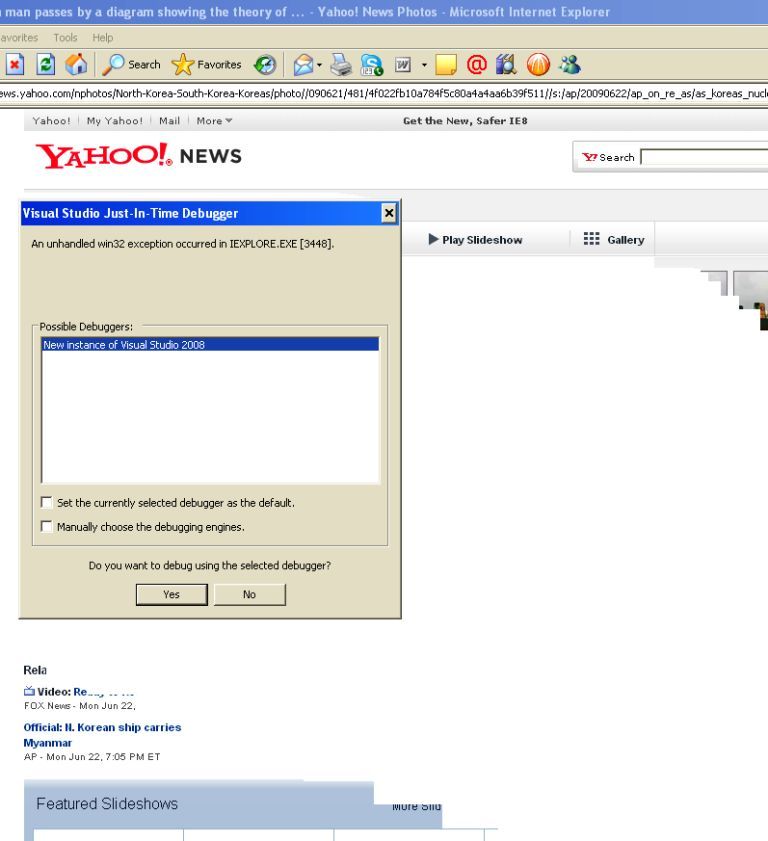
I have a problem using my IE 6.0 ,whenever I open multiple pages it always stops and runs Visual Studio debugger.

The message" An unhandled win32 exception occurred in EXPLORE.EXE [3448].

I have even reinstalled with OS two time but later I faced this problem again.

I attached this screenshot of the of the problem.

Pls help to solve this. Thanks!
Dani AI

Generated

Quick note before troubleshooting: the exact process name in the error matters. The dialog you quoted says EXPLORE.EXE — confirm whether it actually shows iexplore.exe (Internet Explorer) or explorer.exe (Windows shell). That changes where to look. Other posters (, , ) pointed at upgrades or different browsers; those can be useful workarounds but won’t diagnose the underlying crash.

Practical checklist to narrow the cause (do these one at a time):

  1. Reproduce the crash, then open the Event Viewer (eventvwr.msc) → Application log. Copy the error entry: Faulting application, Faulting module (DLL name), Exception code, Fault offset, and timestamp. Post those exact lines — they’re the most useful diagnostics.
  2. If Visual Studio offers Just‑In‑Time debugging, click Cancel so Windows logs the error. To stop the debugger prompt permanently, disable Just‑In‑Time in Visual Studio (Tools → Options → Debugging → Just‑In‑Time).
  3. Run IE with extensions off: iexplore.exe -extoff. If the crash stops, an add‑on/toolbar/BHO is likely at fault.
  4. Do a clean boot (msconfig) to disable non‑Microsoft services/startup items and test again; also try a new Windows user account to rule out profile corruption.
  5. If the crash names explorer.exe, inspect shell extensions (use Autoruns or ShellExView) and disable non‑Microsoft ones; if it’s iexplore.exe, focus on toolbars/BHOs.
  6. Run a full malware scan and sfc /scannow to repair system files.

If these steps don’t help, post the exact Event Viewer lines and the faulting module name. With those details it’s usually possible to identify a specific faulty DLL or driver rather than guessing.

Recommended Answers

All 3 Replies

time to upgrade

Get FireFox or Chrome.

Get FireFox or Chrome.

Rather than keep posting nonsense so that you can spam your signature, why don't you try and give some constructive comments?
Installing a different browser will not fix the problem.

free_eagle, try caperjacks suggestion and install IE7 and see if the problem goes away.

Be a part of the DaniWeb community

We're a friendly, industry-focused community of developers, IT pros, digital marketers, and technology enthusiasts meeting, networking, learning, and sharing knowledge.