Hi there,
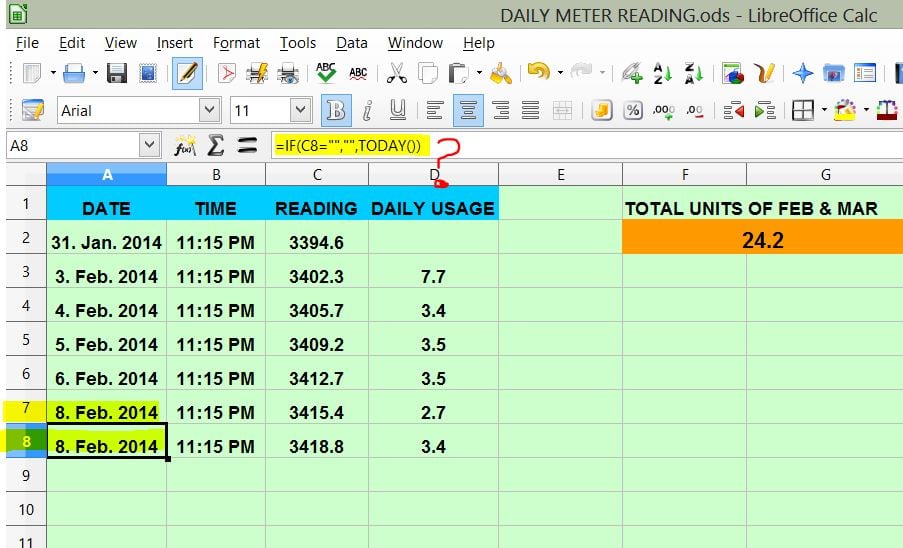
I am using Libre Office Calc in my windows 8 PC. I need to maintain a calc sheet for tracking my home electricity meter reading. pLEASE LOOK THE IMAGE.
FUNCTION OF CELL A2 = if c2 = "" then value = "" otherwise value = TODAY(). This will give me the date of the data entering day. I copied this function till A31 to record one month meter reading. When i enter the reading of febrary 1 is ok. A2 shows Feb 1 2014. But whe i enter reading of feb 2, both A2 and A3 are showing Feb 2 2014. I need to display the date of entering data and not to change when opening next time. Can somebody help me ?
________________________________________________________________

Dani AI
Generated
Short answer: the date formula is dynamic — using Calc functions that return TODAY()/NOW() will update whenever Calc recalculates, so earlier rows will change when you add new input. was right to look at formula syntax, but the root issue is that TODAY() is volatile; to get a non‑changing timestamp you need to insert a static value (keyboard/Insert command), paste a value, or use a small macro that writes the date as a value. (wiki.documentfoundation.org)
Quick options you can use right away
- Fast manual: put the cursor in the date cell and use Insert → Date (or the Ctrl+; shortcut on Windows) to insert the current date as a static value (it will not change later). Format the column as Date if it shows a serial number. (help.libreoffice.org)
- Formula then freeze: keep your formula while entering, then immediately copy the cell and do Edit → Paste Special → Values only to replace the formula with a static date. This is useful if you prefer typing one formula and freezing it for each row.
- Automatic stamping (best for many rows): attach a small LibreOffice Basic macro to the sheet’s "Content changed" event so that when you enter a reading in column C the macro writes the current date as a value into column A (and it can be coded not to overwrite an existing date). See the event notes here. (ask.libreoffice.org)
Macro example you can paste into a module and assign to the sheet event "Content changed" (right‑click sheet tab → Sheet Events → Content changed → choose macro). Format column A as Date and remember macros must be enabled/trusted.
Global g_bStampingDate As Boolean

Sub StampDateOnColumnCChange(pEvent As Variant)
  On Error GoTo ErrHandler
  If g_bStampingDate Then Exit Sub
  g_bStampingDate = True

  Dim oSheet As Object
  Dim oCols As Object, oIntersection As Object, oRange As Object, addr As Object
  Dim i As Long, r As Long, colC As Long: colC = 2  ' zero-based: C = 2

  On Error Resume Next
  oSheet = pEvent.getSpreadsheet()
  If oSheet Is Nothing Then oSheet = ThisComponent.CurrentController.ActiveSheet
  On Error GoTo ErrHandler

  oCols = oSheet.getColumns().getByName("C")
  oIntersection = oCols.queryIntersection(pEvent.getRangeAddress())

  If Not IsNull(oIntersection) Then
    For i = 0 To oIntersection.getCount() - 1
      oRange = oIntersection.getByIndex(i)
      addr = oRange.getRangeAddress()
      For r = addr.StartRow To addr.EndRow
        Dim changedCell As Object, dateCell As Object
        changedCell = oSheet.getCellByPosition(colC, r)
        If changedCell.getType() <> 0 Then
          dateCell = oSheet.getCellByPosition(0, r) ' column A
          If dateCell.getType() = 0 Then dateCell.setValue(Date)
        End If
      Next r
    Next i
  End If

Cleanup:
  g_bStampingDate = False
  Exit Sub

ErrHandler:
  g_bStampingDate = False
  Exit Sub
End Sub
Notes and troubleshooting
- The macro uses
setValue(Date)so the cell becomes a real date value; LibreOffice’s API exposessetValue/getType()for cells. If the macro doesn’t run, check that the sheet event is assigned and that macros are enabled/trusted. (api.libreoffice.org)
If you want, provide your .ods (or a screenshot of A/C columns) and the LibreOffice version and someone can adjust the macro to your exact sheet layout or handle clearing/overwriting rules.
gerbil 216 Industrious Poster
vino, the field separator in libre office is a semicolon " ; ".
So... IF(C2;"";"";TODAY())
Openoffice is absolutely strict about formula formats, I do not know about Libre. OO would throw an error message into the cell [all cells]. PErhaps you could show a screenshot of the formula in an empty date cell, say A18?
Edited by gerbil
Be a part of the DaniWeb community
We're a friendly, industry-focused community of developers, IT pros, digital marketers, and technology enthusiasts meeting, networking, learning, and sharing knowledge.