Hi all

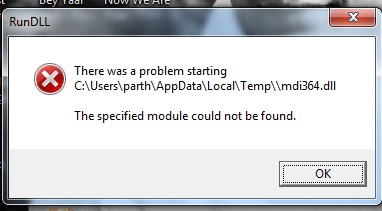
As shown in Image there is a error coming on my pc while i start the machine. or whenever restart it.
please help me to get rid out of these problem.

Thank you

Dani AI

Generated

A RunDLL startup popup usually means Windows is trying to load a DLL that no longer exists (an "orphaned" startup entry) — commonly left behind after uninstalling software or after anti‑malware removed a malicious file. The exact filename and full path shown in the error window are the single most useful clue for where Windows is trying to load that DLL from. (learn.microsoft.com)

A practical, low‑risk workflow that generally fixes this:

  • Record the exact DLL filename/path from the error window.
  • Use Autoruns (Sysinternals) run as Administrator, enable "Hide Microsoft entries", search the DLL name, then uncheck or delete the matching startup item. Autoruns shows the precise Run/RunOnce/StartupFolder/TaskScheduler/Winlogon locations so the orphan can be removed safely.
  • Before removing anything, create a System Restore point and export the registry key(s) you plan to change (Regedit > File > Export). Backups make rollback straightforward if something goes wrong. (learn.microsoft.com)

Scan and repair steps to follow in parallel:

  • Run a full, up‑to‑date AV scan (a full Quick Heal scan is fine), then a second‑opinion scan (Malwarebytes or similar). If malware is suspected and hard to remove, run an offline boot scan (Microsoft Defender Offline) so threats running in memory can be caught.
  • If the missing DLL is a Windows component, repair system files: first run DISM, then SFC. Example commands (run in an elevated command prompt):
DISM /Online /Cleanup-Image /RestoreHealth
sfc /scannow

(learn.microsoft.com)

Cautions and next steps: do not delete registry entries blindly. If autoruns shows entries with random names or the DLL path is under AppData or Temp, priority is higher for malware removal. After cleaning, reboot and confirm the RunDLL popup is gone. If uncertainty remains or the entry cannot be removed, the safest next move is to restore the system point or consult a technician rather than deleting unknown registry keys. This expands on ’s malware suspicion and gives a concrete, reversible procedure for to follow. (learn.microsoft.com)

Recommended Answers

All 3 Replies

That's an odd location for a DLL to run at startup. You probably had a virus/malware issue and this is the remnants of it.

Probably best to run Malwarebytes and to check your starup items as well.

k...will quickheal scan the malware ???
thank you.. :)

Do you mean QuickScan? I would run the Full scan and let it go... it can take a few hours.

Be a part of the DaniWeb community

We're a friendly, industry-focused community of developers, IT pros, digital marketers, and technology enthusiasts meeting, networking, learning, and sharing knowledge.