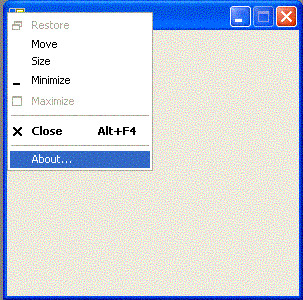
the window have a icon, on caption\title bar. that icon show us the System Menu(mouse right button).
my objective is add to it the Allways on Top option. using a program, on background, i can do it. but i will have another program on process's. so is there another way for add that option on System Menu?

Dani AI

Generated

Short answer: if you control the application, add the item to its system menu. If you want to change other programs' system menus, there is no supported way to do that from outside their process without injection or a global hook — both require a helper running in the background or a DLL injected into target processes and are intrusive (and likely to trigger AV/EDR).

was right for the scoped case: use the Win32 APIs in your own app (GetSystemMenu / AppendMenu / DrawMenuBar) and handle the WM_SYSCOMMAND to toggle topmost with SetWindowPos. The code below is the minimal pattern to add an "Always on Top" item and toggle it:

#define IDM_ALWAYS_ON_TOP 0xA000

// add once (e.g. WM_CREATE)
HMENU hSys = GetSystemMenu(hWnd, FALSE);
AppendMenu(hSys, MF_SEPARATOR, 0, NULL);
AppendMenu(hSys, MF_STRING, IDM_ALWAYS_ON_TOP, "Always on Top");
DrawMenuBar(hWnd);

// in WindowProc
case WM_SYSCOMMAND:
    if ((wParam & 0xFFF0) == IDM_ALWAYS_ON_TOP) {
        static BOOL top = FALSE;
        top = !top;
        SetWindowPos(hWnd, top ? HWND_TOPMOST : HWND_NOTOPMOST,
                     0,0,0,0, SWP_NOMOVE|SWP_NOSIZE);
        return 0;
    }
    break;

For other processes: the typical techniques are (a) a global hook (SetWindowsHookEx with a hook DLL) or (b) DLL/code injection or (c) a helper that watches active windows and flips WS_TOPMOST. All of those mean extra code running with elevated reach, and they carry stability/security costs — so they aren’t “another way” in the sense of a safe, supported single-click registry tweak. ’s desktop-context-menu suggestion is useful, but it applies to Explorer context menus, not per-window system menus.

Practical recommendation: if you can change the app, modify its system menu. If not, use a tiny, trusted helper (or an AutoHotkey script) to toggle the active window’s Always-on-Top state — lightweight and far less risky than injecting into other processes.

Recommended Answers

All 4 Replies

Hello,

How to geek as a good discussion of how to do this in WIndows Vista and later.

If it's just for your application, yes, you can add your own menu
items.

why these option isn't a standard option?

Be a part of the DaniWeb community

We're a friendly, industry-focused community of developers, IT pros, digital marketers, and technology enthusiasts meeting, networking, learning, and sharing knowledge.