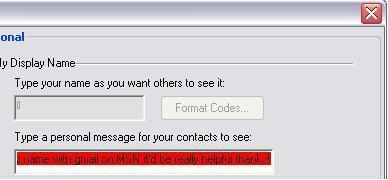
I'm not sure if I've posted this in the right forum or not, but I thought it made sense since its windows live messenger. Anyway, I have recently switch from Hotmail to Gmail, but I am still wishing to use Window Live Messenger. One of my contacts is on gmail on this, but I'm not. I've signed up my account with Window Liv Id, and I can use Windows Live, but I can't make a display name. When I try to, you see this

[IMG]http://i6.photobucket.com/albums/y230/Toni_bird/MSN.jpg[/IMG]

Which is really annoying because I would like to have a display name. If any one knows how to fix, or is even had/having the same problem, it'd be really helpful. Thanks!

Dani AI

Generated

This thread actually contains three separate problems that got mixed together: account setup/display name, client sign‑in errors, and media (webcam) connection drops. Short answers up front — yes, you can use a Gmail address as your Microsoft (formerly “Windows Live”) sign‑in; the account profile (Your info) is where the display name is set; and many Messenger sign‑in failures come from client/SSL, clock, or network/firewall issues. For long‑term reliability note that Microsoft retired Windows Live Messenger and moved users to Skype in 2013. (support.microsoft.com)

If the display name is the blocker for : sign in to your Microsoft account dashboard, open Your info and click Edit name — enter a first and last name, complete the captcha and Save. Changes can take a short while to propagate; signing out and back in forces an update. If you haven’t finished the verification step that Microsoft emailed when you created the account, complete that first (Microsoft will not allow some profile edits until the address is verified). (support.microsoft.com)

For and (sign‑up/sign‑in errors): create a Microsoft account with your Gmail by using “use an existing email” on the Microsoft sign‑up flow, then verify that email and set a Microsoft account password — this is independent of your Gmail provider. If a Messenger client shows an error (80048xxx family), first confirm you can sign in at the web dashboard; if web sign‑in works, the problem is client/local. Run the Sign‑in Helper, check system date/time, and review TLS/SSL options (older Messenger clients required TLS changes in Internet Explorer). If web sign‑in fails, follow the Microsoft sign‑in/ recovery flow. (support.microsoft.com)

Quick diagnostic checklist:

  • Try signing in at (verifies credentials).
  • If client fails but web works: check IE/OS TLS settings, firewall/antivirus, and router MTU/NAT.
  • For webcam drops: test with another app (rules out camera), and allow Messenger/Skype through the firewall/antivirus or use UPnP/NAT‑piercing on the router.
  • If still blocked, migrate to Skype (sign in with the same Microsoft account) — Microsoft provided an official migration path when Messenger was retired. (support.microsoft.com)

References: Microsoft account creation and help pages; the Sign‑in Helper; practical TLS/IE notes for Messenger sign‑in; and the Messenger→Skype retirement announcement. (support.microsoft.com)

Recommended Answers

All 9 Replies

I can't read whatever is in the red bar. Can you type that out for us?


Generally there should be no conflict between gmail and messenger.

I've just recently switched from hotmail to gmail too & also want to use my new gmail address for windows live messenger but when I try to sign up, it wont let me because I don't have a [EMAIL="'@hotmail.com'"]'@hotmail.com'[/EMAIL] email address! any ideas on what I can do please?

I have the same problem. When I try to log on with gmail, it writes that there is some error(800048822).
I don't know what to do. can anyone help me please?

i just tried to contact somenoe @gmail usning live trying to use my webcam. disaster! wlive kept dropping the connection, all sorts of error messages. noone online it said-not one of 300 contacts! reported to MS, expect a change in another 4 years like b4.

There are many things in this thread, and I think most of them aren't connected (except because they're all about live messenger)

The first one: You can 't change your display name until you've clicked the activation link. Did you do that ? Afterwards you can just use your gmail-adress as a Live-ID and shouldn't have any trouble using Live Messenger.

The second one: You can use other adresses, just click "use your own e-mailadress" or something similar. I'm Belgian/Dutch speaking, so I don 't know the exact translation in English.

The third: Error 800048822 basicly says you're live-ID credentials are wrong or non-existant. Make sure you've signed up for a live-ID with your mail-adress, you can 't just use gmail-adresses without signing up for Live ID. If you did, make sure your mail-adress and password are correct (Live-ID password, not gmail-password)

Fourth problem: Connection troubles can sometimes be solved by opening up the right ports on your firewall. Althought it's not recommended to open them up, if your firewall is too strict, you should allow connections according to (I hope everyone sees that page in their language :) )

book

commented: This post makes no sense whatsoever +0

helllllllllllllllllllllooooooooooooooooooooooooooooooooooo

hellllllllllllllllllllllllllloooooooooooooooooooooooooooooooooooo

hellllllllllllllllllllllllllloooooooooooooooooooooooooooooooooooo

Be a part of the DaniWeb community

We're a friendly, industry-focused community of developers, IT pros, digital marketers, and technology enthusiasts meeting, networking, learning, and sharing knowledge.