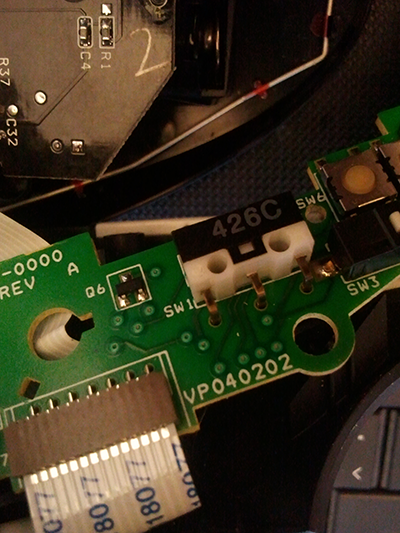
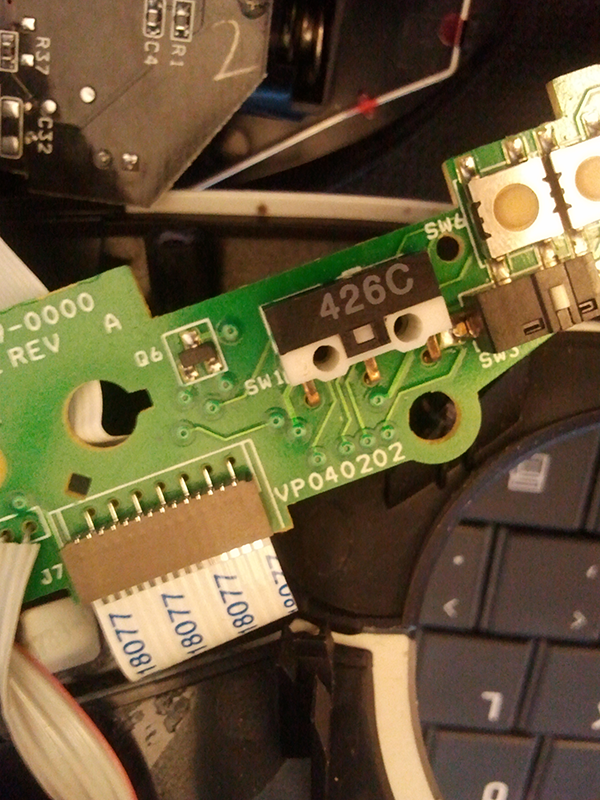
Hello guys, I have a t-rb22 logitech trackball and at the moment it's not working properly. I have thinkered with it a bit, I think I know what the problem is and I need to replace a small switch inside (pictures attached).
7deee63990f867790dc8d2589191b6cccd517819478df412d7a20c4d88486dc7
This switch - well I call it switch - has a little pin at the back not visible in the picture that gets pushed in everytime a button is clicked on the trackball (it's the main left mouse click). I am not really techincal when it comes to these things and I have absolutely no idea where to buy it. It's a 426c IC (as you can see) and there is also a white cover that says 002069-0000 cav4. WOuld anybody know where and if I could buy this part anywhere or where I could get more info? Oh logitech don't sell this trackball anymore so no point asking them.
Thanks

Dani AI

Generated

Short summary and practical next steps.

The intermittent left‑click in a Logitech T‑RB22 is usually caused by a worn or failed microswitch. Community repairs and teardown notes show the Trackman/T‑RB22 almost always uses an Omron D2F family micro‑switch (left‑angled / A1 variants or the F/FL force/lever variants are common). As suggested, this is a standard component you can order from electronics part suppliers. (electronics-lab.com)

How to confirm the exact part to buy: open the upper button assembly (take photos), note the actuator orientation (left vs right), whether the switch has a lever, and whether the switch is through‑hole/right‑angle. The switches are 3‑pin SPDT microswitches; matching the PCB pad spacing and actuator position is critical. Typical replacement PNs reported by repairers include D2F‑FL‑A1 (lever + left angle) and D2F‑F‑A1 (force variant) — check distributor datasheets for dimensions before ordering. (digikey.com)

Repair tips and a cheaper check: before buying a switch, inspect the plastic post on the underside of the button that presses the switch. That post commonly wears a small groove and can produce the same symptoms; lightly filing or sanding it flat often restores reliable clicking without parts. If replacement is needed, desolder the old switch with a small iron, solder wick or pump, fit the new D2F‑type switch (hold it in place while soldering) and test before full reassembly. Watch the ribbon cable and plastic clips when separating the halves. If unsure, harvest a donor T‑RB22 or get help — the new switch is inexpensive but PCB/ribbon damage is not. (electronics-lab.com)

Where to buy: reputable distributors stock Omron D2F variants (Digi‑Key, Mouser, Arrow, etc.). Verify the exact PN, actuator orientation (A1), and lever style (L/FL) against the photos you took before ordering. (digikey.com)

Notes: this expands on ’s microswitch idea and ties it to the specific D2F parts other repairers have used.

Recommended Answers

All 4 Replies

You should be able to find the appropriate switch at an electronics component supply house. Then you will need to unsolder the old switch and solder in the new one. If you aren't an experienced solderer, or the device is wave-soldered directly to the circuit board, then you need someone with a lot of experience. I couldn't do it well, but my grandson does that sort of stuff all the time. Experience is the key here.

It is a microswitch and is available at Maplin.

thanks, that's not actually the switch, mapli doesn't seem to have it but I have found it elsewhere. I will check how that's been soldered and take it from there

I have this same problem. Did you find the right switch and if so, where?

Be a part of the DaniWeb community

We're a friendly, industry-focused community of developers, IT pros, digital marketers, and technology enthusiasts meeting, networking, learning, and sharing knowledge.