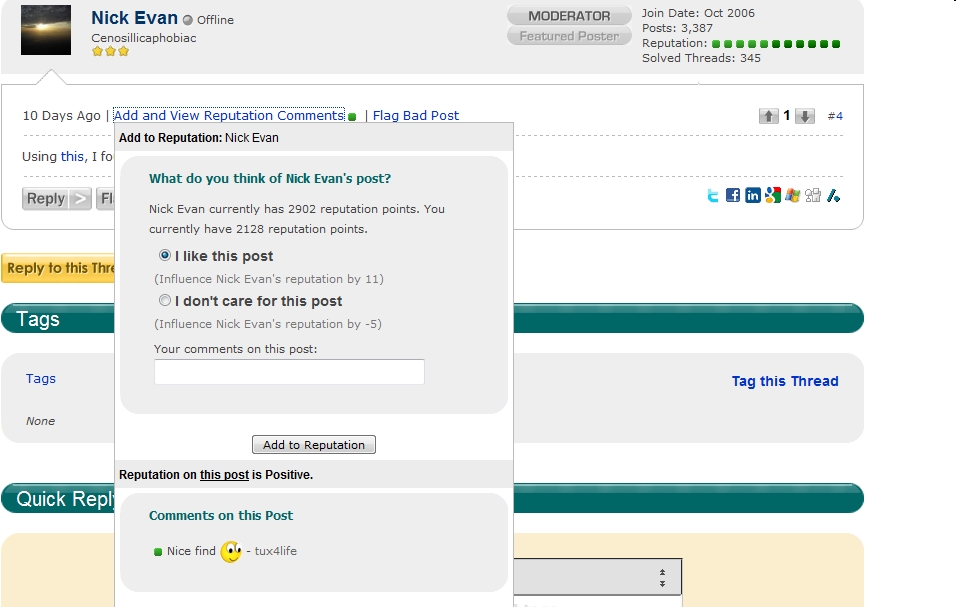
You see an orange or green dot and are curious. Who gave it and why? Currently you can't find out without giving some rep yourself. I propose a "Cancel" button after you view the rep. Sometimes you don't want to weigh in. You just want to view the comments.

VernonDozier 2,218 Posting Expert Featured Poster
Recommended Answers
Jump to Post— Ancient Dragon 5,243You can view the comments of the rep you have been given by looking in your CONTROL PANEL (see the link at the top of every DaniWeb page)
You could also do it your way, but press your browser's Back button or just clicking anywhere outside the rep box …
All 5 Replies

Ancient Dragon 5,243 Achieved Level 70 Team Colleague Featured Poster
VernonDozier commented: Here's some "rep". It won't count, but thanks. +0
VernonDozier 2,218 Posting Expert Featured Poster
VernonDozier 2,218 Posting Expert Featured Poster

Dani 5,664 The Queen of DaniWeb Administrator Featured Poster
tux4life commented: Heh heh :P +0
Be a part of the DaniWeb community
We're a friendly, industry-focused community of developers, IT pros, digital marketers, and technology enthusiasts meeting, networking, learning, and sharing knowledge.