I'm currently in school for webdesign. I've covered css and xhtml but am a newbie when it comes to flash and am having huge problems.

I was given a swf file to edit a flash website. I converted the swf to a fla but am unable to edit any of the text in the file. Everything comes up in Flash but i am unable to edit anything.

Please help!
Dani AI

Generated

Short, practical checklist and fixes for (building on points from and ) when a converted SWF opens but you cannot change on-screen text in Flash CS4.

First, confirm whether a piece of on-stage content is a live Text field: pick the Text tool (T) and click the text. If a caret appears you can edit; if not, the artwork is part of a symbol or a bitmap. Next, double-click suspected symbols from the stage to open them in place and expand nested timelines — editable fields are often buried inside movie clips or button states. Also unlock and show all layers before you start; hidden or guided layers can hide the editable object.

If the text is not recoverable as live text, there are three practical options: recreate the text fields in Flash (fastest), replace the artwork with newly created text styled to match, or ask the original creator for source files (FLA/PSD). To recreate: add a new text field, choose Static/Dynamic as needed, match font, size and color, and if the text belongs inside a button or clip, edit that symbol and replace the artwork on each state. If the project uses dynamic text, remember to update any ActionScript bindings after replacing fields.

To identify fonts or match styling, export a clean screenshot of the menu and use a font-identification service such as WhatTheFont (https://www.myfonts.com/WhatTheFont/). To inspect library contents and export bitmaps for reference, a modern SWF inspection tool like JPEXS Free Flash Decompiler (https://www.free-decompiler.com/flash/) can help enumerate assets, though it cannot magically restore author source files. Always work from a copy of the FLA, keep backups, and if the client can provide the original PSD/AI and FLA, that will save time and avoid guesswork.

Recommended Answers

All 8 Replies

Member Avatar for Member #334542

Please send that swf and fla

This first one is the swf file that I was originally given:

then i used a swf converter to extract the fla file which is this:

Member Avatar for Member #334542

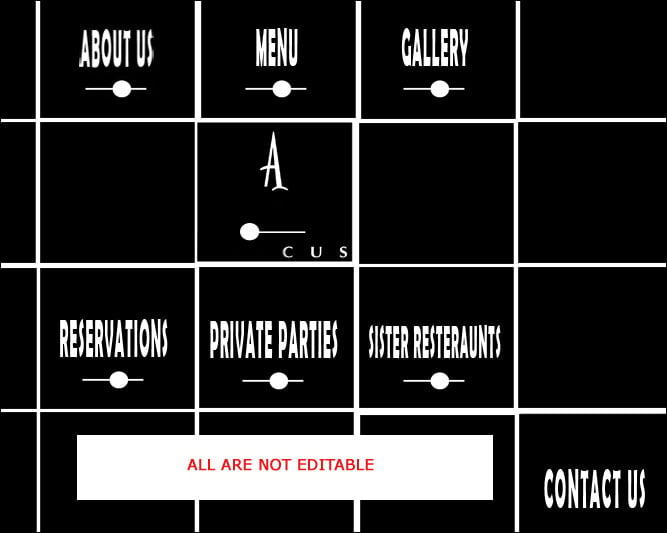
Really all the text within the source are not editable, because all are extracted as a graphic, so its not possible to edit.

Do you give the original swf of that file?

Actually this is the swf you published from this fla, and I will use my converter to extract it.

oops! This is the original that I was sent

So they need to be the raw graphics to be editable? I'm such a novice when it comes to this program

Thanks!
Rebecca

Member Avatar for Member #334542

Hi Rebecca,

I had converted your swf to fla using decompiler and I came to know that some menu items are not editable, but paragraph, bulleted point and so on are editable. There is no way to make the menu items to an editable one. Only it is possible to edit in photoshop if you have the same font. No Possible to edit menus but you can edit text which is displayed as paragraph. Please have a look at screenshots.

Thanks for your help! Do you know the reason behind why it's not editable? I thought all graphics in Flash should be

Member Avatar for Member #46692

Why on earth would your school give you a .swf file to edit, so you have to go through a decompiler to get the .fla file?

Member Avatar for Member #334542

Hi rebeccaj,

You should understand one thing, They developed the flash interface purposely to utilize that part as a graphics. May be they have original photoshop file for that flash, so they can edit anytime with their photoshop source, while decompiling its not possible to get it. GOT IT!

Be a part of the DaniWeb community

We're a friendly, industry-focused community of developers, IT pros, digital marketers, and technology enthusiasts meeting, networking, learning, and sharing knowledge.