Hi, I need to develop something like this. How do I start on this?
Please check the attachment:
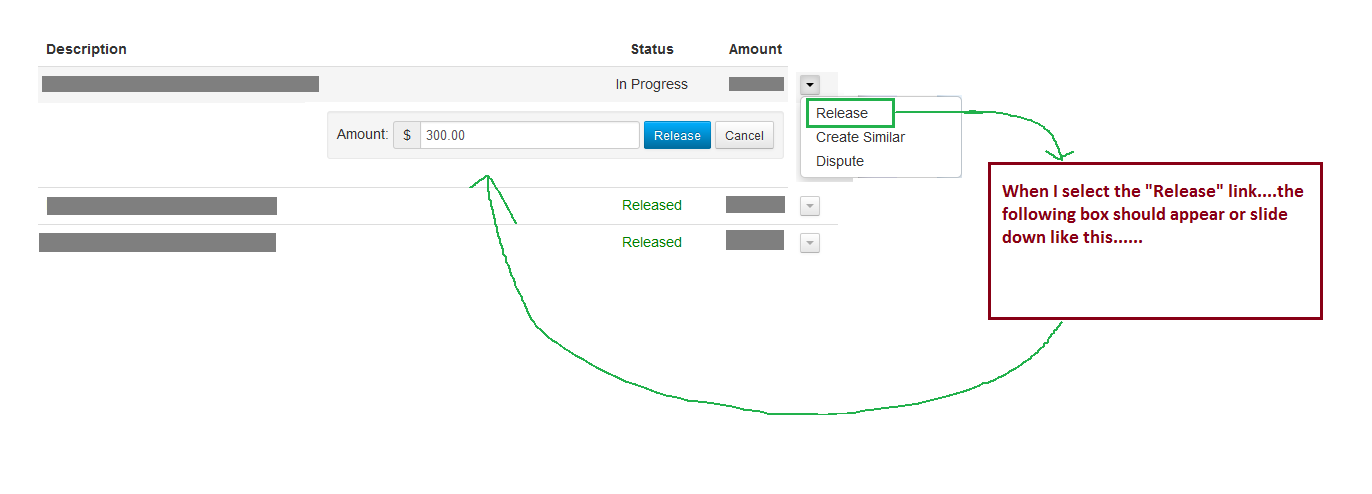
Hi, I need to develop something like this. How do I start on this?
Please check the attachment:

The screenshot looks like a slide-down disclosure/accordion panel rather than an HTML form select. suggested a select and and mentioned jQuery — those ideas point in a direction, but a native select won't recreate a sliding panel or layout like the image. Two practical directions:
Use the native disclosure when possible. The HTML5 <details>/<summary> element is semantic, keyboard-accessible by default, and a great start for simple slide-down content (see the MDN docs below).
Create a custom, accessible disclosure when you need custom visuals or animation. Keep semantics and keyboard support: a toggle button that updates aria-expanded plus a content region with role="region" and aria-labelledby". Minimal skeleton:
<button aria-expanded="false" aria-controls="panel1" id="toggle1">Show options</button>
<div id="panel1" role="region" aria-labelledby="toggle1" hidden>
<!-- panel content -->
</div> On toggle, flip aria-expanded and hidden (or add/remove a class). For smooth animation avoid animating layout-heavy properties repeatedly. Simple CSS transitions on max-height can work for fixed-bounded content, but measuring scrollHeight and animating explicit heights (or using a transform/opacity combo) gives smoother results for variable content. Prefer hardware-accelerated transforms where possible and debounce layout reads/writes to prevent jank.
Accessibility and testing notes: ensure Enter/Space toggles the button, content is reachable by screen readers, and keyboard focus order stays logical. jQuery is optional; plain JavaScript suffices for the toggle and animation logic. For ARIA guidance and patterns, see the WAI-ARIA disclosure example and the MDN details reference.
Jump to Post— Octet 45Hello what you are looking for is what is called a 'select' and is part of an HTML Form.
To do it you would use the following:
<form method = "POST/GET" action = "LOCATION OF PHP/ASP SCRIPT" > <select name = "Select Form" > <option value = …
Hello what you are looking for is what is called a 'select' and is part of an HTML Form.
To do it you would use the following:
<form method = "POST/GET" action = "LOCATION OF PHP/ASP SCRIPT" >
<select name = "Select Form" >
<option value = "1" > Option 1 </option>
<option value = "2" > Option 2 </option>
</select>
</form>
What is happening here is the following:
Personally I would use the POST method, and make sure you sanitise your inputs and outputs! Binding paramaters to a prepared statement is good.
AHarrisGsy has started on the HTML, but you're going to have to use Javascript jQuery to get it to show onclick I'm afraid.
We're a friendly, industry-focused community of developers, IT pros, digital marketers, and technology enthusiasts meeting, networking, learning, and sharing knowledge.