
Afternoon All,

I've been looking at different remote support options for the BlackBerry, we all have them at home at Mum is forever having to ask for help! So I started a little websearch for the best one, although we've already got something similar for all our laptops and desktops; it's much more of a challenge to find something for a mobile device - let alone a BlackBerry!

So I was rather impressed when I found Ignition, although it has been aroud for some time, it now has full support for the BlackBerry (although it's unknown whether it'll support the awaited OS6).

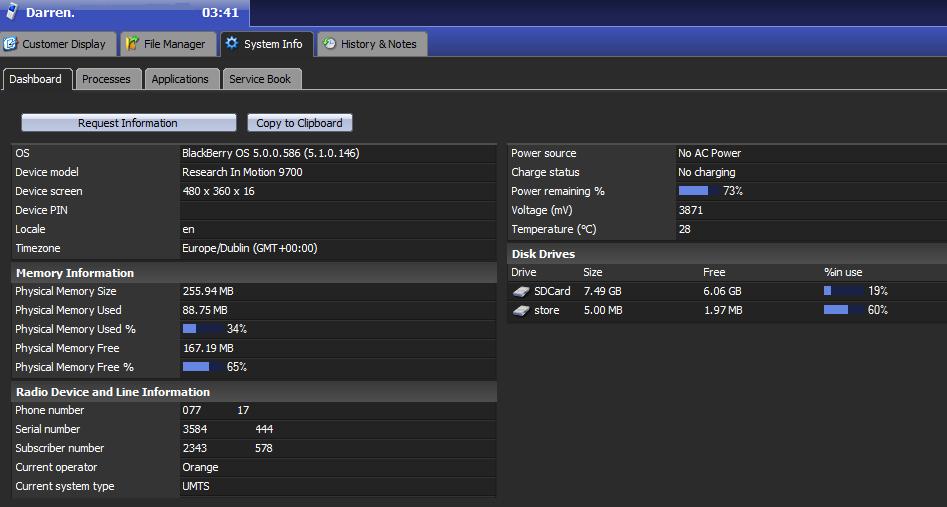
It was able to give me every piece of information about our devices, and even take full control of them. Not only over the mobile network but it worked just as well over Wi-Fi and UMA.

The only issue I could see was that it didn't give you much control over the running processes, only displayed them. A great service other than that!
Dani AI

Generated

’s hands‑on test with Ignition is a good real‑world data point: remote tools can often read lots of device info and establish sessions across Wi‑Fi and cellular, but there are platform limits to what they can do on BlackBerry. Two important realities: capability varies by model/OS, and many third‑party agents cannot manipulate low‑level processes because of BlackBerry’s security model.

Why you see processes but not full control: older BlackBerry OS releases restrict what an app can do to other running apps unless the vendor has privileged/signed system access or is running through an enterprise channel (BES/MDM). That makes process‑level control uncommon for consumer remote‑support apps; they typically offer inventory, configuration pushes, file transfer, screen capture, and one‑time remote sessions instead.

Quick checklist for reliable home support

  • Confirm the exact model and OS version (ask the user to read the device info from Options > About).
  • Install the official agent from the vendor or BlackBerry App World and use the latest build.
  • Grant any permission prompts the agent requests (network, device info, storage).
  • If a session fails on cellular but works on Wi‑Fi, try Wi‑Fi first — carrier NAT/firewalls often interfere.
  • If the tool lists but cannot kill processes, have the user manually close apps or reboot as a practical workaround.
  • For corporate devices, route support through BES/MDM — those systems can perform deeper management.

Security and next steps: only use reputable vendors, require temporary session codes, and revoke access after the support session. For recurring family support, consider an MDM subscription or keep a PC tethered option (BlackBerry Desktop Software) for tasks that agents cannot perform remotely. ’s reply shows a simple acknowledgement — this thread documents a useful starting point, but always confirm vendor OS6/OS7 compatibility before relying on any specific tool.

Thanks.

Be a part of the DaniWeb community

We're a friendly, industry-focused community of developers, IT pros, digital marketers, and technology enthusiasts meeting, networking, learning, and sharing knowledge.