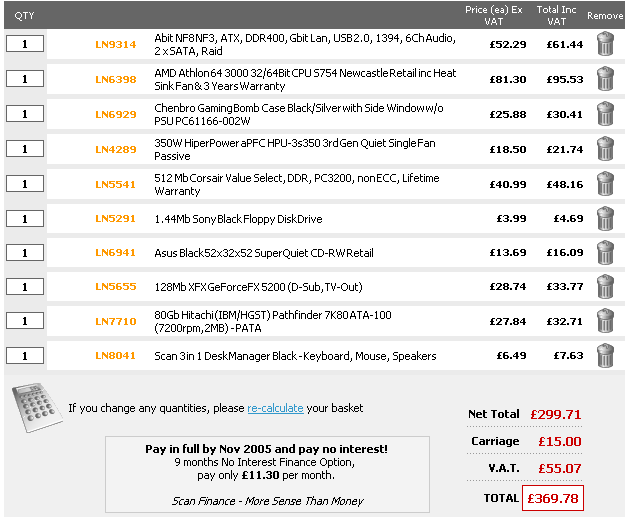
Hi all, i have got this selection of components together for a new computer, using components i havent gone 4 before (im not a very experienced self builder)

what do ppl think? have i made a selection that sumwhere might be incompatible? is it a good selection

any suggestions would be swell ;)
its in the attachement if ive done it right???:eek:


Danniboy.
Dani AI

Generated

A short, practical compatibility checklist and priority guide based on the thread.

Start with the basics: confirm the motherboard's CPU socket and chipset match the chosen processor, and that the board supports the exact RAM type and speeds intended (consult the board vendor's supported-memory list). Verify physical clearances for the chosen graphics card and aftermarket cooler, and confirm the case and PSU form factor match. Check whether the motherboard BIOS supports the CPU out of box or will need an update.

As noted by , PSU selection is about quality and stable rails more than a headline watt figure. Choose a well-reviewed unit from a reputable maker, make sure the +12V capability is sufficient, and leave roughly 20–30% headroom above an estimated system draw. Confirm the supply has the correct main ATX and CPU 12V connectors plus any PCIe or SATA power leads required by drives and the GPU. A poor PSU is a common root cause of intermittent instability and can damage other parts.

Graphics and memory choices should be balanced for the intended workload. GPU frame rates come from the chip and memory bandwidth more than raw megabytes of VRAM; pick a card whose gaming benchmarks match the target resolution/settings rather than picking solely by capacity. For system memory, prioritize enough total RAM to avoid paging under typical multitasking; matched dual-channel kits give better bandwidth than mismatched sticks.

Final checklist before buying or assembling: run a quick power estimate, read model-specific reviews, verify vendor return/warranty terms, and plan a bench test outside the case for first POST. Standard first-failure checks are single-stick RAM testing, reseating power connectors, and consulting motherboard beep codes or diagnostic LEDs. This approach reduces surprises and makes any troubleshooting straightforward for and others.

Recommended Answers

All 11 Replies

Member Avatar for Member #11424

I can't see any attachments.
:S

here is the attachement :o

Member Avatar for Member #11424

It all looks reasonable. (Although the attachment is a bit on the large size).
I'm not sure about the power supply, you don't want to skimp on what is essentially a major component of your system.
Is this pc going to be used for gaming at all?
1Gb of ram would be preferable over 512Mb for gaming, but if budget restrictions apply, then 512Mb should be enough.

here is the link for the PSU, i thought it was pretty standard, which is all i will need.
in answer to your question, it will be used for gaming amongst other things but not a focus on gaming, 1GB would be nice to have but restrictions of the budget does apply unfortunatly. i would opt more towards getting a standard DVD-ROM rather than more ram if any addition to the list.

its all looking compatible as it is tho isnt it, thats wot i wanted to be sure of aswell..

The main consideration with a power supply unit is QUALITY, rather than power rating. cheaper, generic or rebadged units units such as the one you linked are prone to delivering unstable voltages, and can cause system instability later on. They are also more prone to failure.

I'd suggest a unit from Antec, Thermaltake, OCZ or Zalman. More expensive, but a better investment in the long run. Remember, if the power unit blows it can take out motherboard, CPU and other components with it ;)

thank you catweazle, i have (as i said) a limited budget but i will search for a better PSU, i didnt realize it was that important for it to be good, wen i saw this one i saw it as "good enough" not rubbish just OK so i went for it as it was also cheap, i will take your advice however and revise my choice.

Alas... i return swiftly with a new hopefully better choice
again i have found the cheaper option but it is from thermaltake one of your recomendations:

OK, that's a better power unit. Now you need to be attentive to the display card. It's well and good to say the PC is only going to be used for gaming occasionally, but if it's gonna be used at all it needs to be playable! The FX5200 is a very low powered card, and if those games are going to be in any way modern 3D games then you'd be better to get a more capable card.

WQork the figures out and see what sort of a budget you can squeeze out for a display card, and it will be easier to make recommendations.

i think im gonna stick with that display card or possibly get a lower RAM one with better quality etc.
thanks for all your guidance! :)

Danniboy

get more RAM!!!!!!!
oh and a better video card 256 MB is the way forwards....
oh and a bigger hard drive oh in fact get bigger faster better more etc...
:mrgreen:

The amount of RAM on a video card is damn near irrelevent to its capability. It is the graphics processor and the RAM speed on the card which largely determines how powerful it is, and the graphics processor and RAM speed on the FX5200 are substandard in relation to the requirements of modern 3D games.

Be a part of the DaniWeb community

We're a friendly, industry-focused community of developers, IT pros, digital marketers, and technology enthusiasts meeting, networking, learning, and sharing knowledge.