hi everyone
i just bought a new 1tb hitachi hard drive (hua722010cla330)
i splitted it on 3
it's temperature is always too high !! 46+
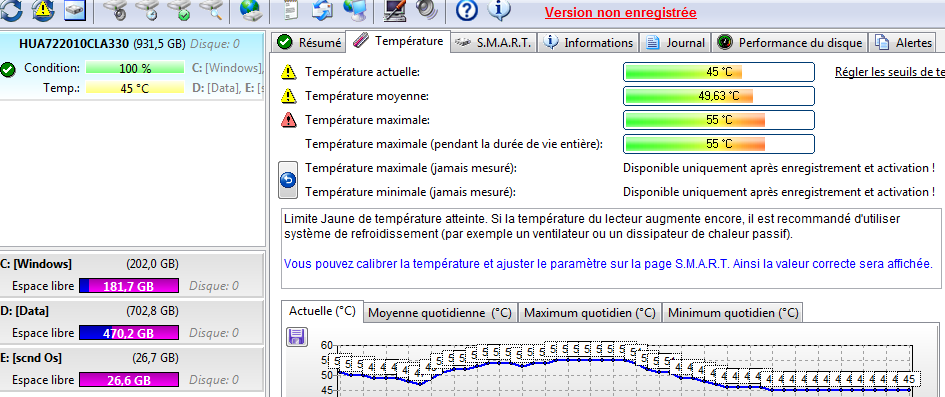
feed46fda77c88ee5997144301132825
and i hear noises when i copy files or when the antivirus start the scan !
please is this normal or should i give it back and get new one !
also, is seagate better than hitachi ?
thank's in advance

Dani AI

Generated

Quick, practical follow-up for (and anyone else reading): the Hitachi/HGST Ultrastar A7K2000 family (the HUA722010CLA330 series) is a 7,200 rpm enterprise-class drive and its spec sheet lists an ambient operating range of roughly 5°C–60°C, so a noticeably warm 7K drive can still be inside the manufacturer’s limits. That said, “within spec” isn’t the same as “perfect” — it’s worth a quick health check and some basic cooling fixes rather than assuming immediate failure; ’s airflow advice is the right starting point. (disctech.com)

Check S.M.A.R.T. and run self-tests before deciding. On Linux use smartctl; on Windows use CrystalDiskInfo or a vendor diagnostic so you see temperature history plus key attributes (Reallocated Sector Count, Current Pending Sector, Offline Uncorrectable) and the self-test log. Example smartctl workflow:

# full SMART report
smartctl -a /dev/sdX

# short self-test (minutes)
smartctl -t short /dev/sdX

# long/extended self-test (hours)
smartctl -t long /dev/sdX

# read the self-test log when done
smartctl -l selftest /dev/sdX

If those attributes increase or self-tests report read failures, plan to back up and replace the drive. (mankier.com)

About the noise: normal seek/head movement can be audible during heavy I/O (antivirus scans, large copies). Repetitive, rhythmic clicking or grinding is a different, bad sign and often indicates failing heads or electronics — that warrants immediate backup and a diagnostic/return. Some utilities (SeaTools, Hitachi’s Drive Fitness Test) include acoustic or extended tests you can run from a bootable ISO. (seagate.com)

Practical fixes before RMA: improve directed airflow across the drive (front bay fan or a small 40–80mm fan), avoid stacking or insulating the drive, clear dust, confirm SATA/power cables are seated, and run the long SMART/DFT tests. If diagnostics fail, RMA — otherwise monitor SMART (or run CrystalDiskInfo to get alerts) and keep good backups.

Recommended Answers

All 4 Replies

It depends upon the drive. Some manufacturers' drives run hotter than others. On my system, my 2TB WD green drives run about 10C cooler than my 320GB Seagate system drive. They are all healthy, at least according to the SMART interface data that I monitor. That said, I have had Seagate 500GB-2TB drives that ran too hot and failed sooner than they should have. Fortunately, most were under warranty, so I only had to pay for shipping in a couple of cases. The replacements are still running hot, so I have decided to use 7200rpm WD drives for now. They have been much more reliable, have fewer bad sectors, and don't overheat.

As for noises when you copy files, that is probably the head positioning drivers. They do make noise to some extent - which is why I usually stream some music when I am running my system (like right now)... :-)

FWIW, Hitachi has a good reputation, and as a disclaimer, I used to consult with Seagate. I still prefer Western Digital drives.

Yes wd drives are more reliable, unfortunally i cant found the 1tb (black version) in my city (casablanca, morocco) . Anyway i sold that pieace
shit (hitachi) to a friend of mine that is going to run it on a dvr , i also lost an external 60 gb hitachi drive this week . Looks like im going to move to seagate drives again ...
Thank you Rubberman .

Well, if the Hitachi is otherwise working ok, I wouldn't worry too much about the current temperature. Just make sure the drive gets enough cool air flow over it - escpecially the controller circuitry on the drive.

exactly

Be a part of the DaniWeb community

We're a friendly, industry-focused community of developers, IT pros, digital marketers, and technology enthusiasts meeting, networking, learning, and sharing knowledge.