I am looking for a solution to my new hard drive.

I have recently bought a Maxtor ATA/100 500GB Hard drive.

I followed the instructions on physicaly installing it perfectly.


My master boot drive is a SATA(Serial ATA) and my new Maxtor is an ATA/EIDE. I have installed it correctly, pluging in the drive to the slave conector on a new strip that came with the drive(connecting the drive to the motherboard). My original SATA hard drive does not have a connector for this strip so it is connected by a small blue wire(to a different spot on the hard drive).

I assumed it was ok since it connected alright. But now when I go into BIOS to setup the hard drive it isnt in the list of available hard drives.
It only shows my master. I cannot find the Auto Detect option in BIOS that the instructions tell me to use either.

When I boot up into Windows XP and use add new hardware, and use the instilation cd that came with the hard drive it does not help detect it at all, and it tells me I only have one HD connected.

Can anyone help me with this.

My system Specs. are:
Dell Dimension 8300
Windows XP Home Edition
Dual Internal Processors (2.8GHz EACH)
Nvidia Gforce FX 8600 GT 526MB
1GB Ram

Thanks

Dani AI

Generated

Brief recap and what to take away: ’s drive ended up being detected after changing the IDE jumper configuration, and ’s suggestion to try cable-select was a reasonable troubleshooting step. Mixed SATA/IDE systems often confuse people because SATA is a separate, point-to-point channel while IDE devices share a single ribbon cable and depend on jumpers and cable wiring to present themselves to the BIOS.

Why this happens (clear, practical reasons): cable-select only works if the ribbon cable and both drives support the CS wiring; some factory or aftermarket cables omit or mis-wire the middle connector. An IDE device that isn’t powered or that has the ribbon oriented incorrectly (pin 1 mismatch) will be invisible to BIOS. Older BIOSes can also behave oddly with very large IDE drives or nonstandard combinations of devices.

Quick, practical checklist to use before assuming the drive is bad:

  • Confirm power: swap the Molex/SATA power connector with a known-good one so the drive definitely has power.
  • Inspect cable orientation: make sure the red stripe (pin 1) lines up with the pin 1 end on both the drive and the motherboard.
  • Try the drive alone on the IDE cable (remove other IDE devices), and test it in the cable end and middle positions.
  • Swap the ribbon cable or use a different IDE channel if available.
  • If still not detected, test the drive in another PC or with a USB-to-IDE adapter to rule out a dead drive.
  • Check BIOS settings: ensure the onboard IDE controller is enabled and boot order is correct; update the BIOS only as a last resort if the board predates large-drive support.
  • After BIOS sees the drive, initialize/partition it in Windows Disk Management before use.

Final notes: having a SATA boot drive and an IDE data drive is fine because SATA uses its own port. When a simple jumper change fixed it for , that was the quickest, lowest-risk solution; the above steps help when the jumper change alone doesn’t do the trick.

Recommended Answers

All 9 Replies

Jumper or set your new drive in cable select settings. Don't use master or slave configuration.

My original Hard drive has a cable coming from the jumper pins(Using them all) and my new hard drive(which will be extra storage) doesnt have anything coming from the jumper pins, but instead it uses an ATA cable...

So my new drive has jumpers and a cable, my old only has jumpers(with a cable coming from them)

I will upload pics and show you..

I have looked all over the place for answers.

I will take apart my comp again and take some pics, then show you.

Be back soon.. I hope..

Slave drive, the new extra storage 500GB

[IMG]http://i184.photobucket.com/albums/x309/Saphirefenix/IMG_0055.jpg[/IMG]

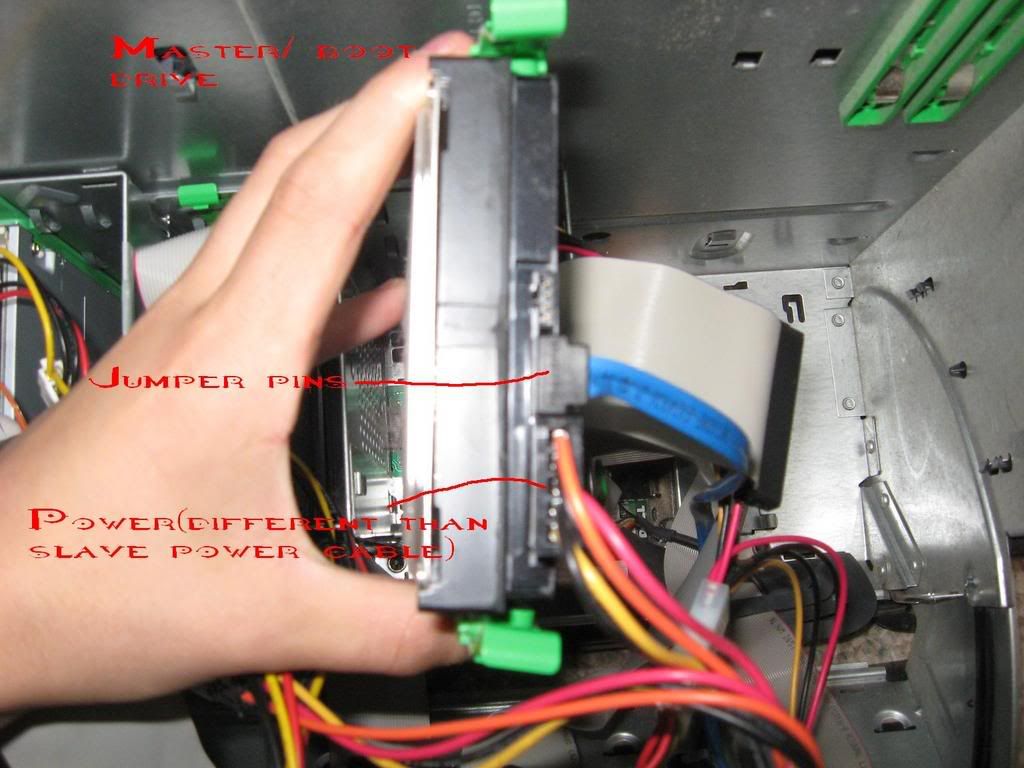
Old master boot drive, 120 gb

[IMG]http://i184.photobucket.com/albums/x309/Saphirefenix/IMG_0056.jpg[/IMG]

Both together, you can see they both have different power cords and different cables.

[IMG]http://i184.photobucket.com/albums/x309/Saphirefenix/IMG_0057.jpg[/IMG]

This is where the Master, boot drive plugs into the motherboard

[IMG]http://i184.photobucket.com/albums/x309/Saphirefenix/IMG_0058.jpg[/IMG]

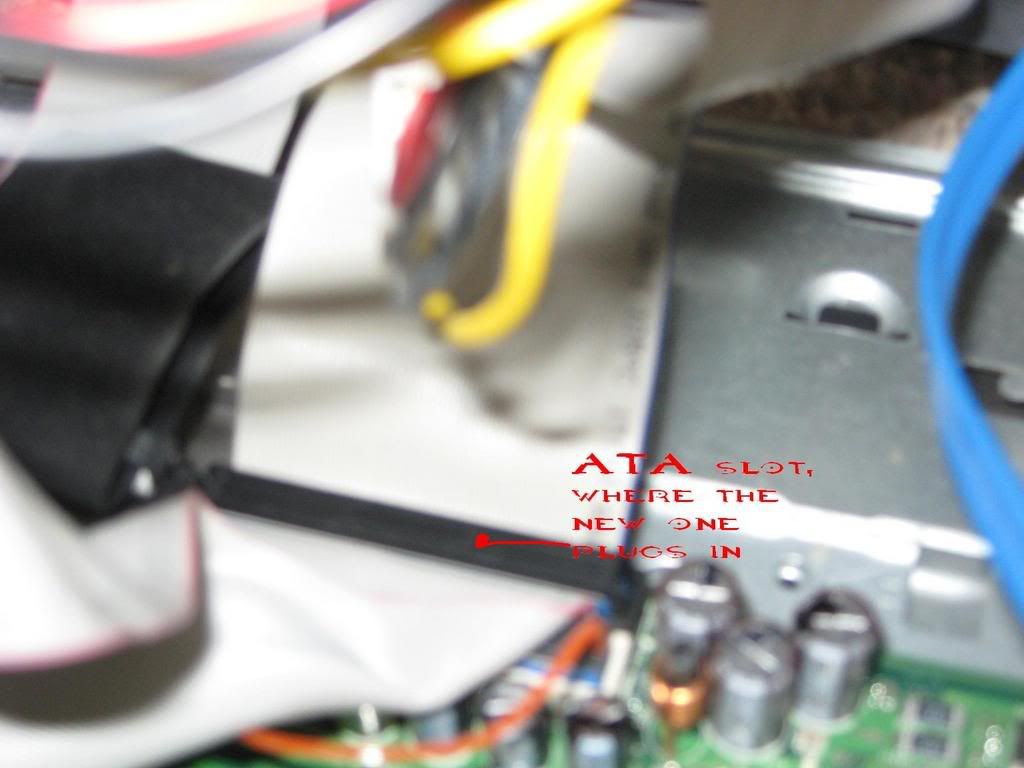
this is where the new storage drive plugs into on the motherboard

[IMG]http://i184.photobucket.com/albums/x309/Saphirefenix/IMG_0059.jpg[/IMG]


As you can see the new ATA cable cant be conected to the boot drive but it can be connected to the new one.

And bios will not detect the new hard drive either..

Okay, what I have seen in your setup were the following:

1. Your sata drive is your boot drive where the winxp is installed.
2. Your 120GB (attached to the last connector of the cable) and 500GB (attached to the middle connector of the cable) are attached together in the same cable with blue stripe.
3. Your cd/dvd roms are also attached in the same cable with red stripe.

Correct me if I'm wrong.

Would your sata along with 120gb hard drives also be recognized by the bios and windows?

Have you messed up the jumper settings of your old 120GB hard disk before? Was it the original factory jumper settings?

Note: Jot it down the jumper position of your old 120GB hard disk and also compare it to the attached info.

Since they are both in the same cable, don't disturb them anymore. Just check and set your jumper settings on both ide drives (120GB and 500GB) in “Cable Select”.

Look at the back of your hard disks and compare the style of the position of the pins jumper in the attached info. Set both at "Cable Select" position.

For your reference, see and compare the attached maxtor jumper settings info below.

2.Only my SATA is connected to the blue cable, the other is connected to the grey "tape".

3. They are connected to a different grey cable than the hard drives

My Boot drive has the blue cable connected to the Jumper pins.
My new Hard drive has factory jumper settings

My Sata is the 120 GB, my new one is the 500gb, it is an IDE/ATA and is not IN ANY WAY connected to the boot drive.

Bios detects the boot drive, but not the new one.


I cannot set them to Cable select becuase my boot drive doesnt have jumpers, my new one does...

So you have 2 hard disk drives, one 120GB sata and 500GB ide hard disk. How about your cd/dvd roms?

Okay, don't bother your sata anymore. Just concentrate on your new hard disk, set it as cable select and mean while connect it to the last ide connector. If it doesn't work, try it in the middle connector.

Or still doesn't work. If there is one cd/dvd rom connected in the secondary ide controller (cable with red stripe), try to connect your new hard drive there in the middle connector.

Go into bios and look for them especially in the boot sequence.

I do have one cd rom drive, but I cannot connect the new hard drive to it because the cable wont reach the hard drive bay.

I have tried both connectors on the IDE cable, and the jumper is already set to cable select, but the drive still wont apear in bios.

Nevermind everyone, I just had to set the jumpers on the new drive to master.

I now have one Master SATA, and one master IDE drive.
The sata is still my boot drive though, so it all worked out fine.

Okay. that's good. All is well.

Be a part of the DaniWeb community

We're a friendly, industry-focused community of developers, IT pros, digital marketers, and technology enthusiasts meeting, networking, learning, and sharing knowledge.