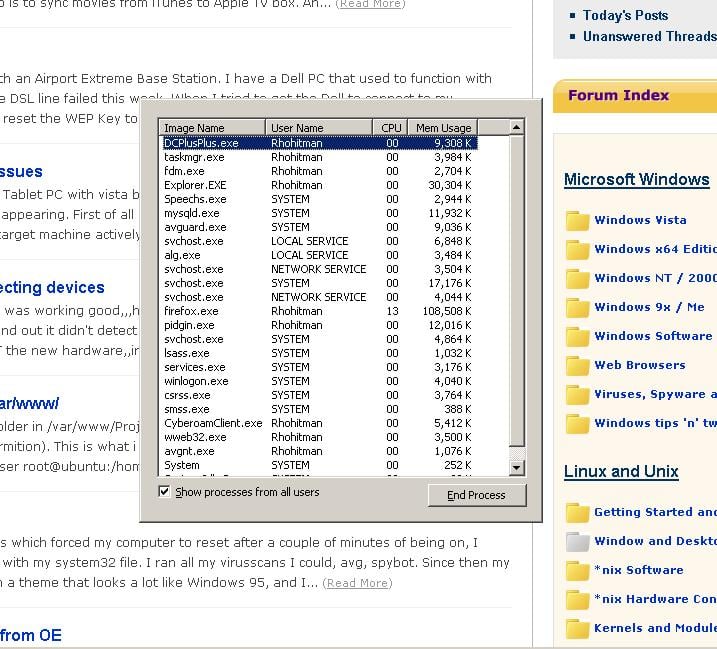
hey my task manger look like something else... without the menu...

Just cheak the picture...

Does any one has the clue..

Dani AI

Generated

The screenshot shows Task Manager in its compact/minimal view (menus hidden). is correct — that view is a built‑in toggle rather than a separate program state. It’s commonly triggered by a double‑click in the space above the tabs and can be returned to normal the same way.

If the double‑click toggle isn’t convenient or doesn’t respond, close Task Manager and open a fresh instance:

  • Close the window (Alt+F4).
  • Open Task Manager directly with Ctrl+Shift+Esc.
  • Or press Ctrl+Alt+Del and choose Task Manager, or Start -> Run and enter taskmgr then Enter.

If a newly opened Task Manager still appears broken or the menu is permanently missing, look for other causes before assuming a bug: check for group policy/registry restrictions (the common registry value is HKCU\Software\Microsoft\Windows\CurrentVersion\Policies\System\DisableTaskMgr), test in Safe Mode to see if third‑party software is interfering, and run an updated antivirus scan if other strange behavior is present. These checks will distinguish an accidental compact toggle from a persistent configuration or security issue.

Just double click on the top border of the task manager window.

You're in 'tiny footprint mode'; you got there by double clicking in the space above the tabs.

Be a part of the DaniWeb community

We're a friendly, industry-focused community of developers, IT pros, digital marketers, and technology enthusiasts meeting, networking, learning, and sharing knowledge.