Hi,

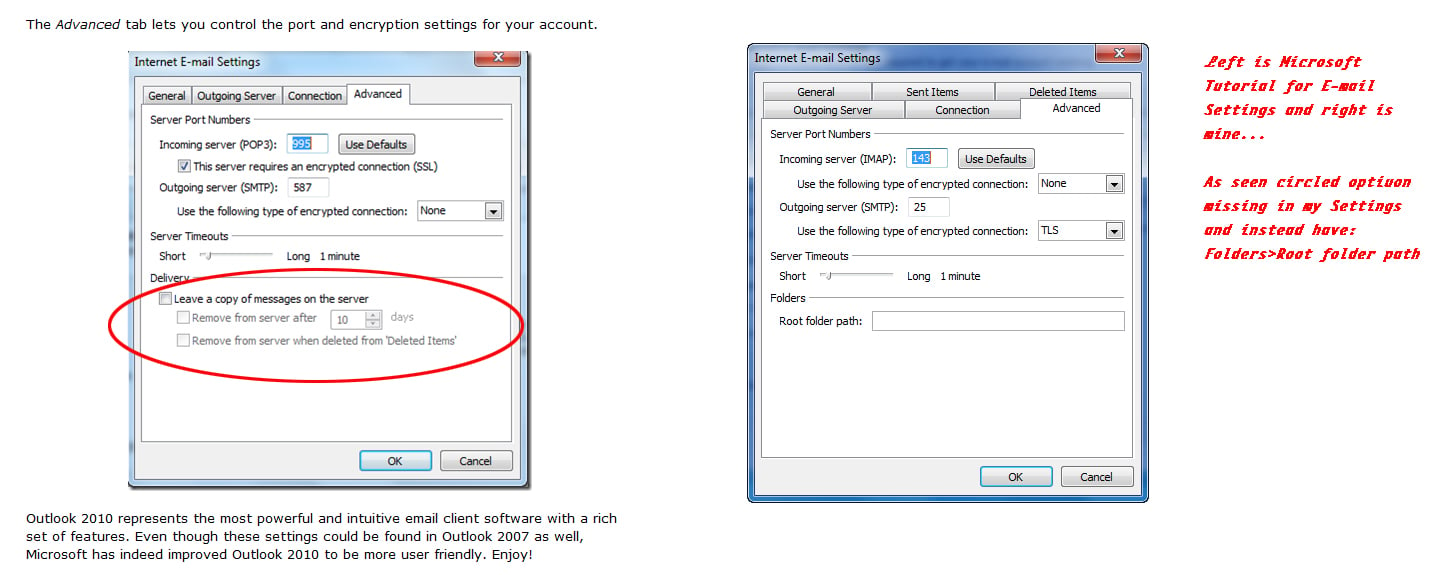
Have problem with Microsoft Outlook 2010. I haven't see option "Leave copy of message on the Server" which I have to uncheck because my provider keepeng all mails I receiving and sending, even deleting and often come with messages that my inbox excited quota. That forcing me to login on webmail quite often to purge all message. Visiting many forums couldn't find solution, so I posting here and hope someone will help. I attaching photo of tutorial by Microsoft and options from my computer. Difference in bottom part under Advance tab is obvious.
Thank everyone for help.
Dani AI

Generated

Most likely cause: the checkbox you expect only exists for POP3 accounts. If Outlook was set up as IMAP, Exchange or an Exchange‑like service (including many ISP "webmail" providers), Outlook will mirror the server and there is no “Leave a copy on the server” option to toggle.

Quick checks and safe next steps:

  • Confirm account type: File -> Account Settings -> Account Settings (Email tab). The Type column shows POP3, IMAP or Exchange.
  • If the account is POP3 and you still cannot see the setting, select the account -> Change -> More Settings -> Advanced and look for the “Leave a copy of messages on the server / Remove from server after X days” options.
  • If the account is IMAP or Exchange, either change server behavior or move mail off the server after delivery. You can:
    • Create a local Outlook Data File (File -> Account Settings -> Data Files -> Add...) and use a rule to move incoming mail to a folder in that PST so messages no longer count against the server mailbox.
    • Export/archive older mail to a PST (File -> Open -> Import -> Export to a file -> Outlook Data File (.pst)) and then delete the server copies.
    • Use IMAP purge/expunge after deleting messages (Folder / Purge for IMAP) to force server removal.

Cautions and troubleshooting:

  • Back up your current data file before making account changes or switching to POP3 to avoid accidental data loss.
  • Switching from IMAP/Exchange to POP3 can create duplicates or leave some items on the server unless handled carefully.
  • Some providers keep copies regardless of client settings; if server copies persist after client-side removal, ask the provider about server retention, POP/IMAP settings or mailbox quotas.

This should help narrow whether the missing control is an Outlook configuration issue or a server-side policy. , confirming the account Type will point to the next concrete step. , feel free to add provider‑specific tips if known.

It's amazing that nobody have answer to my post from 22 ago? Can anyone help or have to looks on another forums. Please!

I call shotgun!

Be a part of the DaniWeb community

We're a friendly, industry-focused community of developers, IT pros, digital marketers, and technology enthusiasts meeting, networking, learning, and sharing knowledge.