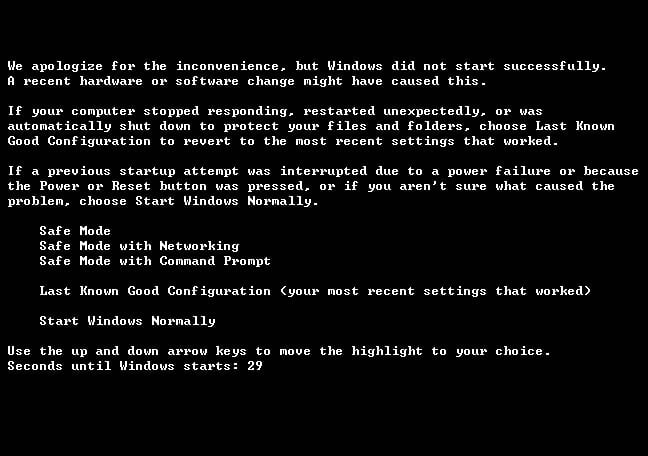
i recently did a windows xp update and after it restarts and gives me the boot menus options to run safe mode, safe mode w/ networking, safe mode w/ command prompt, last known configuartion, and normally start. i tried to do each one but it gives me the same thing of menus. anybody know how to fix it without losing data on my hard rive?

Dani AI

Generated

On a Gateway W730-K8X reports that after a Windows XP update the machine only reaches the Advanced Boot Options menu and every choice returns to that same menu; Safe Mode and Last Known Good have already been tried. Priority is to capture what is failing and preserve user data before attempting any reparative write operations.

From the Advanced Boot Options select "Disable automatic restart on system failure" (so a stop error, if present, will stay on screen). Record any STOP code or driver filename shown — that code points to whether the problem is a driver, filesystem corruption, or hardware fault. Next boot into BIOS/Setup (setup key varies by model; common keys are F2, F10, Esc or Del) and confirm the internal hard drive is detected and first in the boot order. Remove all USB devices and media while testing.

If the OS still will not start, secure the files before attempting fixes that write to the disk. Two low-risk choices: boot a Linux live USB (any current live distro) and use its file manager to copy the NTFS user folders to an external USB drive, or remove the laptop drive and attach it to another PC with a SATA-USB adapter to copy data. Both approaches avoid changing the laptop disk and make later repairs safer.

Once data is backed up, follow repair paths. As suggested, installation-media-based repairs or a repair install can restore missing/corrupt boot components; if SMART or BIOS diagnostics show drive errors, replace the drive and restore data from the backup. Avoid full reinstall or repartitioning until backups are verified.

Recommended Answers

All 3 Replies

If you have an XP CD you could try the Recovery console-Fixboot or Fixmbr may help.
Otherwise you could try a repair install.
http://support.microsoft.com/kb/314058

if you go to this link you will see that i only get this screen.

http://z.

I understand. See my previous post.

Be a part of the DaniWeb community

We're a friendly, industry-focused community of developers, IT pros, digital marketers, and technology enthusiasts meeting, networking, learning, and sharing knowledge.