hello.
I was searching on the internet for some help and came across this site. It looked promising, so we'll see if you can help.

In our home, we have a network that was set up by our daughter(who is in Italy and can't help with the problem, hence me finding this site) We have 3 computers networked to the home computer. Let's call our network "Bear". All is well with 2 of the computers on the network(both pc) but the third computer is a laptop and has stopped connecting to the house network. It picks up surrounding networks from neighbors(secure and non secure) but it no longer picks up the Bear network. I've tried refreshing connections, repairing the connection and checking to see if it is registered on our perferred network(it is). Im not sure why it won't come up any longer.
For awhile, we had two ways of connecting to the network. Through a belkin usb network device and then through an internal dellcard. There were problems with having both of them up, so I followed the advice of deactiving the belkin and strictly using the dellcard(the belkin was installed when a friend had to borrow the dell card). The belkin no longer works, although the program is there. I'm running on a windows xp system and use their firewall.


I know this is probably confusing but perhaps someone has an idea of what I can do. Basically, the laptop is connecting to another network nearby(although it doesnt show as many as the other house computers show) but won't connect to the house network.
Dani AI

Generated

A short expert summary: reports the laptop sees other household and neighbor SSIDs but not the home network "Bear". Two radios were present (internal Dell and a Belkin USB); the Belkin was disabled but its software still exists and the Dell utility showed Bear but would not join. 's points about a hidden SSID or MAC filtering are plausible. The checklist below focuses on complementary diagnostics that often find the real cause.

Hardware and driver checks (first): confirm the laptop radio is actually enabled (many Dells have a physical switch or an Fn key). Ensure only the intended adapter is active in Device Manager. Completely remove the unused adapter's driver and any leftover connection utility so it cannot interfere. Reinstall or update the Dell wireless driver/utility to the correct version for the laptop/XP build. If a third‑party manager is running, switch briefly to Windows' built‑in manager, or vice versa, to rule out a management conflict.

Network and IP checks (next): a command prompt will show whether the adapter got a valid lease. Run:

ipconfig /all
ipconfig /release
ipconfig /renew

An address beginning 169.254.x.x means no DHCP lease. If the SSID appears but joining fails, a saved profile or encryption mismatch is common—remove the saved Bear profile and recreate it using the exact SSID spelling and the correct security type/key. If remote router access is not possible, a temporary wired connection to the router allows inspection of wireless settings directly.

Other useful items: reboot the router and laptop, confirm router wireless mode (b/g compatibility), test the Belkin on a different AP to isolate hardware, and try the Dell card on another network if feasible. Avoid leaving wireless security disabled except briefly for testing. If all checks fail and the internal card still will not join while other PCs do, hardware failure or firmware incompatibility is likely and replacing the adapter or cleanly reinstalling the Belkin software are reasonable next steps.

Recommended Answers

All 5 Replies

It may be two things. Either:

1) SSID

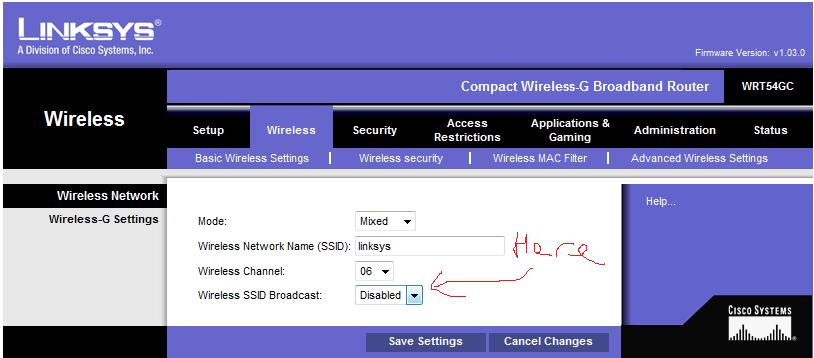
Wireless networks have a unique name called an SSID. It is good security practice to hide this once you have set up the network as it means it wont show up in the network list.

Unhide the SSID in your wireless router config and then connect the laptop to it. Once it is connected sucessfully then hide the SSID again

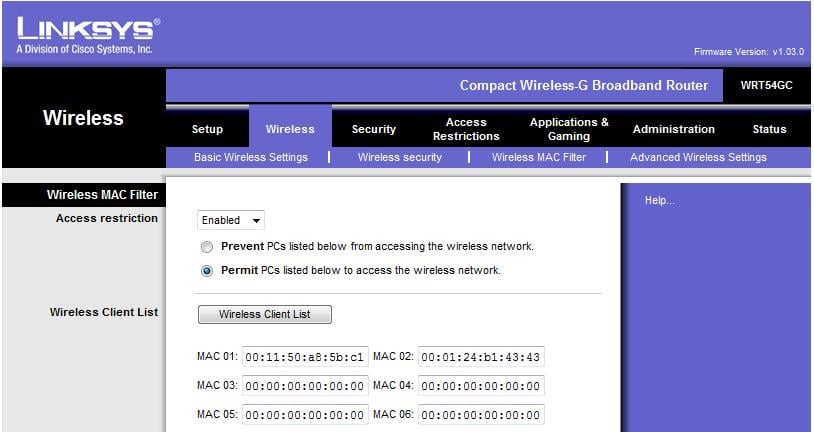
2) MAC

Most people secure there network by using a MAC adress filter. A MAC adress is unique to a single network card. Therefore, If you are using a different card you may not able to connect to the network. Check the MAC adress options in your wireless routers config and add the adress of your new card to it (to find out a cards MAC adress in XP right clickm on the connection -> support tab -> details button)

Where do I "Unhide the SSID in your wireless router config and then connect the laptop to it." at?

to access the configuration screen for your router you go to its I.P

Yours will look different but here are screenshots of what I am talking about (from my router)

Guess I'm computer illerate and couldnt find the program. I used the program through the dell wireless card and the wlan network showed with a strong signal, but wouldnt connect. I think I'm just not up on my computer talk.

Sounds like a MAC or Key issue. Did it ask you for a password? If so did you enter it right?

To check the MAC settings and Keys you need to access the config of your router. You do this by opening up Internet Explorer and typing in the IP adress of the router (usually )

Be a part of the DaniWeb community

We're a friendly, industry-focused community of developers, IT pros, digital marketers, and technology enthusiasts meeting, networking, learning, and sharing knowledge.