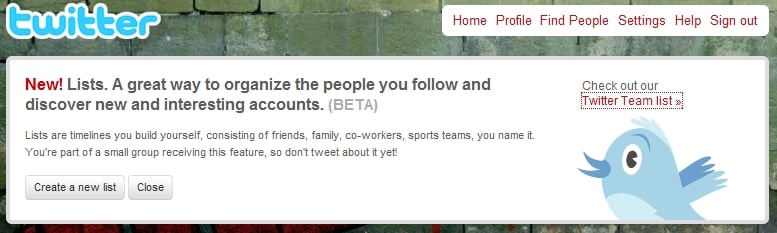
It looks like Twitter Lists have arrived - Hallelujah! I just signed in to my account and got the following:

"New! Lists. A great way to organize the people you follow and discover new and interesting accounts. (BETA)

Lists are timelines you build yourself, consisting of friends, family, co-workers, sports teams, you name it. You're part of a small group receiving this feature, so don't tweet about it yet!"

Off to play now...
Dani AI

Generated

Good call by — lists change how you scan Twitter. Practical points to take away that build on the early reactions here:

Create and manage lists as focused timelines separate from your main follow stream. Use public lists to share curated collections and private lists to monitor accounts without broadcasting that you’re watching them. As observed, you can add accounts you don’t follow, which is handy for topic monitoring or competitor scans.

How to use lists (quick, practical steps):

  • Open Lists from your profile or menu and choose Create new list.
  • Give it a clear name and short description; mark it Private if you want it hidden.
  • Add members by searching or from someone’s profile using the Add to list option.
  • Open the list to view its timeline or subscribe to other people’s public lists to discover accounts.

Privacy and etiquette considerations: ’s “digital surveillance” point is important. Public lists and their membership are discoverable, so avoid inflammatory or embarrassing names. Use private lists for research or internal tracking. Keep lists focused and prune inactive accounts so the timeline stays useful. For precise details about what is visible to others or how notifications are handled, check Twitter’s current help documentation, since rollout behavior can change.

Curation tips: if you publish public lists, include a short description, update them regularly, and consider making separate lists for narrow topics rather than one huge list. Early testers like saw features roll out gradually — expect slightly different behavior as Twitter updates the feature set.

Recommended Answers

All 4 Replies

I love how you followed their instructions not to talk about it since it's not officially out yet :)

well technically i didn't tweet about it. ;)

Loving the lists so far. I noticed that you can add someone to a list but you don't necessarily have to follow them.

Thanks Jay for bringing this up. The fascinating aspect of it is that it is a form of digital surveillance rather than pledging "I am a Follower" since you never know who will access your account and make assumptions from it.

Be a part of the DaniWeb community

We're a friendly, industry-focused community of developers, IT pros, digital marketers, and technology enthusiasts meeting, networking, learning, and sharing knowledge.