Menu DaniWeb
Log In Sign Up
  • Read
  • Contribute
  • Meet
  1. Forums
  2. Hardware and Software
  3. Hardware
  4. Mobile and Wearables
  5. Product Reviews
  6. Product Review

Two into one does go: the Sandberg iPad Camera Link

13 Years Ago happygeek 2 Tallied Votes 385 Views Share
Manufacturer
Sandberg
URL Screenshot of http://www.s…Plus-2-Plus-3 http://www.sandberg.it/product/Camera-Link-for-iPad-1-Plus-2-Plus-3
Price
£16.99
Pros
All-in-one camera connector, cheaper than Apple alternative
Cons
Bigger than Apple alternative, doesn't work with SDHC cards
Summary
If you don't use SDHC cards and you do want the flexibility of a multi-purpose all-in-one connector then the Sandberg Camera Link makes for a good value option when compared to the official Apple Camera Connector Kit.
Rating

e776593293ae5ac1272905a2e76cd945

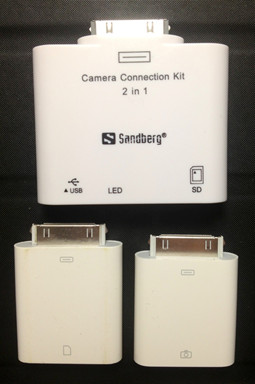
This is the latest upgrade to the Camera Link product from Sandberg, making it compatible with the iPad 3 and iPad 4/Mini; but not at the same time. To get the iPad 4 compatibility rather obviously requires the Lightning connector equipped version, which costs the same as the iPad 3 version. Whichever you need, the premise is the same: upload your photos to your iPad directly from your camera. Insert the SD card into the device, make sure it is toggled to the SD setting, and your iPad will display your images and enable you to import them. If your camera uses a different memory card format, no problem as the Sandberg link lets you connect to a card reader via USB and access your images that way. Finally, that media reading only USB connector (USB A female port) can be used to link directly with your camera itself with a standard USB cable. There are some caveats, namely: only .jpg images are supported and they must be stored in a folder named DCIM.

There's not a lot to say other than 'it worked OK' on the image display front, but there is the small matter of how it compares to the competition. The official Apple Camera Connector Kit may be a lot more expensive than the Sandberg Camera Link at £25, but it's parts are also a lot smaller. In fact, the Apple devices are roughly half the size of the Sandberg one in every single dimension. Dropping them on the postal scales reveals the Sandberg at 18g compared to the Apple at a combined weight of 21g. The extra size of the Sandberg device can, of course, be explained by the fact that it enables you to connect your camera to your iPad directly by way of a USB cable (not supplied) as well as by inserting a SD card. The official Apple way of doing this requires two separate devices, one for the USB and one for the SD card. Whichever way you stack it (literally) the two Apple connectors still take up less bag or pocket room than the Sandberg, but that's clutching at straws a little as neither are exactly trouser breakers!

The real difference, during my testing of the Sandberg Camera Link, was a bit harder to shrug off: it simply didn't recognise the microSDHC card from my camera. Whereas the Apple kit is quite happy with the microSDHC slotted inside a generic adaptor, and all images from that card are automatically displayed with the option to import upon connecting to the iPad, the Sandberg wasn't. Nothing happened at all, despite the little USB/SD switch being toggled to the right position. A full-sized SD card worked as expected, as did connecting the camera directly. For me, then, the no-hassle approach of the official Apple kit wins out. It's a lot smaller (I don't need to carry both adaptors, just the SD card one) and it works with all the SD cards I've thrown at it. That alone is worth the extra money in my book. Of course, if you don't use SDHC cards and you do want the flexibility of a multi-purpose all-in-one connector then the Sandberg Camera Link makes for a good value option.

mac-hardware:ipad pc-peripheral
About the Author
Member Avatar for happygeek
happygeek 2,411 Most Valuable Poster Team Colleague Featured Poster

A freelance technology journalist for 30 years, I have been a Contributing Editor at PC Pro (one of the best selling computer magazines in the UK) for most of them. As well as currently contributing to Forbes.com, The Times and Sunday Times via Raconteur…

Dani AI

Generated 9 Months Ago

’s hands‑on is useful: the Sandberg Camera Link was an inexpensive, all‑in‑one connector that let an iPad read cards or a connected camera, but it has limits and — per Sandberg’s product page — the device is discontinued and only exposes JPEG files placed in a DCIM folder. (sandberg.it)

Why a microSDHC might not appear: card and host compatibility are the usual culprits. SD standards separate SDSC/SDHC/SDXC (SDXC typically uses exFAT), hosts expect camera-style transfer protocols (PTP or Mass Storage) and many adapters/readers only present a card correctly when the filesystem and folder layout match the camera convention. Checking the card format and the presence of a DCIM folder helps narrow this down. (sdcard.org)

Quick, practical troubleshooting (apply in order; back up data first):

  • Test the microSD in a PC or camera to confirm files are visible and in a DCIM folder; copy a JPEG into DCIM and retry.
  • Try the microSD inside a known‑good full‑size SD adapter (cheap adapters can fail electrically or mechanically).
  • Use a compact USB card reader in Sandberg’s USB A port (it exposes media via USB) to rule out the card/adapter versus the Camera Link slot. (sandberg.it)
  • If connecting the camera by USB and the iPad shows a power warning, use a powered USB hub or the Lightning/USB‑3 camera adapter with its power input — many import failures are simply insufficient power. (support-en.sandisk.com)

If saving time is the priority, carry a small, good quality SD card plus a reliable reader (or use Apple’s camera adapters on Lightning/USB‑C iPads) rather than relying on a single low‑cost multi‑tool. Always back up before reformatting a card, and test your workflow at home before relying on it in the field. (support.apple.com)

Be the first to reply
Be a part of the DaniWeb community

We're a friendly, industry-focused community of developers, IT pros, digital marketers, and technology enthusiasts meeting, networking, learning, and sharing knowledge.

Sign Up — It's Free!
Recommended Topics
  • Member Avatar Introducing the truly amazing fold-flat iPhone charger 4
  • Member Avatar Mac Book Pro vrs Dell v305 printer 2
  • Member Avatar The confusing Nexus One Google name game 1
  • Member Avatar Hands-on with the ultimate iPad keyboard case 6
  • Member Avatar Dell Printer driver for Mac OSX 20
  • Member Avatar How to print from your iPad or iPhone to a non-AirPrint printer 5
  • Member Avatar 1 speaker not working 3
  • Member Avatar EcoStrip 2.0 - Energy Saving Power Strip 2
  • Member Avatar iPod Touch and viruses 3
  • Member Avatar Kensington gets straight to the point with the 3-in-1 Presentair 0
  • Member Avatar Time to Reject Content App Silos 0
  • Member Avatar iPad and Python 1
  • Member Avatar laptop wont boot 10
  • Member Avatar iPad shopping website FAIL? 7
  • Member Avatar There is a problem with the clock on the device, please contact customer se 2
  • Member Avatar Is banned Android Samsung Galaxy Tab 10.1 better than the Apple iPad 2? 22
  • Member Avatar New battery for my android phone 7
  • Member Avatar Apple iPad Mini versus Amazon Kindle Fire 7
  • Member Avatar Is this the world's biggest iPad case? 3
  • Member Avatar The truth about the iPad in Russia revealed 3
Not what you need?

Reach out to all the awesome people in our mobile and wearables community by starting your own topic. We equally welcome both specific questions as well as open-ended discussions.

Start New Topic
Topics Feed
Reply to this Topic
Edit Preview

Share Post

Insert Code Block

  • Forums
  • Forum Index
  • Hardware & Software
  • Programming
  • Digital Media
  • Community Center
  • Recent
  • Recommended Topics
  • Newest Topics
  • Latest Topics
  • Latest Posts
  • Latest Comments
  • Top Tags
  • Tools
  • Writing
    • Start New Topic
    • Markdown Syntax
    • Newsletter Archive
  • Social
    • Top Members
    • Meet People
  • APIs
    • Connect API
    • Forum API Docs
    • Topics Feed
  • Resources
  • Community Rules
  • DaniWeb Premium
  • FAQ
  • About Us
  • Advertise
  • Contact Us
  • Legal
  • Terms of Service
  • Privacy Policy
© 2026 DaniWeb® LLC
© 2026 DaniWeb® LLC
  • FAQ
  • About Us
  • Advertise
  • Contact Us
  • Terms of Service
  • Privacy Policy