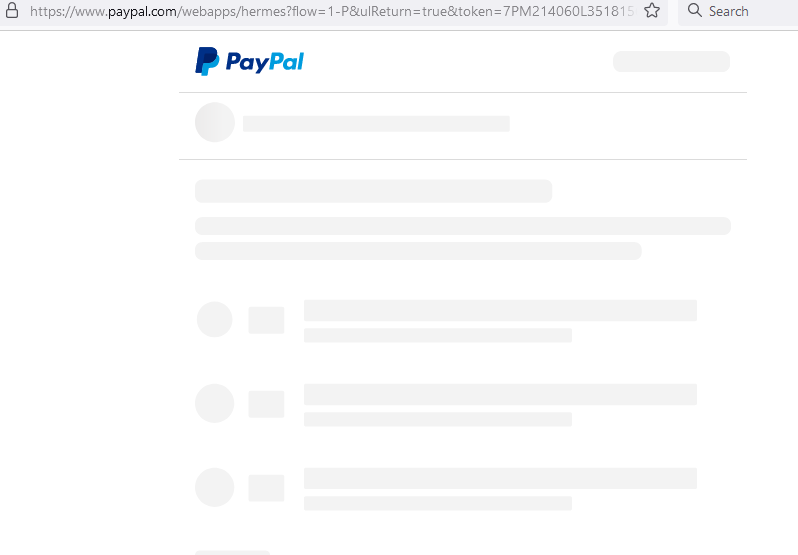
It seems this fault has been going for years, PayPal don't know why it is and say it's our fault.
I think the checkout page is hosted somewhere else?
My regular customers don't have this problem, it's the NEW customers that can't pay. I suspect PayPal save their details so checkout is faster or pre-filled?
Does anyone have this problem?
Did anyone solve it? Ta everyone, Steve

Dani AI

Generated

Short summary and what’s likely happening (quick checklist): the grey/blank overlay you and your buyers see is usually the hosted PayPal UI waiting to initialise inside a popup/iframe — returning customers who are already remembered often skip that slow step, which is why sees orders only from repeat buyers. This can be caused by slow/or-late loading of PayPal’s JS, by browser privacy (third‑party cookie / SameSite) policies, by a restrictive Content‑Security‑Policy or by ad/privacy extensions blocking PayPal resources. (developer.paypal.com)

Immediate, practical fixes to try (low effort, high payoff):

  • Migrate any legacy checkout.js/Express Checkout code to the current PayPal JavaScript SDK (Smart Buttons) if you haven’t already — it uses the popup/in-context flow and is the supported path. (developer.paypal.com)

  • Preload or pre-cache the SDK and/or render the PayPal button in a hidden container so the frame is ready when the user clicks (PayPal documents this pattern). Example (place on a pre-checkout or landing page or render hidden on cart):

    <script src="https://www.paypal.com/sdk/js?client-id=YOUR_CLIENT_ID" async></script>
    
    <div id="paypal-button-container" style="display:none"></div>
    <script>
      paypal.Buttons().render('#paypal-button-container');
      // reveal the container when cart opens
    </script>

    This matches PayPal’s performance guidance. (developer.paypal.com)

Checklist for debugging when the grey screen persists:

  • Test with extensions off / in Incognito and ask a few new customers to try again; adblockers/privacy tools often block PayPal assets. (Other merchants report fixes after disabling blockers.) ()
  • Check browser console/network for blocked requests, CSP frame policies (frame‑ancestors / X‑Frame‑Options) and SameSite cookie warnings — these will break in‑iframe flows. If third‑party cookies are blocked by the browser, the embedded flow can fail or fall back to slower redirects. (developer.mozilla.org)

UX and next steps: add a short, visible “Waiting for PayPal — please stay on this page” message and spinner while the popup/iframe starts; this reduces bounces while you fix the root cause. If problems continue after migrating to the SDK and preloading, capture a failing session (timestamp, browser, network HAR, PayPal token) and open a developer support case with PayPal — that lets their engineers trace the backend redirect/timeout. (developer.paypal.com)

Recommended Answers

All 2 Replies

The checkout page is greyed out if you are on your own Paypal checkout page. I've never seen it in any other scenario.

What is the difference between the Paypal URL that regular customers see vs the one new customers see? Can you please provide a link to the Paypal checkout URL for new customers?

Thanks for responding to my post, below is what my customers see when they go to pay, it's a grey page with lines, there's no fields to fill, no .gifs. just a PayPal insignia at the top left.
New customers don't have any details saved at PayPal (their details are held in a database?) so all they see for the first time is this grey screen, the returning customers (the only people from whom I receive orders) see the pay screen.

This was explained to me by a PayPal developer: up until approx. 12 months ago, the whole shooting match was run in Java, it was a quick flow, but since approx 12 months, there's a redirect when anyone goes to pay and then, the all important page is run in something called Node.js which is far more sercure, but because of the redirect and depending on how busy it is, there's a time lag of between 5 & 8 seconds for it to begin to load and that's where I'm losing my sales.
On my site, the Add to Cart button works fine.
At the cart page, you click on PayPal Checkout, takes you to the Login page, it works fine.
Login with my private e-mail address and then you have to wait, staring at a greyed out screen (and not many surfers will do that), not knowing if or when it will spring into action, so they go, you can't blame them.
Here's the complete url:

I had a developer who specialises in PayPal go through the workings of my PayPal account, he assured me that my setting were all fine, he said but the PayPal re-direct is out of his control, it's within the inner workings of PayPal.
So I went to the PayPal Community to see if any other merchants were having the same problem and yes, they do and they're all concerned about the lost sales and they're all disheartened at PayPal's don't care attitude. The chocolate teapot Technical Department ignore the hard stuff and close the case after a week, so it's no good asking them if there's a work around.

So I'm now going through all of my site's shopping pages, (each & every item) leaving a message by the 'Add to Cart' button At the end, please wait 5 seconds for the Payment page to load. in the hope that they will see it & read it, I am also putting a small .png of the Payment page so they might recognise it and know what to expect.

Sorry for the long, in depth reply, but I explained it fully because it might just help a PayPal buddy, Steve 63

greyed-out.png

Be a part of the DaniWeb community

We're a friendly, industry-focused community of developers, IT pros, digital marketers, and technology enthusiasts meeting, networking, learning, and sharing knowledge.