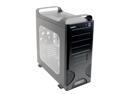
Hey, im rallying all the hardware together for when I build my new computer, check out all this hardware and tell me what you think. Also tell me if there is a mismatch of hardware, or something im missing, here goes:

Case =ASPIRE X-Infinity Black ATX Mid-Tower Case with 350W Power Supply, Model"ATXB6KLW-BK/350" -RETAIL
case

Mobo =GIGABYTE "GA-K8N Ultra-SLI" NVIDIA nForce4 SLI Chipset Motherboard For AMD Socket 939 CPU -RETAIL
Mobo

Processor =AMD Athlon 64 3500+, 512K, L2 Cache, Socket 939 Windows Compatible 64-bit Processor - Retail

Fan and Heatsink =ZALMAN CNPS7000B-AlCu Aluminum + Copper CPU Cooler for Socket 478/462/754/939/940 CPUs -RETAIL

Hard Drive =Hitachi 160GB 7200RPM SATA Hard Drive, Model HDS722516VLSA80 OEM Drive Only

Memory =Corsair Value Select (Dual Pack) 184 Pin 512MBx2 DDR PC-3200 - OEM

Thats about the size of it..I know I dont have a monitor or the keyboard or mouse, but I have all those already. Also I will buy a video card later. Thanks.

Dani AI

Generated

Solid parts selection so far — you have the right idea and a sensible upgrade path. A few practical checks will save time and money later: double-check the case clearance and mounting for any long graphics cards you might add, confirm the bundled power supply is up to the job (quality matters more than raw label wattage), and match memory to your motherboard’s recommended slots if you plan dual-channel or any overclocking. Good reminders from about needing a GPU, and from and about PSU headroom and RAM choice.

Before adding a discrete video card

  • Verify the case will physically fit the card (length and slot profile) and that the board’s expansion layout doesn’t block drive bays or coolers.
  • Check the PSU has the right auxiliary power connectors for modern cards and that its +12V capability is adequate; if you plan to add a second card later, plan the PSU for that now.
  • Measure clearance between the CPU cooler and the top memory slots; tall heatsinks or tall memory modules can conflict.

Build and first-boot checklist

  • Seat memory in the correct paired slots for dual-channel operation.
  • Mount the CPU cooler square and use fresh thermal paste.
  • Plug all motherboard power plugs and any GPU auxiliary feeds before powering on.
  • Update the BIOS only if a known fix or compatibility improvement applies, and follow the board maker’s instructions.

Post-build testing and drivers

  • Run a memory tester and a CPU stress test to validate stability before installing lots of software.
  • Install chipset and storage drivers from the motherboard vendor for best stability.
  • If you consider RAID or aggressive disk configs, remember the performance/reliability tradeoffs and keep regular backups.

With those checks you’ll avoid the common gotchas and make a smoother transition when you add the graphics card.

Recommended Answers

All 7 Replies

Member Avatar for Member #11424

That all looks good. Won't be much use without a graphics card though but you already confronted that issue.
Nice heatsink btw.

Looks good, but get a gfx card and higher watt PSU imo :p

the only thing i would do differently is the ram, that is if you are going to try to do any kindof overclocking, however, if your not than it's a great setup in my mind

Thanks, the only reason Im not buying a video card right now is because the best video card, cant think of it at the moment, costs about $400!! Could you suggest any that would be the best bang for my buck...I dont really want to play doom 3 or half life 2...More along the lines of RTS games, oh yea and I definitely want to play star wars Rogue Commander. Well thats just to give you some idea of the games I want to play. Yea, that is the only reason I wasnt going to get a bigger power supply, because I kind of dismissed the idea of a video card at the moment. ooooo yea I think the fan and heatsink look totally sweet!

6600GT hands down....under 200 bucks and if you want you can add a second one later in sli :lol:

Be a part of the DaniWeb community

We're a friendly, industry-focused community of developers, IT pros, digital marketers, and technology enthusiasts meeting, networking, learning, and sharing knowledge.