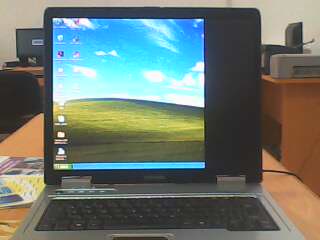
my laptop monitor displays with a thick black portion that covers about one quarter of the screen. but when i press down on the screen(top right hand corner) it displays well only to show the black portion again when i remove my hand(i.e stop applying pressure)
Note attachment :shows the monitor displaying the black portion.
i need heeellllpppp soooooooonnnn.
Thanks

Dani AI

Generated

Symptom described by — a large fixed dark area that returns when pressure is removed but clears while pressing the top‑right — points strongly to a mechanical/display-contact problem rather than a Windows driver. Echoing , the behavior (pressure restores the image) usually means the display’s flex/hinge cable, the connector/solder at the panel edge, or internal panel traces are losing contact. ’s similar report on an HP confirms this is a platform‑independent hardware fault.

A practical diagnostic and repair workflow:

  1. Test with an external monitor (VGA/HDMI). If the external image is clean while the laptop’s panel shows the quarter‑black, the GPU/motherboard is almost certainly fine and the fault is in the display assembly.
  2. While powered on, carefully press different areas around the bezel to map exactly where pressure restores the picture; note that location.
  3. Power down, remove AC and battery. If comfortable with small disassembly, remove the bezel to inspect the display cable where it passes through the hinge and its connectors on the panel and motherboard. Photograph each step for reassembly.
  4. Reseat the cable at both ends. If visible damage (kinks, frays, pinching) exists, replace the cable first — it is usually cheaper than a panel.
  5. If a new cable does not fix it, the LCD panel itself likely has cracked traces or a failing driver board and should be replaced.

Cautions and notes: disconnect power and battery before opening, avoid touching the LCD surface, and observe ESD precautions. CCFL backlights have high‑voltage inverters—do not tamper with those. If under warranty or unsure about disassembly, obtain a professional repair quote; recording the panel part number (on the sticker behind the bezel) speeds correct part ordering.

Hey,
I'm pretty sure that the problem is a broken LCD cable (or single wires of the cable). So the problem is "physical".

I'm having the exact same problem. I have an HP Pavilion. It started all of a sudden.
It's fine when the computer is loading but the right side of the monitor goes black when Windows starts.

Be a part of the DaniWeb community

We're a friendly, industry-focused community of developers, IT pros, digital marketers, and technology enthusiasts meeting, networking, learning, and sharing knowledge.