Member Avatar for Member #748501

Gateway M305CRV cpu heatsink removal problem.
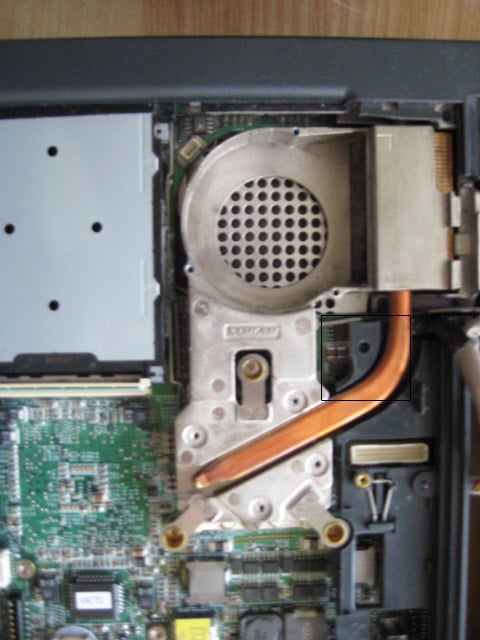
I am replacing the power jack and disassembly was was going great until I couldn't remove the fan-heat sink. The top edge of the cover is under the copper on the heat sink making removal impossible. How do I remove the fan/heatsink? It seems to be pressed in place permanently.
I need to get the fan/heatsink assembly to get the motherboard removed for replacing the power jack.

Dani AI

Generated

As discovered and documented, the heatsink/fan assembly on the Gateway M305CRV can be removed and the factory service manual is available online. The following practical notes expand on that result with model‑relevant guidance for safe removal, inspection, and reassembly.

Before disassembly, battery and AC should be removed and the work performed on a static‑safe surface. Photograph each step and keep screws and small parts in labeled containers; mixed‑length screws and captive sleeves are common and reassembly errors often come from misplacing fasteners. If the heatsink resists lifting, check for hidden fasteners or retention sleeves and use a gentle rocking motion to break the thermal bond rather than levering aggressively, which can kink heat pipes or damage the board.

After the heatsink is off, clean old thermal interface material with high‑purity isopropyl alcohol and a lint‑free wipe, inspect the fan and fins for bearing wear or clogged dust, and replace any degraded thermal pads. Apply a small, pea‑sized amount of a non‑conductive thermal compound to the CPU, seat the heatsink, and tighten the mounting fasteners evenly (cross pattern) to avoid uneven pressure. Verify the fan connector is seated and briefly power the machine to confirm fan operation and normal POST/temperatures before completing reassembly.

For long‑term usefulness, download and keep a local copy of the factory service manual and photograph critical steps during teardown. When ordering replacement parts (DC jack, fan, cable assemblies), match part numbers and physical dimensions rather than generic descriptions to ensure fit. These precautions minimize rework and protect fragile laptop components.

Member Avatar for Member #748501

Found the answer to removing the fan/heatsink.
I needed a #0 Philips screwdriver to remove the 3 silver metric screws down the bottom of the brass sleeves holding the assembly to the mother board.
Success
Hope this helps someone else.
I also found the complete service manual for the Gateway M305CRV on line but I could not save the site as a bookmark. Still looking for it.

Member Avatar for Member #748501

Here is the web site where I found the service manual for the Gateway M305CRV laptop: http://tim.id.au/laptops
If you are looking for a service manual try this site.

Be a part of the DaniWeb community

We're a friendly, industry-focused community of developers, IT pros, digital marketers, and technology enthusiasts meeting, networking, learning, and sharing knowledge.