Hey,
I am totally screwed up people. Yesterday i don't know what happened suddenly to my PC that i was surfing a random site and suddenly my screen crashed. I am on a 1024x768 resolution since 6-7 yrs. on my same monitor. I tried restarting it was working nicely until the windows start up screen comes after that it crashes again. I was into pieces. :(
I tried safe mode it was working good. Again i restarted in the normal mode but to no use. The monitor again crashed at the same stage. I thought it might have been some virus attack so i formatted by windows drive. Re-installed XP. No drivers at present. XP loaded completely. Was happy. Installed ESET NOD32. Ran a complete scan. Found 2-3 spy-wares. Then installed my VGA drivers that i use every time since 6-7 yrs. Re-started. WT* the same thing the monitor crashed again. :( :(
So uninstalled the drivers from safe mode.
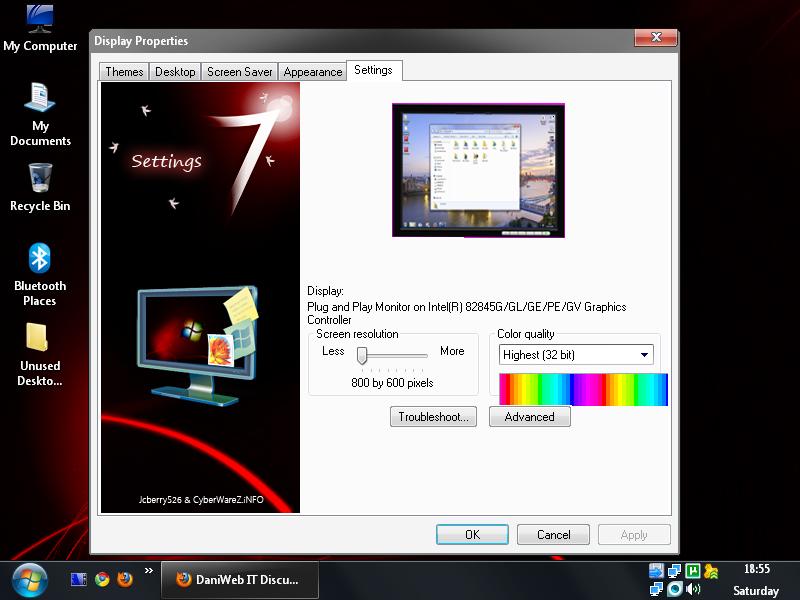
Installed VGA drivers in normal mode and setup the screen to 800x600 with 32 bit color.
It restarted perfectly except the screen resolution. So from all this i make out that my Monitor is no more supporting 1024x768 resolution.
Can anyone help me with this..?
Which all reports do i need to provide..?
At present I've attached my current resolution pic..

I'll provide all the tit-bit info anyone needs for this.. :(

Thnx guys..
Regards,
Salil
Dani AI

Generated

Quick expert note: when Windows is stable in Safe Mode but the screen fails once the full video driver and normal desktop are loaded, the problem is most often a driver/timing mismatch, a failing GPU (or its power supply), a bad signal cable/connector, or failing monitor electronics. ’s refresh-rate suggestion and ’s advice to try another monitor are exactly the right first checks — they help separate software timing issues from hardware faults.

Suggested isolation steps (in order):

  • Boot with F8 and choose "Enable VGA Mode" or Safe Mode. From there remove the vendor GPU driver so Windows uses the standard VGA driver, then reboot to normal at a low resolution/60 Hz.
  • If the crash returns only when the vendor driver is installed, try an older or alternate driver (the one from the GPU maker, not a generic pack).
  • Swap the video cable and try a different input type (VGA vs DVI/HDMI) or a different monitor. Also try the suspect monitor on another PC. These quickly identify whether the monitor, cable, or video card is at fault.
  • If available, test the PC with a different GPU (or the card in another PC).

Useful diagnostics to gather:

  • Any Windows Event Viewer entries around the time of the failure (Start -> Run -> eventvwr.msc).
  • Any small memory dump files in C:\Windows\Minidump if a BSOD occurred.
  • Exact monitor make/model, GPU model and driver version, cable type, and whether the monitor shows "No signal" or an OSD at the moment of failure.

Notes and cautions: flicker or intermittent signal loss often points to cabling or monitor power board issues (or a dying GPU). Replace the cable first. If the monitor is opening up or replacing capacitors is considered, leave that to a qualified repair shop. If driver rollbacks and hardware swaps still show the fault, replacement of the failing component (monitor or GPU) is the most likely outcome.

Recommended Answers

All 5 Replies

Try lower refresh rate at advanced - monitor option. Usually 60 Hz will do

Hey tried doing it..But still the same thing...It crashes at the log on screen..! :(
Anyways thnx for ur reply mate..! :)

can you try a different monitor...just to make sure its not the monitor...
what are your system specs...
make and model of computer

Dude i tried changing the resolution yesterday n its worked properly..Now i am on 1024x768 resolution..But my Monitor screen has started Flickering.. I dont know how come it started working back to normal.. o_O . .

Thnx for ya help mate..!! :)

your welcome...and thanks for letting us know...

Be a part of the DaniWeb community

We're a friendly, industry-focused community of developers, IT pros, digital marketers, and technology enthusiasts meeting, networking, learning, and sharing knowledge.