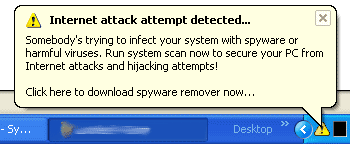
i got a virus or summit today...every 5mins or so it comes up woth a message in a red box saying your computer has been infected witha virus, and their is a new desktop quick icon in the bottom right saying virus alert... i am getting loads of spyware on my counts now and i cant find the real problem. any advice would b gr8!!!


thx

Dani AI

Generated

Short expert summary: the symptoms described by — frequent alarming red-box popups, a new “virus alert” shortcut and a flood of spyware — match classic scareware / rogue anti‑spyware behavior rather than a legitimate AV alert. ’s suggestion to run a targeted removal routine and ’s note about popup-driven scam sites point in the right direction. Evidence and removal techniques below are practical, stepwise and up‑to‑date.

Immediate triage (do these first)

  1. Isolate the infected machine from the network (unplug ethernet, turn off Wi‑Fi) to stop further downloads or data exfiltration.
  2. Do not click popups, call numbers shown, or follow site prompts — these are typically scams.
  3. From a known‑clean PC create rescue media or boot the infected PC into Safe Mode (or use the built‑in offline scan) and run on‑demand scanners such as Malwarebytes and Microsoft’s safety/offline tools.

References: guidance on scareware behavior and why popups are untrusted, plus Microsoft advice to isolate compromised devices and use offline scanners.

Cleanup and verification

  1. Run full scans (Malwarebytes, Microsoft Safety Scanner / Defender Offline). If the normal OS environment is blocked, run a bootable rescue scan from removable media.
  2. Use a startup inspection tool (Autoruns) to reveal and disable suspicious autostart entries; hide Microsoft entries first and only remove items that are clearly malicious.
  3. After confirmed cleanup, remove old System Restore points (they can reintroduce infections) and create a fresh restore point. If malware persists, back up only personal documents (scan them on a clean machine) and perform a clean OS reinstall using official installation media.

References for autorun/startup inspection, offline rescue scans and reinstall/reset options:

Notes and cautions

  • Do not pay or provide payment/remote access to sites or numbers shown by popup alerts; these are commonly fraud.
  • Scan any backup media on a clean system before restoring files.
  • If manual removal is not successful or the system shows persistent signs of compromise, a full reinstall or trusted professional remediation is the safest option.

(Advice above builds on the suggestions from and while recommending safer, up‑to‑date tools and procedures.)

Recommended Answers

All 2 Replies

Hi,

Please download (by S!Ri)
Extract the content (a folder named SmitfraudFix) to your Desktop.

Open the SmitfraudFix folder and double-click smitfraudfix.cmd
Select option #1 - Search by typing 1 and press "Enter"; a text file will appear, which lists infected files (if present).
Please copy/paste the content of that report into your next reply.

Note: process.exe is detected by some antivirus programs (AntiVir, Dr.Web, Kaspersky) as a "RiskTool"; it is not a virus, but a program used to stop system processes. Antivirus programs cannot distinguish between "good" and "malicious" use of such programs, therefore they may alert the user.

Be a part of the DaniWeb community

We're a friendly, industry-focused community of developers, IT pros, digital marketers, and technology enthusiasts meeting, networking, learning, and sharing knowledge.