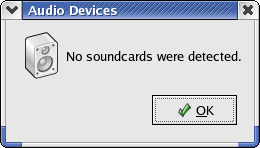
Hi. I have recently switched over from Windows to Linux (redhat). Whenever I select "System Settings > Soundcard Detection" it comes up with the below dialog. My card worked in Windows 98. How do I find the driver for my card? I don't know what kind it is.

Dani AI

Generated

As observed, a driver must exist for the card; as noted, drivers appear as kernel modules. A concise, repeatable diagnostic checklist helps turn the “unknown card” problem into the exact vendor/device information needed to find a driver.

Useful commands to collect identification and kernel messages:

lspci -nn | grep -i audio
lsusb
cat /proc/asound/cards
aplay -l
dmesg | egrep -i 'snd|hda|audio|ALSA'
lsmod | grep snd

The PCI output includes a vendor:device pair (eg. [8086:2668]); use that exact hex pair to look up supported drivers in the PCI ID repository (pci-ids.ucw.cz) or the community hardware database (linux-hardware.org). If cat /proc/asound/cards or aplay -l shows the card, ALSA already recognizes it — mixer levels or output selection (check with alsamixer) are common causes of “no sound.”

If the kernel log (dmesg) shows probe failures, missing firmware, or no device entry, the matching kernel module may be absent or disabled in the running kernel. The ALSA project and the kernel sound documentation are primary references for driver availability and installation: ALSA project and kernel sound docs.

Common module names to look for include snd_hda_intel, snd_intel8x0, snd_emu10k1, snd_ice1712, snd_ens1371 and usb-audio for USB devices. If a matching module is not available, distribution packages for ALSA or the ALSA sources provide drivers; alternatively a kernel rebuild with the appropriate sound options enabled will be required. Some very old or proprietary Windows-only cards may lack Linux drivers — the PCI ID and ALSA matrices indicate support status.

Recommended Answers

All 2 Replies

this usually happens when linux can't find any drivers for that card.
find out what the card is then google it to see if you can find any drivers.

Find out the exact model of your soundcard (it's usually a Creative). Then you have to find a driver. Linux works with modules. You load modules, and then if the module is the right one, the hardware will be detected. So, you need to find the name of module to load.

You can see if Linux will recognize it by typing "modprobe " (replace with the one you are testing). Once you know it works, edit the file /etc/modules.conf so that the module is in the list.

Be a part of the DaniWeb community

We're a friendly, industry-focused community of developers, IT pros, digital marketers, and technology enthusiasts meeting, networking, learning, and sharing knowledge.