If you’re one of the outstanding users yet to make the pilgrimage to Gmail from your dilapidated Hotmail account, you may have been one of the lucky ones (like myself this morning) rewarded recently with a handful of e-sunshine for your continued loyalty.
The once affluent e-mail service received a facelift back in June that would make even Heidi Montag proud. Windows Live Hotmail Wave 4, the latest generation of its e-mail client, was introduced to address issues users had with lacking file and media sharing privileges, but less than 2% of its users actually received the new services before the end of the month. Enter July, which has seen a drastic turnaround in rollouts, passing the 100 million user mark yesterday. Currently, 28% of the 360 million global Hotmail subscribers are able to utilize the new features, with a gradual 100% completion being estimated before the year’s end.
For those of you with accounts already in the green, there won’t be much new info for you to graze about here. For those of you yet to receive a golden ticket, here is what you can look forward to when the doors open to the e-chocolate factory:Photos and videos can now be viewed directly from your e-mail, preventing the need open a separate browser window download a photo to view them.
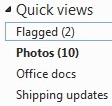
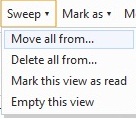
The “Sweep menu”, located on your header of options, helps users manipulate multiple e-mails in one fell swoop. The “Delete all from…” option, for example, clears out any e-mails you select and blocks the senders, saving you the hassle of searching through an inbox cluttered with Cialis advertisements and debt consolidation promises. The “Move all from…” option takes the senders from your selected inbox folder and automatically redirects future correspondence into a folder of your choice, making organization a breeze. A new “Quick views” folder section allows you to easily bring a variety of e-mails to the forefront:[INDENT] Flagged — Self-explanatory Photos — E-mails containing photo attachments Shipping updates — E-mail notifications from Amazon, USPS, and other vendors Office docs — Groups together all of your e-mails with Word, OneNote, Excel, and PowerPoint attachments [/INDENT] Users can now upload significantly larger documents attachments--up to 200 50MB files--via SkyDrive, Microsoft Live's online storage stolution. They can then be opened and edited directly through Hotmail via Office Web Apps for Word, Excel, and PowerPoint files. Downloading and reattaching is now a thing of the past. Previously, Hotmail’s rate of updating its functionality in competition with the significantly preferred Gmail was like comparing the Republic of Congo’s technology to the US. Their older iterations were prehistoric when compared to the newer, more streamlined Google e-mail host, and void of many options that would send a user teetering on the line between loyalty and usefulness on to Gmail without hesitation. Here's to hoping this is a sign of the times for people holding out with their @hotmail.coms and an acknowledgement of great things to come. If Hotmail has been good for one thing, it's teaching us that patience is a virtue.