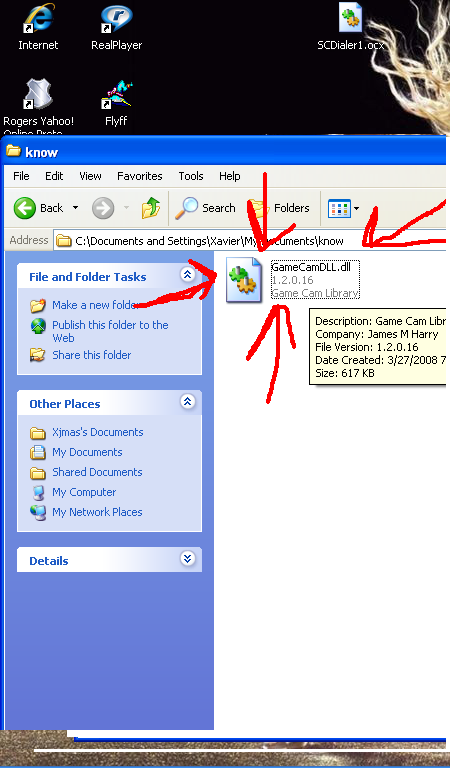
I downloaded GameCam but it was the older version so i uninstalled. when i tried to delete all the left over contents that had things to do with GameCam this one file wouldn't delete.

I have tried CCleaner to it wouldn't delete it.

Dani AI

Generated

A stubborn leftover file after uninstall is usually held open by a running process, protected by permissions, or sitting on media the OS treats as read‑only. 's Safe Mode suggestion is a good first step; when that doesn't clear the file, the next safest approaches are to identify the locking process or remove the file from outside the running Windows session.

Use Process Explorer to find and release the lock: download Process Explorer from Microsoft, run it with administrative rights, press Ctrl+F (Find Handle or DLL) and search for the GameCam filename (or a unique part of it). The search shows which process holds the handle; right‑click the handle to close it or terminate the process if closing the handle is unsafe. The command‑line Sysinternals tool Handle is a useful alternative for scriptable checks (Process Explorer, Handle). Closing handles belonging to system processes can crash Windows, so prefer terminating noncritical apps or rebooting if unsure.

If the file is protected by attributes or simple permissions, an elevated command prompt can clear attributes and force deletion:

attrib -s -h -r "C:\full\path\to\filename.ext"
del /f /q "C:\full\path\to\filename.ext"

When an in‑OS delete still fails, boot the disk from a Live USB/Windows PE/recovery environment and remove the file offline; this avoids any running process holding the handle. Also check antivirus/quarantine logs—security software sometimes locks installer files. Create a backup or restore point before removing files from system folders. These steps give alternatives to Safe Mode and CCleaner and will reveal which process or protection is preventing the removal of the leftover GameCam file for .

Recommended Answers

All 3 Replies

Member Avatar for Member #127113

May be its in use....try to delete in Safe Mode.

Welcome to DaniWeb !

how do i go into safe mode again?

Member Avatar for Member #127113

Start the Computer, before Windows Boot-up press the F8 key. You will get the OS startup choices, select Safe Mode and Start Windows and then try to delete the file you wants to.

Be a part of the DaniWeb community

We're a friendly, industry-focused community of developers, IT pros, digital marketers, and technology enthusiasts meeting, networking, learning, and sharing knowledge.