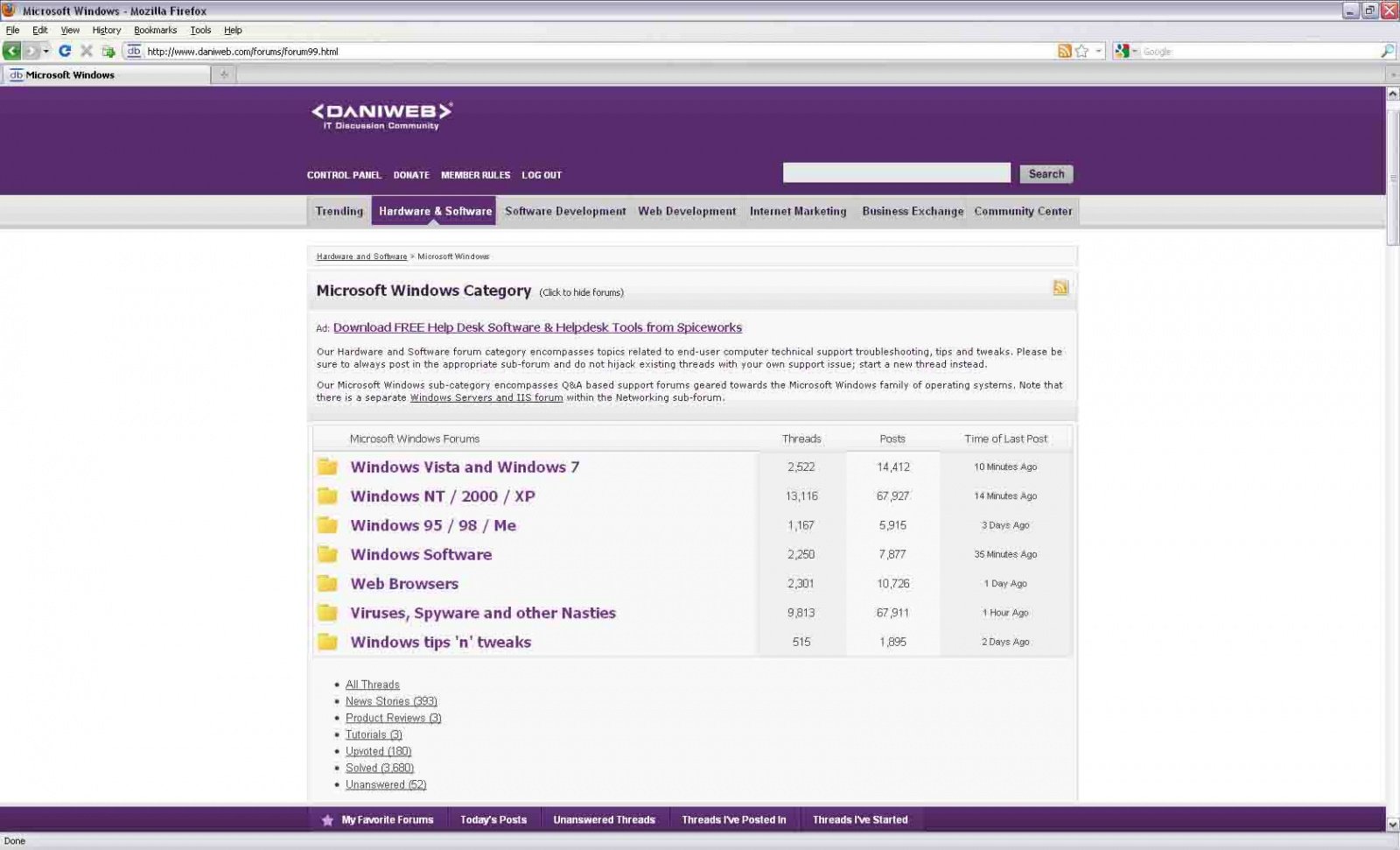
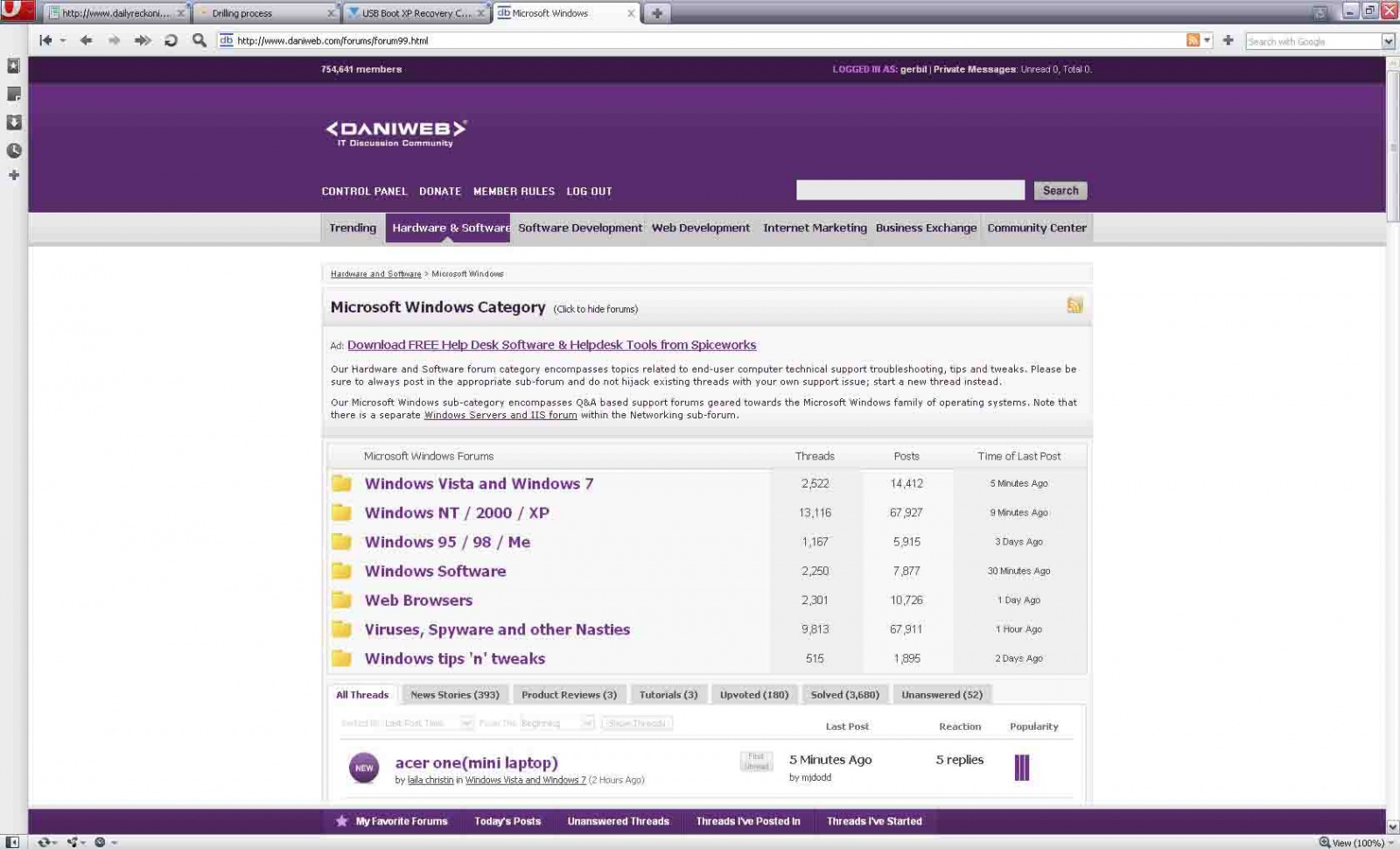
I cannot see where else to post this so here it goes....
=The font size range is a bit too large. I find it very disagreeable. for my taste, the big is far too big. Sorry.
=I cannot link from Microsoft Windows to Win NT/2000/XP. I can only get there by clicking on a thread from that forum after I log in. [Opera, FF..].

Dani AI

Generated

Brief summary: several posters (notably and ) reported the redesign produced very large font jumps, missing subforum dropdowns and collapsed quoted text. correctly flagged JavaScript as a likely trigger. The entries below expand on those observations with a compact diagnostic checklist and a small, practical fix to tame font sizes when the site’s CSS/JS feels hostile to the eyes.

  • Isolation first: load the forum in a private/incognito window (extensions are usually disabled there). If the problem disappears the cause is an extension, cache or profile setting.
  • Disable script/content blockers or temporarily pause all extensions and retry; many blockers can stop navigation scripts from running.
  • Open developer tools (F12) → Console and Network. Look for red errors, blocked requests, or “blocked by client” messages; failed script loads point squarely at a client-side blocker.
  • Quick JS test: enter console.log('DaniWeb JS test') in the Console; a printed message means the console is functioning — then watch for site-generated errors.
  • Clear site cookies and cache, or create a fresh browser profile if sessions/redirects persist.
  • Try a different browser or a freshly installed portable build to confirm whether the issue is browser-specific.

A small site-specific stylesheet can smooth font jumps (apply via a user-style extension or a userContent/user stylesheet):

/* site font-size override (apply with a site-style extension or user stylesheet) */
body, p, td { font-size: 13px !important; line-height: 1.4 !important; }
h1, h2, h3 { font-size: 1.1em !important; }

For site maintainers: provide non-JS fallbacks for core navigation, avoid placing essential links behind third-party scripts, and monitor client-side errors in the console. That combination of diagnostics and a simple CSS override resolves most of the issues described in this thread while preserving accessibility for users who block or limit scripts.

Recommended Answers

All 20 Replies

I could add that if I load Daniweb URL of the forum I wish to enter, then my browser will start there. But when I log in I get knocked back to the Microsoft Windows page and there is no link forward [that works].

I could add that if I load Daniweb URL of the forum I wish to enter, then my browser will start there. But when I log in I get knocked back to the Microsoft Windows page and there is no link forward [that works].

Click on the words Microsoft Windows sub menu will pop up just below. Don't feel bad I'm lost too.

Were you able to figure it out? From the MS Windows category page, click on the title to bring up the listing of forums availabe. From there, you can go into a forum or start a new thread directly from there.

Click just where it says Click to show Forums? I do, but they don't. Latest Opera and FF. Sigh.
Anyway, the font size range. Somehow it just annoys my brain, readjusting to the vastly different sizes. Something to do with eye-scanning, I suppose.
Okay, I check the Microsoft Windows Category page element, and sure in /forums/clientscript/scripts/forummenu.php the forum10.html [this forum] does not show up in the script... and there just is no dropdown menu appearing. For my browser/sys it is a dead link.

Ok, you win, i give up... there are more important things to do.
The problem stated: I put http://www.daniweb.com/forums/forum10.html into my browser [Opera, as you can tell], and that page opens. I log in and get bumped to the main forums page. I click Microsoft Windows and get taken to that page which shows posts from all sub-forums. There I have no way to navigate to a subforum other than to click on a post from that forum. The link Microsoft Windows Category is dead to my browser - no dropdown menu appears. One the fwd/bkwd tree tangles I have to go back and do the same thing again to enter a forum.
So i give up.

Ok, you win, i give up... there are more important things to do.
The problem stated: I put http://www.daniweb.com/forums/forum10.html into my browser [Opera, as you can tell], and that page opens. I log in and get bumped to the main forums page. I click Microsoft Windows and get taken to that page which shows posts from all sub-forums. There I have no way to navigate to a subforum other than to click on a post from that forum. The link Microsoft Windows Category is dead to my browser - no dropdown menu appears. One the fwd/bkwd tree tangles I have to go back and do the same thing again to enter a forum.
So i give up.

Do you experience the same behaviour in FireFox, IE, Safari, or Chrome?

I do, cscgal... IE, FF, Opera.
Once in a forum I can use the top line of "where you are" links to go backwards, also the link in the line that contains "Discussion thread" but not to another forum [and mouse nav buttons, of course, while the tree is unbroken].
So am I the only bloke with this problem? It must be my sys, then...:(
I don't understand browsers too well... too big a topic to approach.

Dani,
Why did you changed from old gold to this one?
Colours are too strong IMHO and reading forum is harder.
I agree on new features/Design (I have to use torch to search under bed where is "Post New Thread button") but you need to look if there is another design.

RHS of forum, Ads takes big big space that makes hard to read.
Just my 2cents

....And the bad is I cannot Start new thread in some forum including this.
Is Daniweb becoming "prorietary" than "opensource" ;)
Just funny

Oh dear, you are going to love this cscgal [so much like see a seagull...]; compensate for me not loving it. I am toying with an ad blocker script, and before it worked just fine - not a single ad. Then you changed the site. Still not a single ad, but it was blocking a couple of new items : the small member sign-in popup and all subforum block popins. I turn it off, restart Opera, and your site works as it probably should. Sigh.... I see ads, too. Some thinking to do. I'll get there again. I want to keep it generic.
Sorry for the bother.

Get back beautiful old Daniweb :'( :'(

Ah, you're fooling with me; it wasn't my gear after all - I have it running now and the site works beautifully in Opera [no ads, though... :)].
But I must say that your pages present differently in FF.

How so? Can you take screenshots? Is something broken in Opera or FF??

The difference is how the All Threads text boxes present. In Opera they are correct [follow the code]; in FF they tile vertically as a list of links. "All Threads" itself shows as a link, but null.

gerbil your FF is messed. either settings or FF its self, my FF3.6.3 displays exactly like your opera. Later---

Help! I am trying to just start a thread asking for help with a Windows VISTA crisis, and cannot figure out how to do it!

Can someone help me please???

Okay, biker, thanks.... might be settings, cos IE shows page errors also. I could worry more; Opera is my main browser, IE I use for only two sites to do with work, and FF I use sporadically. Next time an FF update rolls in I shall uninstall and dl the whole new thing. IE? Who really cares?

Gerbil, do you by any chance have JavaScript disabled in FF? Or JS security settings set very high or something?

> Help! I am trying to just start a thread asking for help with a Windows VISTA crisis, and cannot figure out how to do it!

Click the big New Thread button at the bottom of this page: http://www.daniweb.com/forums/forum38.html

Oops, sorry, cscgal.... I have Javascript enabled, and generally my security settings are lower than medium .
This seems to be an intermittent problem. Sometimes on sys startup it is there, sometimes all is well on startup. Beats me.
I realise that OSs accumulate errors and that eventually they overwhelm you. There is another one I have noticed - quoted material from other posts is hidden, and can be expanded. But not on my browsers. Not being able to see that material makes interpretation difficult.
These problems have arisen only since Daniweb adopted the new format.

Everything you are mentioning seems related to JavaScript. Perhaps you are using an ad blocker that is blocking JavaScript on DaniWeb from running?

Be a part of the DaniWeb community

We're a friendly, industry-focused community of developers, IT pros, digital marketers, and technology enthusiasts meeting, networking, learning, and sharing knowledge.