After i upgraded my win7 OS to win8, i found out that my audio output device is not installed.i tried installing realtek and other audio driver but still it is not fixed...please help me with this problem???
Here's my motherboard type: ASRock G41M-VS3....

Dani AI

Generated

Brief expert summary and a focused checklist to follow before resorting to a full OS reinstall. The thread shows attempts to use motherboard drivers and a clean install (notes from and ). For an ASRock G41M-VS3 upgraded from Windows 7 to Windows 8, the most common causes are driver/architecture mismatch, disabled onboard audio, Windows services stopped, or leftover conflicting driver packages. The steps below start with non‑destructive diagnostics and move toward safe reinstalls.

Quick diagnostics (run these tools to collect facts):

msinfo32
devmgmt.msc
dxdiag
services.msc

Stepwise troubleshooting (recommended order)

  1. Confirm OS bitness in System Information (msinfo32) so the correct 32/64‑bit driver is chosen.
  2. In Device Manager (devmgmt.msc) enable "Show hidden devices", check under Sound, video and game controllers and Other devices. For any unknown device note the Hardware Ids (Properties → Details → Hardware Ids). The VEN_xxxx / DEV_xxxx values identify the exact codec.
  3. Verify Windows Audio and Windows Audio Endpoint Builder are Running and set to Automatic (services.msc).
  4. Remove driver clutter: for each audio entry choose Uninstall device and (if shown) check "Delete the driver software for this device". Reboot and allow Windows to re-detect hardware.
  5. If Windows installs a generic driver that works, fine; otherwise use Device Manager → Update driver → Browse my computer → Let me pick from a list → choose "High Definition Audio Device" as a fallback, then install the correct vendor driver from the motherboard vendor support page for the board and matching Windows 8 bitness.
  6. If multiple vendor drivers were tried earlier, repeat step 4 to ensure old packages are removed before any new install.

Advanced checks and safe workarounds

  • Verify "Onboard Audio" is enabled in BIOS.
  • Test hardware with a Live Linux USB or another PC to rule out failed codec or front-panel wiring.
  • Create a restore point before driver installs. If all else fails and hardware is suspected, a low-cost USB audio adapter will restore sound without further driver hunting.

Recommended Answers

All 3 Replies

here is you MoBo audio driver link
1. Open this Link/Page
2. Enter Captcha
3. Press Download on next page click on[ VIA_Win7-64_Win7_Vista64_Vista_XP64_XP_2K(v7700d).zip ]
4. Extrect ZIP and Install Driver.
5.if windows says " NOT COMPATIBLE WITH YOUR OS " then right click [ Troubleshoot Compatiblity] Run SETUP again.
6. if fail. driver for you PC (One/All-CD)
If Fail Text me. I'll find the perfect easy solution.

If formatting is an option, please consider it. You probably made a mess anyway by installing various drivers, so a clean install will surely fix your problem. When you perform a clean install, your audio output device will be detected automatically and it will work (I have installed Windows 7/8/8.1 about a 100 times on various computers and I have not yet encountered the otherwise). If somehow your audio output device is still malfunctioning, please proceed to the following link.

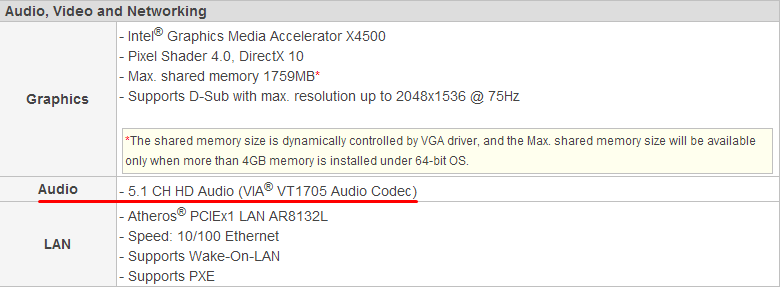
Once you get there, choose Microsoft Windows for the operating system type, Windows 8 32 bit or 64 bit (depending on your Windows installation), choose Audio for the driver type. Lastly, open the dropdown menu and choose the entry which contains VT1705 (your audio chip).

fc0b3023822cecdf55f128ea86d3c4cf

Hope this helps.

Thanks for the dirver, I have the same problem

Be a part of the DaniWeb community

We're a friendly, industry-focused community of developers, IT pros, digital marketers, and technology enthusiasts meeting, networking, learning, and sharing knowledge.