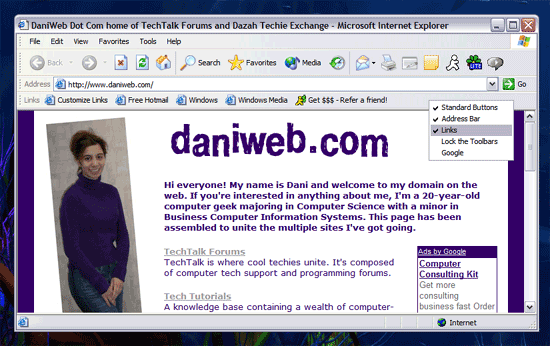
i was on the net one moment, then i shut down the PC for the night... came on the next morning and find that all my sites from the "favorites" section in iExplorer have disappeared....

has anyone experienced this before....??

can anyone help me out..????

Dani AI

Generated

A few quick ways to recover or make Favorites usable again on Windows 2000/XP with Internet Explorer:

  • If you can see your Favorites on disk but not in IE, check whether Windows created a new profile after a crash or repair (as a few members here ran into). Look under C:\Documents and Settings for similarly named profiles such as YourName.000, Owner, or Administrator. If you find an older Favorites folder there, close IE and copy the entire folder (not just individual .url files) into your current profile’s Favorites to preserve the structure. If you are unsure where they are, use Search to look for *.url and enable searching hidden/system folders.

  • If Favorites appear but do nothing when clicked (like Nick described), repair IE’s URL handlers and defaults. From an Administrator account, run these, pressing Enter after each line, then restart IE:

    regsvr32 urlmon.dll
    regsvr32 actxprxy.dll
    regsvr32 shdocvw.dll
    regsvr32 browseui.dll
    regsvr32 shell32.dll

    Then in IE: Tools -> Internet Options -> Programs -> Reset Web Settings. On IE7/IE8 you can also use Tools -> Internet Options -> Advanced -> Reset (this disables add-ons; re-enable as needed).

  • If the Favorites folder path was changed, verify it in the registry: HKCU\Software\Microsoft\Windows\CurrentVersion\Explorer\User Shell Folders -> Favorites should be %USERPROFILE%\Favorites. Back up the registry first, and log off/on after correcting it.

Tip for the future: in IE use File -> Import and Export -> Export to save an HTML backup of your Favorites to external media.

Recommended Answers

All 14 Replies

Are they listed here ...

C:\Documents and Settings\Your-Windows-Username\Favorites

got em back... thanks CSCGAL....

now, is there anyway i can get them back in the tool bar or do i manually have o go and key them in again

Right click on a blank portion of the toolbar, and then check "Links"

I guess I was a bit unclear. The "Links" which appear there are the ones that are in the Links subdirectory in your Favorites folder.

thank u so much....

u have been a big help....

i know this may sound sorta upfront-ish.... but i would like to get to know u more...

lemme know what u think...

THX again CSCGAL

This also worked for me - thanx

Welcome to Daniweb,glad ya got things taken care of!!

I have my links in C:\Documents and Settings\Username\Favorites as was suggested. My links are also on the IE toolbar. But when I click on any of these links,...nothing. Any suggestions?
Nick

Computer crashed, did recovery system but favorites vanished. help!

I found my favorites listed under Documents and Settings, however, it is unclear on how to move them to my favorites folder as they were before they disappeared. Can you provide a step by step for me? I am not real computer literate, but was able to retrieve them as you suggested in an earlier post. I am standing by for a reply. Thank you.

Lost favorites toolbar. Please help.
Thank you.

What version of IE are you using? Under toolbar, is the favourites bar box check with a tick?

1. Click start
2. In the "Start Search" box, type "windows explorer" (without quotations)
3. On the left side under "folders" look for "Favorites"
4. Right click "Favorites", left click properties
5. Choose "hidden"; then click apply
6. In the next box "Confirm Attribute Changes," choose "Apply changes to this folder only" and click "ok"
7. Once you have finished hiding, then go back to step 3 to look for "Favorites" again
8. Right click "Favorites", left click properties
9. Uncheck "hidden"; click "apply"; choose "Apply changes to this folder, subfolders, and files.
10. Click OK, Apply, OK.
11. Close out your internet explorer browser and re-open it again. All of your "Favorites" should be visible in your drop down menu. After having them all disappear and finally see them reappear, I was so thankful!

Much appreciated. Thank you.

Be a part of the DaniWeb community

We're a friendly, industry-focused community of developers, IT pros, digital marketers, and technology enthusiasts meeting, networking, learning, and sharing knowledge.