Is IPv6 as awesome as Facebook says on World IPv6 Launch Day?

Updated happygeek 1 Tallied Votes 350 Views Share

Today is World IPv6 Launch Day.Today is the day that the global Internet gets redefined. Today is the day that people everywhere are saying "so what?" I imagine. However, not everyone is having a 'meh!' moment at the thought of IPv6 being officially launched. Take Jay Parikh, Vice President of Infrastructure at Facebook, who insists that "supporting IPv6 has become crucial to the future scalability of the Internet" and goes on to say that it's "awesome to see so many people and companies working together across the world to make progress on this transition".

But is IPv6, as the Internet Society insists, now the "new normal" for the Internet? Certainly as websites, ISPs and router manufacturers start supporting IPv6 by default, a process which one assumes is meant to happen from this day forth, that statement could make sense. For many people though, IPv6 adoption is as far off as ever. If you want to see whether your ISP is supporting IPv6, determine if you can access IPv6 only websites, simply navigate to the Test Your IPv6 Connectivity site.
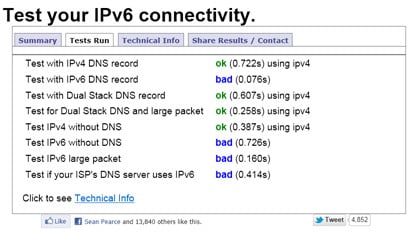
dweb-ipv6 The chances are pretty high that, for now, your test results will not be 'awesome' in regards to IPv6 connectivity but then neither is it 'critical' that they should be right now. It may be World IPv6 Launch Day but that doesn't mean that the Internet will somehow stop working from now on if you remain an IPv4 user for the foreseeable future.

The World IPv6 Launch Day has been organized by the Internet Society and acts as a permanent commitment across the Internet industry to accelerate the deployment of IPv6 across the Internet. As such, major websites are enabling IPv6 from today and ISPs will permanently enable IPv6 across a significant portion of their subscriber base. But what is the reality?

"IPv6 is critical to the future of the Internet’s underlying architecture, and to supporting the billions of devices that will connect to the Internet over the coming years” Tom Leighton, chief scientist and co-founder of Akamai which has a global IPv6 footprint in more than 50 countries. "With ubiquitous IP connectivity becoming a reality, IPv6 is critical to ensuring applications and services can reach users anywhere they live and work" states Krish Prabhu, President of AT&T Labs and Chief Technology Officer for AT&T which has enabled IPv6 by default for a million broadband subscribers. This level of excitement and hype is, perhaps, to be expected but it does rather bely the simple fact that for the vast majority of us IPv6 is still a pipe dream.

John Schanz, Chief Network Officer, Comcast gives us a glimpse of reality when he admits that despite enabling a third of the Comcast network it has only "exceeded our goal of 1% of our customer base being enabled with IPv6 for World IPv6 Launch!" which, if you ask me, is not something to get overly excited about.

Run that IPv6 connectivity test and report back to DaniWeb with the results. It will be interesting to see how many of our tech-savvy community are actually ready for the new normal...

Dani AI

Generated

A short, practical summary that follows the original thread: the World IPv6 Launch (June 6, 2012) was a coordination point, not a switch. The protocol exists to solve long‑term address exhaustion and to give the Internet a more scalable addressing model; the top‑level IPv4 free pool was depleted in 2011, which is why adoption continued as an operational necessity after the Launch. (labs.apnic.net)

Mixed results in this thread— seeing IPv6 working while and did not—are exactly the typical, expected outcome during a staged rollout. Common causes are: no native prefix from the ISP (or an ISP using a carrier‑grade solution such as DS‑Lite), CPE/router firmware with IPv6 turned off or buggy, missing AAAA records for services, and IPv6‑specific firewall/ICMP‑v6 or MTU issues that break path MTU discovery. Architecturally IPv6 is the protocol designed to replace IPv4 (larger address space, simpler autoconf), and several translation/transition mechanisms exist so networks can interoperate during migration. (datatracker.ietf.org)

Practical checklist (operators and savvy home users can apply these immediately):

  • Confirm whether the ISP advertises a native IPv6 prefix (provider docs or BRAS/CMTS info).
  • Confirm the CPE/router has IPv6 enabled and up‑to‑date firmware; enable SLAAC/DHCPv6 as appropriate.
  • Check DNS for AAAA records for public services.
  • Verify local addressing and reachability with diagnostic commands; common examples:
    ip -6 addr show
    ping -6 google.com
    dig AAAA example.com
    traceroute -6 2001:4860:4860::8888

    If native IPv6 isn’t available, ISPs may offer DS‑Lite/translation options or a tunnel broker as a workaround; full service availability is best solved by dual‑stack or by enabling IPv6 on public services. For a stepwise deployment checklist and operational guidance aimed at providers and admins, see APNIC’s “twelve steps” overview. For quick connectivity checks, use an independent IPv6 test site. (blog.apnic.net)

Takeaway: the variability shown in the thread is normal. IPv6 is the long‑term direction (RFC standard), but real networks roll forward at different paces; diagnosing the exact failure usually points to ISP provisioning, CPE settings, DNS, or firewall/MTU issues rather than a mysterious protocol fault. (datatracker.ietf.org)

blud 82 Linux Reject Moderator

Test with IPv4 DNS record
ok (0.159s) using ipv4
Test with IPv6 DNS record
ok (0.127s) using ipv6
Test with Dual Stack DNS record
ok (0.140s) using ipv6
Test for Dual Stack DNS and large packet
ok (0.163s) using ipv6
Test IPv4 without DNS
ok (0.135s) using ipv4
Test IPv6 without DNS
ok (0.114s) using ipv6
Test IPv6 large packet
ok (0.131s)
Test if your ISP's DNS server uses IPv6
ok (0.162s) using ipv6

Luckily, technology has changed so much that the ipv6 rollout won't even be noticable to most people.

Andrew Wiggin 0 Newbie Poster

Test with IPv4 DNS record: ok (0.180s) using ipv4
Test with IPv6 DNS record: bad (1.409s)
Test with Dual Stack DNS record: ok (0.179s) using ipv4
Test for Dual Stack DNS and large packet: ok (0.090s) using ipv4
Test IPv4 without DNS: ok (0.084s) using ipv4
Test IPv6 without DNS: bad (0.572s)
Test IPv6 large packet: bad (0.587s)
Test if your ISP's DNS server uses IPv6: timeout (15.024s) - internal DNS on Win2k3

Member Avatar for Member #120589
Member #120589
Test with IPv4 DNS record       
ok (1.022s) using ipv4
Test with IPv6 DNS record       
bad (0.467s)
Test with Dual Stack DNS record     
ok (0.642s) using ipv4
Test for Dual Stack DNS and large packet        
ok (0.650s) using ipv4
Test IPv4 without DNS       
ok (0.380s) using ipv4
Test IPv6 without DNS       
ok (1.070s)
Test IPv6 large packet      
bad (0.388s)
Test if your ISP's DNS server uses IPv6     
bad (0.378s)

So I guess no go.

Be a part of the DaniWeb community

We're a friendly, industry-focused community of developers, IT pros, digital marketers, and technology enthusiasts meeting, networking, learning, and sharing knowledge.