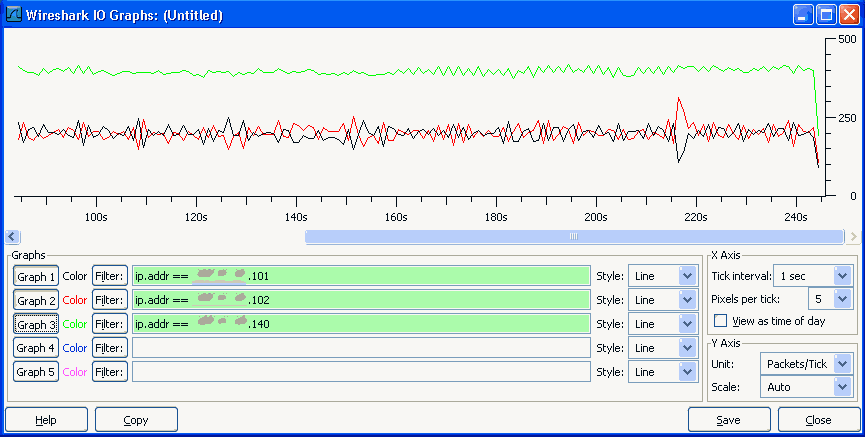
I have a port server that converts an 19.2kbps rs-232 data stream to tcp/ip then to my computer wirelessly using Motorola Canopy system. When my tcp/ip server software connects to the end device (the serial device), the available bandwidth is reduced drastically. Here is a screen shot of the bandwidth usage when connected to two port servers:

See Attached Image 1
(My computer IP is .140 and the two serial port server IPs are .101 and .102)


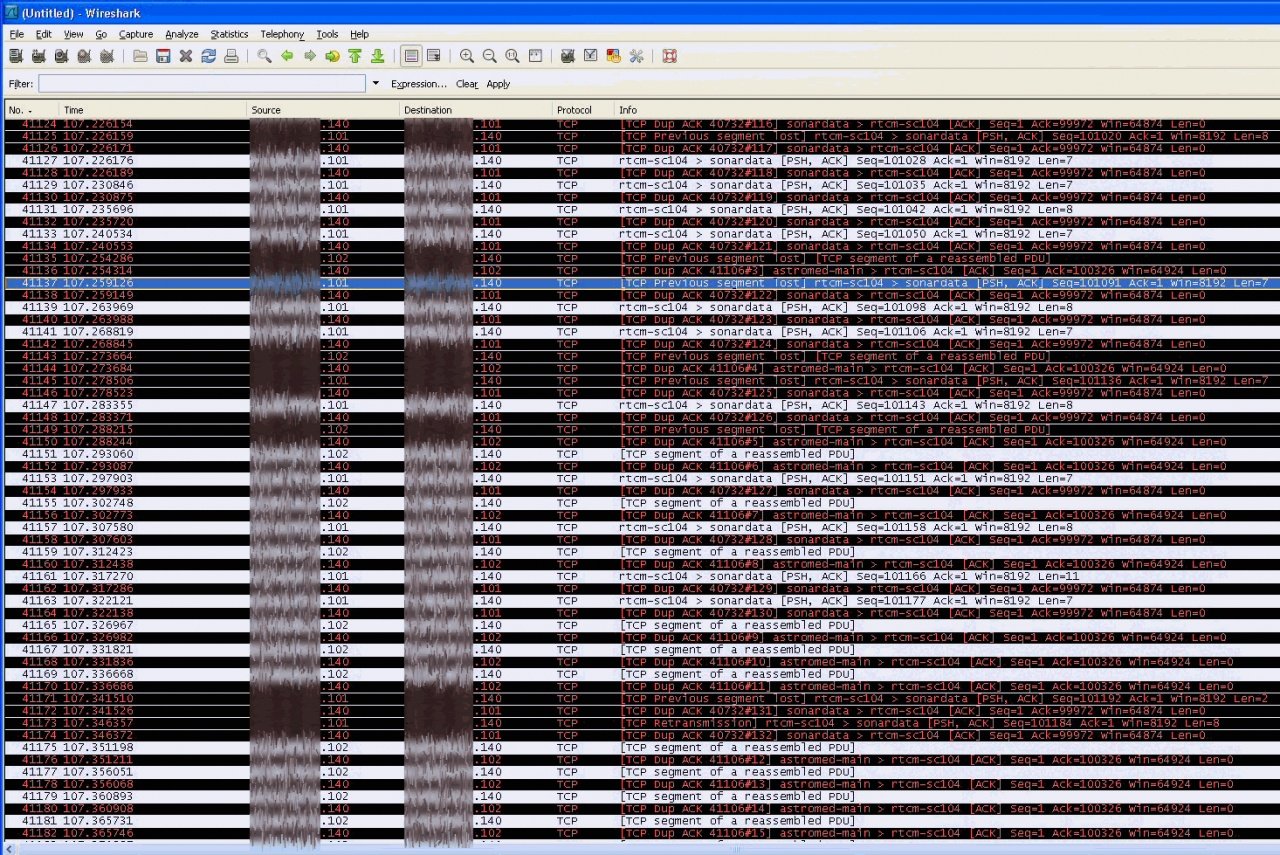
I used wireshark to have a look at the packets being sent accross the network. It seems that the network conjestion is being cause by a Duplicate Acks sent by my computer. Here is a picture of the wireshark capture:


See Attached Image 2
(My computer IP is .140 and the two serial port server IPs are .101 and .102)

What are possible explainations of so many duplicate acks being sent. What else can I do to trouble shoot the problem?


Thanks so much for any help as I have been scratching my head for days on this one:)
Dani AI

Generated

This thread shows a classic TCP behavior trap and a good troubleshooting path. 's follow-up indicates the serial->TCP gateway was emitting many tiny segments and that changing the device’s buffering removed the problem. Below are the deeper reasons why that happens, plus concrete checks to verify and other mitigations to consider.

Duplicate ACKs mean the receiver is repeatedly acknowledging the same last-in-order byte because it hasn’t seen the next expected segment. That is a signal of loss or out-of-order delivery; when the sender sees several duplicate ACKs it will do fast retransmit and reduce the congestion window, which explains the sudden throughput collapse. On wireless or bridged links, a high packet rate of very small segments increases the chance of link-layer drops, reordering and CPU/queue pressure — so many small writes turn into many TCP control events and real throughput loss.

Practical checks and captures to run (after the device change to confirm the fix):

  • Capture on both sides (gateway and PC) to determine where loss/reordering occurs.

  • In Wireshark use these display filters to find the load-bearing events:

    tcp.analysis.duplicate_ack
    tcp.analysis.retransmission
    tcp.analysis.out_of_order
    tcp.len < 64
  • A useful tcpdump capture command (replace placeholders):

    tcpdump -i any -s 0 -w capture.pcap "host <pc-ip> or host <gateway-ip>"
  • Look at sequence/ack gaps and the sender’s cwnd behavior in the TCP stream graph; compare before/after changes.

Other mitigations if buffering isn’t available: aggregate writes in the application, enable socket-level coalescing or larger MSS where possible, check Nagle (TCP_NODELAY) interactions, and tune delayed-ACK behavior only if the impact is understood. After any change, re-run captures and confirm duplicate ACKs and retransmissions have dropped and that average segment size has increased.

Okay, I finally found the problem. The serial port server was not buffering data before sending it TCP, instead it was just sending small packets of data and that flooded the network. Fixed problem by increasing data buffer size on port server.

Be a part of the DaniWeb community

We're a friendly, industry-focused community of developers, IT pros, digital marketers, and technology enthusiasts meeting, networking, learning, and sharing knowledge.