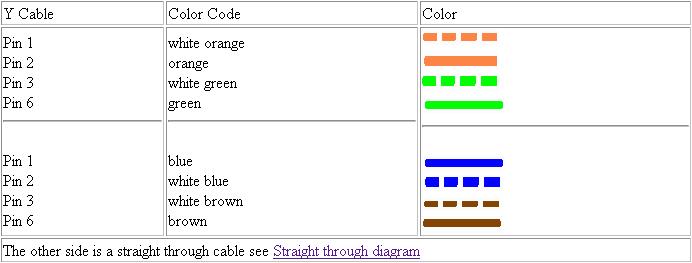
I have 3 PC, and each PC have only 1 NIC(10/100). So is it possible to connect them peer2peer with an Y-cable ? (w/o hub or switch or router). :rolleyes:
If that true. Plz show me how to make that Y-cable. Thx.

Dani AI

Generated

Short answer: a passive Y‑cable will not work and can cause problems. ’s idea of “splitting” pairs looks clever, but Ethernet PHYs and link‑layer behaviour make a passive cable the wrong tool.

Why it fails: 10/100BASE‑TX uses two differential pairs (one pair for transmit, one for receive). Ethernet NICs are active transceivers with magnetics and line drivers. Tying transmit pins from two or three NICs together with a cable simply connects active drivers to each other and to receivers without isolation or re‑driving. That corrupts the signal, breaks collision/line management, and can damage hardware. A hub or switch contains active electronics that isolate, reshape and re‑drive signals (hubs are repeaters; switches forward frames at layer‑2). That is why you can’t replace a hub/switch with passive wiring — a cable can’t do the jobs of magnetics, buffering and collision arbitration. ’s historical note about passive hubs is apt: a real multiport Ethernet device is active.

Practical alternatives:

  • Cheapest and simplest: a small unmanaged switch (5 ports) and straight patch cables.

  • If you must avoid new hardware, make one PC the router/gateway: give it two NICs, connect each other PC to one NIC (use crossover only if NICs lack auto MDI‑X), assign IPs, and enable IP forwarding/NAT on the router machine. Example for Linux:

    # enable forwarding (temporary)
    sudo sysctl -w net.ipv4.ip_forward=1
    
    # NAT outgoing from eth0 for clients reached via eth1
    sudo iptables -t nat -A POSTROUTING -o eth0 -j MASQUERADE

For Windows use Internet Connection Sharing (ICS) or RRAS. Also consider inexpensive USB‑to‑Ethernet adapters if you need a second interface without opening a PC.

Final caution: don’t tie NIC transmit pairs together with a Y‑cable. Follow ’s advice — design the network with the correct active device or a routed host rather than trying to cheat with passive wiring.

Recommended Answers

All 6 Replies

you would have to wire up some sort of box to make all transmit pairs 1 and 2 resend on each receive pairs 3 and 6. I have never heard of anyone trying this so I am quite interested to know if it works. From the PC's perspective it would have to be like a hub and it shouldn't care (as long as it is half duplex on the NIC settings for each.)

Good Luck!

Hi.

This is not possible. You need a hub or a switch to connect 3 or more computers. Or, you can have one computer with two NIC cards, and a crossover cable, and then turn on packet forwarding.

Do not deviate from standards. Design your network right the first time.

Christian

kc0arf has the correct answer, do it the right way. Get a hub or switch with a couple straight cables and be done with it.

Being a vernerable sith lord, I was referring to a ancient device of great evil, the passive hub.

This is only informational, I haven't actually seen one of these in over a decade, wirespeed was much slower then :)

Oh thank w1r3sp33d n kc0arf.
Really I have that question when I have seen this page:
And I understand that the Y-cable connect 1st & 2nd PC with standards crossover. N other connection is pairs 1-2, 4-3 :eek:. Does it work well?

All kidding aside, that is most definately the path to the dark side.

I have seen people "split" cables like this, it won't accomplish exactly what you are trying to achieve. Since the brown and blue pairs don't match up with the tx and rx of the first pc it wont work for what you want to do.

Is this is school project or a network you want to use? If you want to use these machines I would just go buy a little hub or switch.

You have seen people "split" cables like this? N it isn't work? Ok thank for your sharing. :)

Be a part of the DaniWeb community

We're a friendly, industry-focused community of developers, IT pros, digital marketers, and technology enthusiasts meeting, networking, learning, and sharing knowledge.