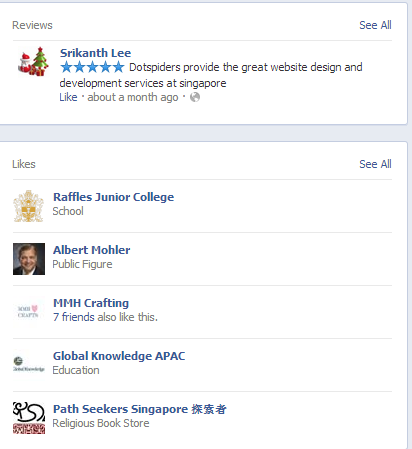
Hi Friends, I want to remove the Likes tab below the reviews tab.Because i don't want to exhibit the my likes to the visitors which are the pages i liked. So that i want to remove the tab from my facebook page and i want to insert my website URL to the page. How we can add that link to the facebook page. Thanks in advance.

Dani AI

Generated

Short summary for : Facebook no longer guarantees a way to "delete" the Likes tab for every Page. Page navigation is now a set of configurable sections, and what you can hide or remove depends on whether your Page is using the New Pages experience or the older Classic layout. Some sections are locked and can’t be removed. (facebook.com)

Practical steps to try (pick the one that matches the Page UI you see):

  1. Try Manage Sections (New Pages experience): switch into your Page profile, click More under the cover photo → Manage Sections, and uncheck the Likes / Pages‑liked section if it’s available. This hides the section from visitors. (facebook.com)

  2. If you can’t hide the section, remove the items shown: go to your Page’s Pages Feed (See Pages Feed) → open “Pages liked by this Page” and use “Unlike as Your Page” (or visit each target page and use the three‑dots menu → unlike). That clears the list rather than deleting the tab. (socialmediaexaminer.com)

  3. Classic / older tabs: Settings → Templates & Tabs used to allow removing tabs, but that control has been changed and many custom tab features were deprecated; some old tabs can only be removed through the third‑party app dashboard that created them (e.g., Woobox). (help.woobox.com)

To add your website: open Edit Page Info (or Page Settings → Page Info) and paste the full website URL in the Website field; for higher visibility add a CTA action button like “Visit Website.” (merchants.doordash.com)

Note: is correct that “likes” are designed to be public; ’s suggestion to check Settings is the right starting point. If none of the UI options appear, the most reliable fallback is to unlike pages your Page previously liked or manage/remove the app that created a custom tab. (socialmediaexaminer.com)

Recommended Answers

All 5 Replies

the entire point of 'liking' a page, is so people can see that you like the page. why like anything if nobody is allowed to know?
why would there be a functionality to undo the default functionality, and remove the entire goal of it?

yes i agree with you, stultuske,
thanks

Hi,
go to settings tab and make changes you want make.
thanks

I agree.... true

I agree with stultuske views.

Be a part of the DaniWeb community

We're a friendly, industry-focused community of developers, IT pros, digital marketers, and technology enthusiasts meeting, networking, learning, and sharing knowledge.