iPad Reports Roll In: Mostly Positive

Techwriter10 0 Tallied Votes 418 Views Share

The iPad hit the streets yesterday and reports have rolled in from bloggers, reporters and users. For the most part people seem very pleased with their new devices, but there have been some problems (as you would expect with any electronic device on its first day). Contrary to reports (including one from me on Friday), there didn't appear to be any real difficulty for Apple Store employees who didn't get to see the device until just before the store opened. Maybe it's that easy to use or maybe these people really are geniuses.

Here's a smattering of reports from around the country:

* that there was a mob scene at the Apple store in NYC, but the staff handled it well. TUAW reporter Mike T Rose reported people could have gotten one without a line at the Best Buy on Broadway. Go figure.

* that there were about 100 people waiting in line at the Apple Store in Boston and Apple employees greeted the customers with coffee. He reported on one visitor from Germany who planned his vacation around the launch, but it still sounds like much smaller crowds than we saw for the iPhone launches in previous years.

* Online friend, Jason Turcotte shot a from line outside the Apple Store at the Holyoke Mall in Holyoke, MA.

Reactions

For the most part people seemed happy with their new machines, but as you would expect on the first day, there were some glitches.

* Jason Turcotte had to bring his unit in for repair because it wasn't functioning corectly, and even though he had traveled to New Hampshire, they fixed the unit for him at the Salem, NH store

* Online friend, David A. Knopf seemed completely pleased with his iPad (which arrived by mail) and was followed by a thank you note from Apple.

* Online friend and fellow technology journalist reported his iPad was taking a long time to synch and update.

* There were also reports of interesting games and applications on the iPad. Stories have been running all week about favorite applications for the iPad.

So far, the reports are mostly positive and the device at first blush seems to be living up to its considerable hype, but it will be interesting to hear reactions in the days and months ahead as people use these devices on a regular basis and learn the good, bad and the ugly of any electronic gadget. We also have only seen the release of the WiFi version and in several weeks we get the celluar version, which is a bit more expensive but has the advantage of being almost always connected (at least where there is a cell tower available for your carrier).

I have to say that hearing these reports has only left me more intrigued and interested. And yes I want one. I really, really want one.

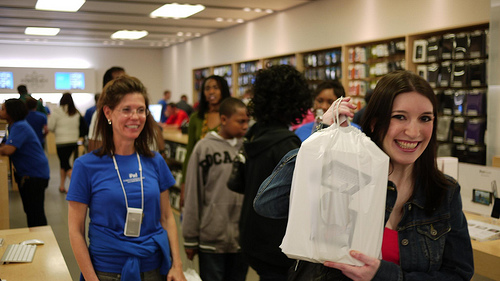
Photo by Grant Robertson on Flickr. iPad launch at the Atlanta, GA Apple Store. Used under Creative Commons License.
Dani AI

Generated

A short, practical checklist and troubleshooting guide for anyone picking up a launch‑day iPad or reading this thread later. The early reports from , @JasonTurcotte and @MitchWagner show mostly positive impressions with a few first‑day hiccups; the steps below focus on quick tests you can run, simple fixes for common setup problems, and what to keep if you need service or an exchange.

  • Keep the box, receipt and original packing intact until you are certain the unit is problem‑free. Note the serial number (printed on the box and visible in Settings) for warranty/service.
  • Before leaving the store, confirm you are opening a new sealed unit (not a demo). Visually inspect the chassis and screen for marks. Display a full white and a full black screen (open a plain web page or an image) to check for dead pixels or uneven backlight.
  • Test basic hardware: full‑screen touch responsiveness (corners and edges), pinch/zoom and rotation, speaker and headphone jack, sleep/wake and home buttons, and charging with the wall adapter and USB cable you plan to use.
  • Verify wireless and sync: join a Wi‑Fi network and load several pages or a short streaming clip. For slow syncing (as noted by @MitchWagner), update desktop software, try a different USB port or cable, sync smaller batches (photos/music), and restart both computer and device before deeper troubleshooting.
  • If software oddities persist, back up, then perform a restore via desktop software. If problems remain after a restore, request an exchange or Genius Bar appointment—bring the box, serial, and receipt.
  • Setup essentials once the unit is healthy: sign in with your account, enable device location/backup, set a passcode, and install only essential apps first to keep initial sync fast.

These checks catch most early failures and make support interactions smoother. If hardware or persistent software issues appear after a restore, escalate through the store or official support using the serial and purchase proof.

Techwriter10 42 Practically a Posting Shark

Just a quick clarification. Jason Turcotte reports his iPad was working fine. He watched several Apple Store employees trying to figure out how to fix a display unit that wasn't working properly. He said when he walked past the store about 10 minutes later, it was working (or else they had replaced it).

Ron

MikeTRose 0 Newbie Poster

Hey! That's @film_girl!

Techwriter10 42 Practically a Posting Shark

Hey Mike,
You know, I suspected it was, but thanks for confirming.

Ron

Be a part of the DaniWeb community

We're a friendly, industry-focused community of developers, IT pros, digital marketers, and technology enthusiasts meeting, networking, learning, and sharing knowledge.