Hello all,

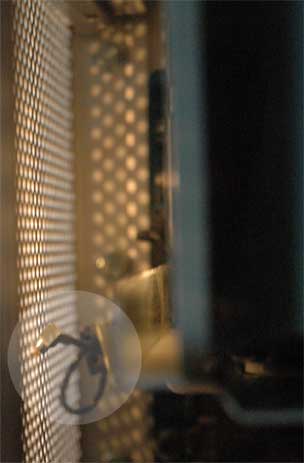
who could help me identify the loose cable in my G5 and tell me where it should go? I've attached a picture of it. This morning I noticed a strange reflection coming from behind the grill of the mac and lo and behold: a loose cable! The mac's still working fine so it isn't anything critical. I suspect it to be the cable for the speaker, as I'm using the sound out port on the back for my monitors so I wouldn't notice the difference between the internal speaker working or not working.

It's right at the front, in the upper half and has a sticky thingie attached to it, probably to put and keep it somewhere where it will look esthaetically alright.

All help would be greatly appreciated.

thanks,
Paul
Dani AI

Generated

Short expert summary and likely IDs: the loose lead behind the G5 front grill is most commonly one of three things — the AirPort (Wi‑Fi) antenna coax, the Bluetooth antenna coax, or a small modem/front‑panel cable — all of which Apple documents as being routed and stowed around the front fan/speaker area. Since ’s speaker check (and ’s followup) indicates the internal speaker still works, the speaker cable is less likely; a grounding strap is possible but less common. The Apple Service Source shows the black (AirPort) and gray (Bluetooth) antenna leads routed under clips and the front‑panel/modem cables in that same area. (manualmachine.com)

Quick identification checklist (safe, offline work only): remove mains power and follow the manual’s take‑apart steps for the front inlet/fan and speaker/fan assembly, then trace the loose wire to its termination. A tiny round metal snap connector on the end = antenna coax (AirPort/Bluetooth). A 2‑pin white plug = speaker or small fan/sensor. A wider multi‑pin connector or black plastic cap = front‑panel cable. A thin cable that runs to a small PCB behind the fan is likely the modem filter cable. The service manual details these parts and their connectors. (manualmachine.com)

How to proceed safely: with power removed, do not force connectors or route wires over moving blades. If the end is a coax snap and an AirPort card is installed, gently reconnect the coax to the card; if there’s no card present, tuck the cable back into its original clip or secure it out of the airflow with tape or a cable tie. If it’s a modem/filter or front‑panel lead, follow the manual’s reconnect steps when reinstalling the board. The service notes explicitly warn to reconnect antenna and modem cables and show the proper routing. (manualmachine.com)

Safety and impact: an unattached antenna/BT lead won’t stop the G5 from booting but will disable or degrade Wi‑Fi/Bluetooth; an unattached modem lead will affect modem functions. For exact pictures and connector locations, consult the Power Mac G5 Service Source sections “Antenna Board and Cables” and “Front Panel Board Cable.” (manualmachine.com)

Recommended Answers

All 3 Replies

I can't really make it out. If you want to know if it's the internal speaker cable just unplug the external speakers and play a CD or MP3. If it makes sound then it's not that :-) Is it possibly the cable for Airport Extreme?

I cannot make it out, and unforuntaly, don't have access to a G5 to compare, ATM. However, are you sure it's not just a grounding cable?

thank you both so far,

I did what gortonsfi suggested and the internal speaker still produces sound, so it's not the speaker cable. It might be the airport cable though. I'll keep on searching.

Thanks again,
Paul

Be a part of the DaniWeb community

We're a friendly, industry-focused community of developers, IT pros, digital marketers, and technology enthusiasts meeting, networking, learning, and sharing knowledge.