Hey Guys!

So... I left my PC back home when i went off to college and now that I'm back for summer, it seems that it has missed me because it doesn't work anymore.

First Problem:

When I tried to switch it on, it would start to boot (I'd see the fans try to spring to life) and then it would immediately switch itself off.

What I Tried:

  1. Removed peripherals and reseated all the hardware (RAM sticks, video card, CPU, etc.) -- No luck
  2. Reset BIOS to eliminate overclocks. (removed battery) -- No luck
  3. Took the motherboard, PSU, and video card out, cleaned them thoroughly (with compressed air), connected them outside the case, and applied power. -- This took care of this problem and led to the next.
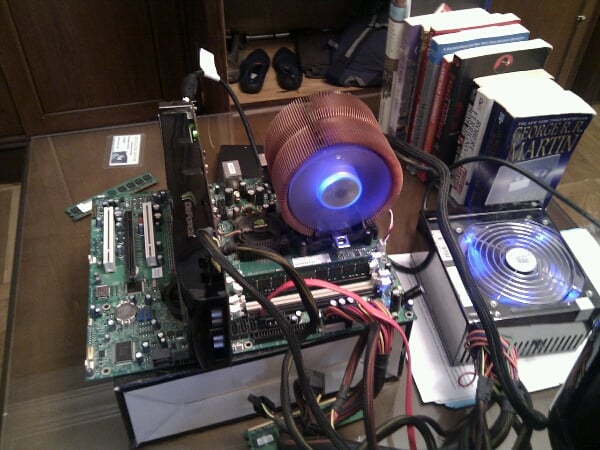
    13366208298541

Second Problem:

PC powers up, fans would get started, all the relevant lights would work but nothing on the screen and no hard drive activity is heard.

What I Tried:

Nothing. I had exhausted my arsenal of things to try in the first problem.

What now?

First i thought maybe I should buy a new video card... Now I'm thinking it's the motherboard because I did have problems with its DIMMs before. You guys have any suggestions?

Thanks,
Khodeir

Dani AI

Generated

Quick diagnostic summary tied to the thread: the original symptom (fans spin then immediate shutdown) being cured by benching often points to a short or bad front-panel/case contact; the current symptom — fans/lights run but no video or drive activity — is a classic POST failure that can come from GPU, RAM, PSU rails, CPU/socket damage, or motherboard DIMM circuitry. ’s onboard-GPU idea and ’s memory-check suggestion are both on target; the steps below expand those ideas into a reproducible isolation workflow.

  • Perform a strict minimal bench test: motherboard + CPU + single known-good RAM stick (in the slot nearest the CPU) + PSU + GPU only if the board lacks integrated video. Attach a small motherboard speaker or the board’s debug LEDs. Power the PSU, short the power-switch pins to start, and observe beeps/LED codes.
  • Check power wiring: confirm the 24-pin ATX and the 4/8-pin CPU power are seated, and any PCIe 6/8-pin connectors on a discrete GPU are plugged. Many boards will refuse to POST if CPU_FAN RPM is not detected — make sure the CPU fan header is connected.
  • Swap/verify components in this order if no POST codes appear: known-good PSU (or use a proper PSU tester/multimeter to check 12V/5V/3.3V under load), known-good GPU (or try the monitor/cable on another machine), then RAM sticks one at a time in every slot. If a stick or slot fails consistently, the RAM or the DIMM trace on the board is suspect.
  • Inspect the motherboard/CPU visually and with magnification for bent socket pins (LGA) or bent CPU pins (AMD), leaking/swollen capacitors, corrosion, or any foreign conductor. Clear CMOS using the jumper per the manual (battery removal alone is less reliable).

Interpreting results: audible memory beeps point to RAM/slot issues; a single short beep then silence often means CPU/motherboard OK but video/GPU problem; no beeps and no debug codes with fans spinning tends to implicate CPU, motherboard power circuitry, or a dead speaker/header (confirm a speaker is connected). Given prior DIMM trouble, a faulty motherboard is plausible — however, exhausting the PSU/GPU/RAM swaps first avoids an unnecessary board purchase.

Recommended Answers

All 2 Replies

Have you tried using the motherboard's on board graphics chipset (if your board has one)?

RAM issues may prevent a system from booting. No POST when you boot? You indicated that you were able to get into te BIOS.

If you at least get to the POST process, to rule out a motherboard issue, boot up using a Linux Ubuntu CD. If it boots motherboard should be good a d memory should be at least mostly good.

No video, try another video source.

Be a part of the DaniWeb community

We're a friendly, industry-focused community of developers, IT pros, digital marketers, and technology enthusiasts meeting, networking, learning, and sharing knowledge.