Hello Daniweb,

I've just purchased a new laptop, an Acer V3-571G which has an advertised battery of up to five hours. Obviously this is going to be dependant on what you are running, but even when using Ubuntu 13.04 to simply browse the internet, check emails and do some word processing, the battery discharges at a significant rate.

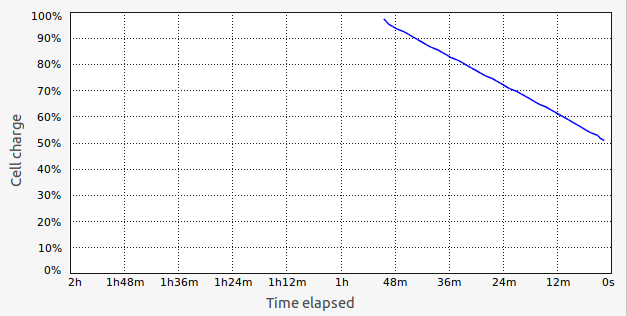
Attached is the discharge profile, which as you can see in about 50 minutes the battery is already 50% depleted, this being with the screen brightness reduced to the minimum and doing nothing which requires intensive power consumption.

Do you think it is a faulty battery, a problem with the laptop itself, or is Ubuntu 13.04 just very power hungry?
9eee890d44cfc4a3b2a176f0a4f0bc69

Dani AI

Generated

— short expert summary and practical next steps. Many V3-571G SKUs shipped with an NVIDIA discrete GPU, so high idle drain on Linux is commonly caused by the dGPU being powered when it shouldn’t be rather than an immediate battery defect. The Fn/battery-key suggestion from is unlikely to apply if the keyboard lacks a battery symbol; a quick diagnosis will show whether the problem is software/configuration or true capacity loss. (laptopmedia.com)

Quick diagnostics (run from a terminal — record the outputs for comparison):

sudo apt-get update && sudo apt-get install powertop acpi-utils tlp
upower -i $(upower -e | grep BAT)
acpi -V
lspci -k | grep -EA3 'VGA|3D'
sudo powertop --calibrate
sudo powertop

Powertop shows real-time power users and suggested tunables; UPower/ACPI output shows energy-full, energy-full-design and capacity (use those to tell if the battery has lost capacity). (en.wikipedia.org)

Persistent fixes and checks: install and enable TLP (it applies conservative, persistent power-saving settings) and inspect battery stats with sudo tlp-stat -b; if capacity is well under ~80% the cell has aged and replacement is likely. Example install/start:

sudo add-apt-repository ppa:linrunner/tlp
sudo apt update
sudo apt install tlp tlp-rdw
sudo tlp start
sudo tlp-stat -b

TLP’s defaults are already tuned for battery life. (linrunner.de)

If lspci shows an NVIDIA device, treat it as an Optimus/hybrid-graphics case: use Bumblebee or the distro’s PRIME tooling so the dGPU can be powered off when unused (bbswitch/vga_switcheroo help here). Also perform a battery calibration cycle (full charge, full discharge, full charge) to correct state-of-charge reporting; if capacity still reads low afterwards, pursue warranty/RMA or replacement. (wiki.ubuntu.com)

Summary: gather the command outputs first (UPower, powertop, tlp-stat, lspci). If the dGPU is powered or power-hungry processes show up, fix power-management (Bumblebee/Prime, TLP). If energy-full vs energy-full-design indicates low capacity, the battery is likely the failing component.

Recommended Answers

All 5 Replies

Before you reach that level, try pressing a combination of fn and the key with the battery icon [Mine is f3].

At first I also thought that my battery was depreciating, but when I pressed that, my battery came back to life and added a good 2 hours to the battery strength.

Try that. At least b4 u think of replacing.

Ih, and when you press the combination, give it a few moments then check your battery discharge levels ....

Thank you for the suggestion, however I don't have any key which would suggest it has anything to do with the battery. F3 is for the wireless card and none of the others have anything to do with the battery.

Hmm, in that case, you may surely have to replace the battery ... Or alternatively, u can ask a pal who may be having the same machine, and try it out on his; so that you can establish how exactly the battery is being eaten up.

Be a part of the DaniWeb community

We're a friendly, industry-focused community of developers, IT pros, digital marketers, and technology enthusiasts meeting, networking, learning, and sharing knowledge.