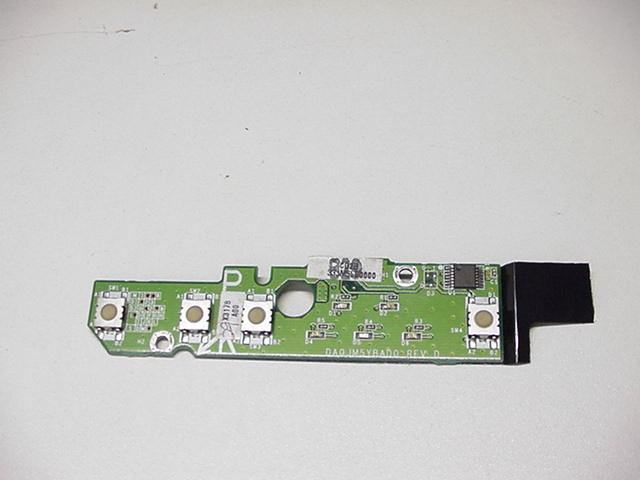
Hi, and thanks to all to can help.
To make the story short, I have a Dell Latitude, and the power button stoppen working. Upon inspection, I found that the power button board itself was broken. This was confirmed because none of the caps lights, etc didn't light up when the computer did work, so it was dying. Anyway, now the computer won't turn on!!!! Is there anyway to bypass the main switch on the Power Cirucit board itself?? I know I can get a new one, but it won't come soon enough! Once I get it on, I can keep it in standby.

I do know that if I remove the power circuit board, I can see that it connects to the motherboard itself through a plug. Is there any way to use this to start the computer???

Please help, and thanks to anyone who replies immediately!

{Ps- I am good at computers, but am not great inside the computer, but cam take certain things apart}.

Dani AI

Generated

Short expert summary and a safe diagnostic path for a D610 with a broken power‑button board (as described). The fault can be either the small push‑button/LED board or something upstream in the motherboard’s power circuitry (as and suggested). Before ordering parts, the following checks narrow the cause and allow a safe temporary start if appropriate.

Start with basic safety and observation: remove the battery and work on a non‑conductive surface; use ESD caution. Confirm the AC adapter actually provides its rated DC at the barrel with a multimeter. With AC connected (battery out) check the motherboard for a standby rail — a small fixed voltage present with the adapter plugged in even when the laptop is “off” (commonly a few volts). If that standby voltage is absent, the power regulation/ DC‑in area is the likely fault and bypassing the front switch won’t help.

If standby voltage is present, identify the power‑switch pins before touching anything. Reconnect the small board (if still usable) and put a meter in continuity mode across the connector pins while pressing the power button. The pair that closes on press are the switch contacts. With the battery removed and AC connected, a momentary, very short contact between those two pins will simulate the button and should start the machine. Use an insulated jumper or a proper momentary pushbutton; do not drag a screwdriver across multiple pins (risk of shorting a power rail). Stop immediately if unexpected voltages or smoke appear.

If the momentary short starts the laptop reliably, install a small tactile switch or replace the broken board for a permanent fix. If the short does nothing or the standby rail is missing, the DC‑in / power‑regulator area needs repair by a skilled technician. This approach ties the thread’s suggestions together while minimizing risk and avoiding needless part orders.

Recommended Answers

All 13 Replies

Where exactly is the damage to the board?

The circuit board itself is fried. None of the lights came on the board when it was dying, and the power button on the board literally fell off the other day, so there is no way to turn it on unless I bypass the board.

Where exactly is the damage to the board?

Can I replace the laptop powr board?? It is no a part of the mother board, it is seperate. When you rmeove the bezel with the power cover, beneth it is the power board. Once I remove the screws, I can remove it and underneath is a plug.

I mean, if I get a new one, is it going to work, or does anyone else think there is another problem?? It was working before,, but like I said I literall had to push down with all my force just to turn the laptop on!
Please,please anyone help if they know how to fix this!!

If that board is fried it seems more likely that the problem is elsewhere and most probably to do with the power regulation side of things.

i have a dell d610,i've found that the way Dell mounted the plug to the board makes it prone to break off the mother board,unless it has broken off completely it looks as if it is still ok,this is in reference to the power button my power button would not work unless i hit or jarred my laptop.

If you are having problems with your power socket then you need to get to a repair shop as soon as you possibly can as socket problems left unrepaired can cause far more serious motherboard problems.

I run my own computer business and have dealt with socket problems on many occasions (replaced a socket just yesterday for example). The longer the problem is left too long then more damage is very likely indeed!

The problem comes from the female connector that is solded in the main mother board.
The joints get worst because pushing the power button so many times.
The solution is to reforce the solderings joints but it is necessary especial soldering tools.
Fernando

push down on f8 and f9 button or the 8 and 9 buttons as u tune it on i have one and i start it this way every time it might take a little presher

hi i have a problem with my laptop latitude d610. when i power it on and am working, when i finish and shorts it off, to power it on is a problem. but if i keep it for a week, and power it on it comes on but now it does not even come on atall again. can someone help me please????????

Would I be right in saying that this laptop is over 4 - 5 years old? There's nothing wrong with having an old laptop, but as they age natural fluctuation in temperatures causes soldered joints crack. The solution to this problem is finding the 'dry joint'.

Worst case scenario is if it's on the motherboard, and if this is so you have the option of replacing the motherboard, or applying a procedure called 'Reflow' were a heat gun is used to carefully sweep the motherboard (there is more to this process than explained here) in an attempt tore-melt all of the solder joints at the same time. It could be, or near to, the power connector. There's a possibility it's an issue with the power button itself.

Sadly, this doesn't look like it's going to be straight forward job.

Common problem in this style of Dell. Replace the PCB and problem solved. Plenty available on Ebay.

There are compaines that will reflow and reball your solder joints.Once again Ebay is where to look.

Be a part of the DaniWeb community

We're a friendly, industry-focused community of developers, IT pros, digital marketers, and technology enthusiasts meeting, networking, learning, and sharing knowledge.