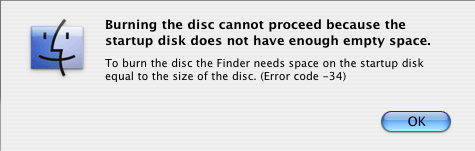
Every time I insert a blank CD-R, a message pops up that reads:

Burning the disk cannot proceed because the startup disk does not have enough empty space.
To burn the disc FInder needs space on the startup disk equal to the size of the disc. (Error code -34)

I have 51.36 GB available on my hard drive so memory cant be the problem right?? Thanks for any help that you can give...
Dani AI

Generated

Finder and the macOS burn stack often stage the data to be written on the startup volume before committing it to the optical drive. That means a burn can fail even when Finder reports plenty of free space — the system may need a large contiguous allocation, and modern macOS can report "available" space that includes purgeable or snapshot-held data that isn't immediately usable. 's quick test (try another account) is a good first check; here are additional, practical steps to diagnose and work around the problem.

Quick checklist (safe, ordered actions):

  • Empty Trash (for every user) and quit apps that might hold large files.
  • Look for stuck or hidden mounts under /Volumes and unmount them first.
  • Run Disk Utility / First Aid on the startup volume.
  • If using Time Machine, inspect and remove local snapshots that can hold space.
  • As a direct workaround, build a burnable image and hand it to the drive instead of letting Finder stage everything.

Example: create a CD/DVD master from a folder and burn it from the command line (bypasses Finder staging):

hdiutil create -srcfolder /path/to/folder -ov -format UDTO /tmp/mydisc.cdr
hdiutil burn /tmp/mydisc.cdr
ls -la /Volumes

If those steps still fail, try booting in Safe Mode or from an external volume and burning there, or burn on another Mac / with a dedicated app. Check Console.app for burn-related messages for precise error lines to post. The macosxhints thread linked has several community-sourced fixes worth scanning if a simple cleanup doesn’t help.

Recommended Answers

All 2 Replies

Try logging in as another user (create one if you need to) and see if the problem follows you there. Also, please post the results (from Terminal.app) of:

df -h

Be a part of the DaniWeb community

We're a friendly, industry-focused community of developers, IT pros, digital marketers, and technology enthusiasts meeting, networking, learning, and sharing knowledge.